
Zima Media OÜ

Riff: AI Reply & Comment Writer for LinkedIn & X. Free, No Account
3 ratings
)Private AI chat in your browser, plus a writer for social replies and posts. Runs on your device. No account, no API key.
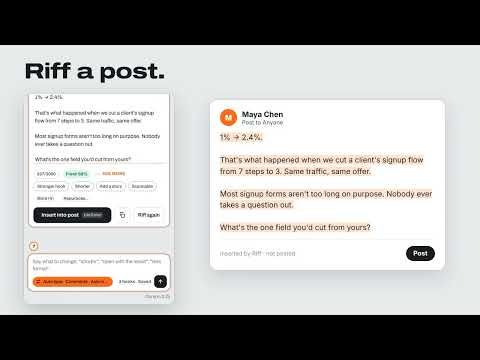
Riff is private AI that lives in your browser. Chat with it like you would with ChatGPT, ask it about the page you're on, and let it write replies and posts in your voice on the social sites you use. By default the AI model runs on your computer, so your chats, notes and drafts never leave it. No account, no subscription, and no API key needed. PRIVATE AI CHAT Open Riff Home (Alt+Shift+H, or type "riff" and a space in the address bar) for a full-page chat. • Ask anything. Answers stream in, and you can stop them at any time. • Ask about a page: right-click any page or selected text and choose "Ask Riff about this page". • Paste text or attach a text file to work on it. • Your chat history is saved in your browser. Search it, export it or delete it. • Turn any answer into a post: "Make it a post" opens the post builder with it. REPLIES AND POSTS WHERE YOU WRITE Riff works on X, LinkedIn, Threads, Facebook and Instagram. Click the small Riff wave on a post (or press Alt+Shift+R) and the side panel opens with the post ready. 1. Write your point. Rough is fine. 2. Set the dials: how smart, how salesy, how adventurous. 3. Press Enter. The reply streams in, written for that post and for the site's length and tone. 4. Rework it in one click (Shorter, Punchier, More human) or say what to change. 5. Insert. Riff fills the reply box. You read it and press Reply yourself. For your own posts, the post builder works like a chat: drop your notes, ask for changes in plain words, try three hooks, save the setups you like as recipes, and insert the result into the post box. Riff writes first messages and replies in your DMs and work chat too. It also writes comments on YouTube videos, and replies to the comments under them. YOUR VOICE Tell Riff who you are once and every draft sounds like you. Answer a short interview run by the AI on your computer, or fill in the fields yourself: what you do, how you write, stories and proof, words to avoid. Add brand voices if you write for more than one. Your Library keeps the links and points you use often. CHOOSE YOUR MODEL • Gemini Nano, the AI model built into Chrome. • Gemma 4, an open model from Google, for Brave, Edge or any Chrome that can't run Nano. It downloads once (about 3 GB, or a 5 GB size for strong graphics cards) and then runs offline on your computer's graphics chip. • Already use LM Studio or Ollama? Connect Riff to the models in those apps: on this computer, on your own network, or at your own https address, with an API key if the app asks for one. Riff connects only to the addresses you add, and only after you click Connect. Gemini Nano writes 5 languages and Gemma 4 writes 16. When a post is in a language your model can't write, Riff tells you before it writes and can hand that one reply to Gemma 4. YOUR OWN AGENT Run a Hermes agent on a machine of yours? Add its address and chat with it from Riff Home. You see each step it takes as it works, and you can open the sessions it already has. An agent chat sends what you type to your agent's address, and the chat says so at the top. Agents are for chat only; replies and posts are always written by the model you chose. KNOW YOUR USAGE Riff keeps a count of the tokens you use, per day and per model, on your computer. If you run local models, an optional savings counter shows what the same work would have cost on a hosted service. Turning it on downloads a public price list from OpenRouter once a day; none of your text or usage is sent. PRIVATE BY DESIGN • On your device by default. Riff has no servers and collects no data. • Chats, settings, your voice profile and any API keys you enter stay in your browser's storage on this computer. • Riff goes online only for what you turn on: model files you choose to download, model apps or an agent at addresses you add, and the optional price list. • Riff never posts or sends anything for you. REQUIREMENTS • Desktop Chrome, Brave or Edge on Windows 10/11, macOS 13+ or Linux • About 3–4 GB of free disk space for the on-device model (5–6 GB for the larger Gemma 4) • 8 GB of RAM or more recommended SHORTCUTS Alt+Shift+R opens the side panel. Alt+Shift+H opens Riff Home. Type "riff" and a space in the address bar to start a chat. Enter riffs, Ctrl/⌘+Enter inserts, Esc stops. Riff is an independent extension. It isn't affiliated with or endorsed by X Corp., LinkedIn, Meta, Google, Microsoft, LM Studio, Ollama, Nous Research or OpenRouter.

More from Zima Media OÜ


Details
- AddressZima Media OÜ
Lasnamäe linnaosa, Sepapaja tn 6 Tallinn, Harjumaa 15551 EE - TraderThis developer has identified itself as a trader per the definition from the European Union and committed to only offer products or services that comply with EU laws.
- D-U-N-S987976493