
Wizweb IT Solutions Pvt Ltd

Google Search Console – Bulk URL Indexing Tool
7 ratings
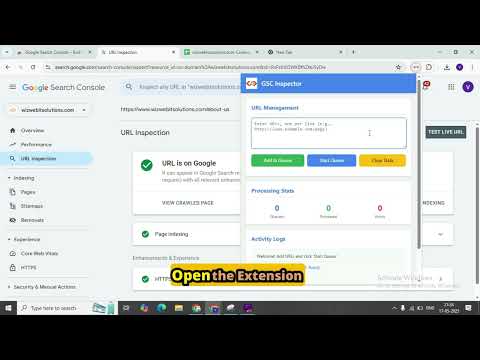
)Automates URL input in GSC, handles dialogs, and tracks processing stats. Pause/resume, live progress, stops on quota.
GSC Bulk Indexing Tool — Request indexing for many URLs, hands-free. Submitting URLs to Google Search Console one at a time is slow and tedious. This tool automates the entire "Inspect URL → Request Indexing" flow for your whole list, handling confirmation dialogs and tracking every result — so you can set it running and get back to work. ✦ Key features • Pause & Resume: Stop the queue at any time and continue later. Your queue and report are kept — no need to clear data. • Live progress: See "X of Y URLs finished", a progress bar, and the URL currently being processed. • Retry Errors: Move all failed URLs back into the queue with one click. • Accurate results: Waits for Google's actual response for each URL (the live test can take 1–2 minutes), so the report matches what was really submitted. • Property check: Tells you immediately if a URL does not belong to the Search Console property you have open. • Bulk processing — Paste a list of URLs (or import them) and the extension inspects and requests indexing for each one automatically. • CSV / TXT import — Load URLs straight from a CSV, TSV, or plain text file. Don't know the format? Download a ready-made sample with one click. • Detailed report — See exactly which URLs were Sent for Indexing and which hit Errors, with the specific reason for each failure (quota exceeded, request rejected, URL already on Google, and more). • One-click CSV export — Download a full report (Status, URL, Reason, Timestamp) for your records or your team. • Works in the background — Start a run, then switch to other tabs and keep working. The Search Console tab keeps processing on its own, with a live status indicator. • Quota-aware & safe — Adds natural, randomized delays between requests to mimic human behavior, and automatically detects and stops when Google's daily indexing quota is reached — so you don't waste requests. • Live stats & activity log — Track queued, processed, and errored counts in real time, with a timestamped activity log of everything that happens. • Clean, modern interface — A simple, professional popup that anyone on your team can use. ✦ How to use Open Google Search Console for your property. Click the extension icon. Paste your URLs (or import a CSV) and click Add to Queue. Click Start Queue — that's it. Watch the progress, or switch tabs and let it run. Download the report anytime. ✦ Important notes • You must be signed in to Google Search Console with a verified property for the URLs you submit. • This tool automates the official Search Console "Request Indexing" feature inside your own browser — it does not use any private API or bypass Google's limits. Indexing is always at Google's discretion. • Keep the Search Console tab open while processing. Built and maintained by Wizweb IT Solutions Pvt Ltd.

More from Wizweb IT Solutions Pvt Ltd

Details
- AddressWizweb IT Solutions Pvt Ltd
Office No - 204 A-140 Sector 63 Noida, Uttar Pradesh 201301 IN - TraderThis developer has identified itself as a trader per the definition from the European Union and committed to only offer products or services that comply with EU laws.