
Piotr Kucharski Bioinformatyka

Word2Mail: AI Email Writer for Gmail & Outlook
2 ratings
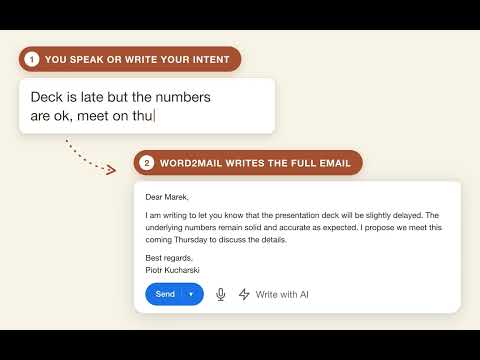
)Speak or type a few words: AI writes the whole email. It reads the open thread, so replies have context. Gmail and Outlook.
WRITE IT BADLY. SEND IT WELL. Word2Mail is an AI email writer chrome extension that lives inside Gmail and Outlook — not in another tab. Speak or type a few words, get a finished message back. THIS IS NOT A WRITING PROBLEM The content is in your head in three seconds. Then you sit there rewriting the same sentence for the fourth time, because the first was too blunt, the second too eager, and the third read like an apology for having written at all. It is a distance — between what you mean and the shape it has to take before you can send it. Word2Mail does exactly one thing: it closes that distance. You supply the raw material: "tell him the deadline slips by a week, apologise, offer Thursday". A finished email comes back. HOW IT WORKS 1. Open a reply in Gmail or Outlook. Where you already are. 2. Say or type a few words. Badly. In fragments. Without punctuation. 3. A finished email comes back — greeting, body, sign-off, in a tone that fits the conversation. WHERE YOU NOTICE IT MOST The follow-up — "follow up on the quote, friendly, ask if the budget moved" → a follow-up that doesn't sound pushy. The payment reminder — "remind about the invoice, polite but firm, due last Friday" → a reminder that doesn't read like collections. The complaint response — "admit they're right, apologise, offer a replacement" → a reply that cools things down instead of heating them up. The polite no — "decline, but leave the door open for next quarter" → a no that keeps the relationship. A REPLY THAT KNOWS WHAT THE CONVERSATION WAS ABOUT When you reply, Word2Mail reads the open thread. You do not have to summarise what it was about, or paste the previous message into a separate window. That is why "remind him about the thing we discussed" is a complete instruction. Worth reading twice: to do this, we do not ask for access to your mailbox. The extension reads what is open on your screen. It has no permission to browse your mail — so there is nothing for us to store. FOUR THINGS YOU ARE PROBABLY THINKING "It sounds like AI." Generic email is what you get when the tool knows nothing beyond your prompt. Type "help me write an email" and you get an email — somebody else's. That is why we read the thread on replies. Judge it on the second email, not the first. "I tried ChatGPT and it took longer." Because copying costs more than writing. Open a tab, paste the context, paste the answer back, fix the formatting — on a short email that is a loss, not a saving. This one works in the window you already have open. "Dictation always breaks on me." There is no separate transcription step. The recording goes to the model in a single call and comes back as a finished email. You are not gluing a dictation tool to an AI. "So, another subscription." Ten emails a month are free and need no card. Write two emails a week and you never pay. WHAT THE AI ACTUALLY DOES A language model composes the email from what you say or type, plus the content of the open thread. We do not train the model on your correspondence. The result always lands in the edit field so you can read and change it before sending — nothing goes out without your click. WHO IT IS FOR It works if you write in Gmail or Outlook in a desktop browser, form costs you more time than deciding what to say, and you reply to threads where remembering the last message matters. Wait if you use another mail client or your phone, your email has to stay on your own machine (we do not offer local processing), or you write email where every word carries legal weight. PRICE Ten emails a month, free, no card. After that a subscription - price shown before you pay, cancel from your dashboard. Honestly: ten emails is not much if you write for a living. It is enough to find out whether the tool writes the way you write. WHO IS BEHIND THIS Piotr Kucharski, a one-person company in Poland. Built in Europe by one person. Contact: admin@word2mail.com Legal text: Before you install — what this extension does and how we use it Purpose. The extension reads the email thread open in your mailbox and drafts a ready reply from it — either from a voice recording or from a few typed words. How we use it. The extension runs only on Gmail and Outlook pages and on our own websites. It activates when you open a message there. The visible thread and your recording are sent to our server (api.x2mail.eu) to produce the reply, and come back to you as ready text. The extension stores settings and session data needed to work in your browser. It does not read pages other than those listed and does not run in the background on other sites. By installing the extension you consent to its installation and use as described above. How to remove it. At any time: extensions menu → right-click the extension icon → „Remove from Chrome". Removing it immediately ends its access to your mailbox.

Details
- AddressPiotr Kucharski Bioinformatyka
Meksykańska 3 / 14 Warszawa 03-948 PL - TraderThis developer has identified itself as a trader per the definition from the European Union and committed to only offer products or services that comply with EU laws.