
Devs Routes LTD

AI subtitles and summary for YouTube videos. Export YouTube transcripts and download subtitles.
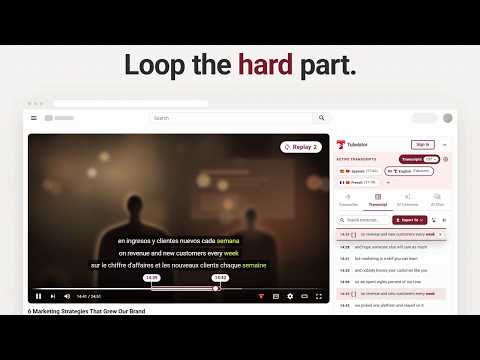
Tubelator gets you a full transcript and dual subtitles on YouTube videos, including ones with no captions at all. Most transcript tools only read the captions YouTube already made. If a video has none, they show you nothing. Tubelator transcribes the audio itself in 98 languages, so it works either way. Free to start. No card needed. 📝 Transcripts for videos with no captions - Punctuated, readable text, not YouTube's run-on auto-captions - Every line timestamped, searchable and clickable - Fills in line by line while it plays - 98 languages on its own, 161 with YouTube's own tracks 🌐 Dual subtitles, or more than two - Two languages at once, or three, or more - On the video itself, where you are already looking - The spoken word lights up as it's said - Style each track separately 🤖 Summaries and answers from the transcript - Summary, key insights, topics and FAQs - Section breakdown with timestamps - Ask the chat anything about it - Answers come from what was actually said 🔁 Loop a section until it sticks - Mark two lines and it repeats that passage - Repeat a phrase until you can say it - Drill a guitar solo or a dance tutorial step 🎨 Make it yours, then take it with you - 25 ready-made subtitle styles, from karaoke to newsroom - Or set your own font, color, background and outline, per language - Thirteen export formats: subtitles, documents, spreadsheets and code 🎯 How to use it 1. Open a YouTube video. The panel is already there in the sidebar 2. Read the transcript, or press Generate if the video has no captions 3. Stack a second subtitle track, loop a passage, or ask the chat about the video ❓ Is it free? Yes. 5 videos a month, plus monthly allowances for AI overviews, chat and exports. Nothing is locked behind a paid plan: every feature works on the free plan, including all 13 export formats and all 161 languages. Plus and Pro raise the limits. 💬 Contact us - Live chat: https://tubelator.com - Email: support@tubelator.com - Discord: https://discord.gg/5PZxEsADeM NOTE: This extension does NOT allow or permit the downloading of YouTube videos and does NOT include any such feature.

Details
- AddressDevs Routes LTD
Office 9338 182 High Street North London E6 2JA GB - TraderThis developer has identified itself as a trader per the definition from the European Union and committed to only offer products or services that comply with EU laws.
- D-U-N-S231109878