
DBOOST S.R.L.

Dboost AI: Complete Tool for Dispatchers
2 ratings
)Chrome Extension for Car Hauling Dispatch
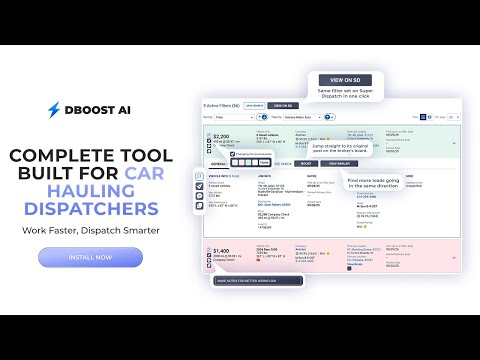
Dboost AI — The Ultimate Chrome Extension for Car Hauler Dispatchers Instantly see auction loads, copy broker messages in one click, add color tags, leave team notes, jump between boards, and much more. Whether you're an independent dispatcher or running a full team, Dboost AI gives you superpowers to work faster, stay organized, and book smarter. 🔹 Boost Button One-click access to the broker’s original load page Click on a load — and jump straight to its original post on the broker's board. No more copy-pasting Load IDs or switching tabs. Fast, smooth, and direct. 🔹 Auction Flags Instantly see which loads are from auctions We add clear visual badges on each load card — so you instantly know if it’s from an auction. You don’t need to memorize ZIP codes or Google where each auction is located — we do the recognition for you. 🔹 Similar Loads Button Find more loads going in the same direction If you’re using a wide-open filter and spot a good load, click this button to instantly filter for all loads going to the same city — so you can build that route in seconds. 🔹 Super Button Search the same direction on another board in one click We mirror your current pickup and delivery filter and apply it to another board — so you can instantly check what’s available elsewhere, without typing anything again. 🔹 Copy Button Copy a clean, formatted message to send to the broker One click and you get a professional booking message: includes load ID, year, make, model, origin, destination, and rate. Just paste and send — no more manual typing. 🔹 Color Tags Visually organize your loads with custom color codes Tag loads with any color — mark what’s good, bad, or pending. It’s your personal visual system to stay focused and avoid clutter. 🔹 Notes Button Leave internal notes on any load card Drop quick reminders like “Already called”, “Waiting for update”, or “Booked”. Your notes stay attached and visible only to you or your team. 🔹 Team Access Add team members and work together Invite dispatchers to your team. Everyone gets their own login and shares the same interface, tools, and load notes. Collaborate, don’t duplicate. 🔹 Feature Control Panel Enable only the tools you want to use Every feature can be toggled on or off in your Settings. Turn off what you don’t need — and keep your interface clean, focused, and tailored to you.

More from DBOOST S.R.L.

Details
- AddressDBOOST S.R.L.
Șos. Mihai Bravu 255 MODUL S 187 București 030302 RO - TraderThis developer has identified itself as a trader per the definition from the European Union and committed to only offer products or services that comply with EU laws.