
Cloudinary Ltd

Cloudinary
2 ratings
)Insert Cloudinary image and video asset URLs into matching web form fields.
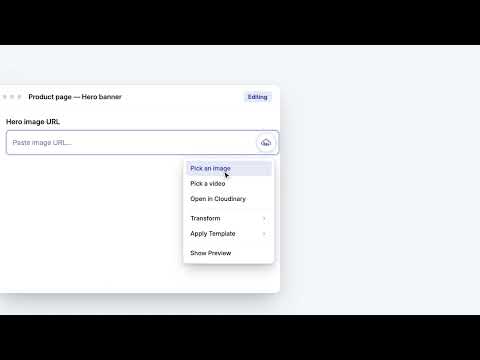
Note: This is a Beta release for customers who want to preview version 3.7.0 of the Cloudinary Chrome extension. Cloudinary Media Library lets you insert Cloudinary assets straight into image and video URL fields anywhere on the web. Browse your Cloudinary Media Library, pick an asset, preview it inline, and generate an optimized Cloudinary delivery URL, all without leaving the page you're working on. It fits common CMS, ecommerce, and marketing workflows, including dynamic image fields in platforms such as Klaviyo and Braze. Key features: * Insert image and video URLs from your Cloudinary account * Preview Cloudinary media right beside supported fields * Crop and resize images, add text overlays, and trim videos before you insert them * Apply named transformations and template-based dynamic media * Detect relevant URL fields automatically * Use Cloudinary blocks in Braze: pick, change, edit, and remove them in the drag-and-drop and HTML editors * Power dynamic personalization workflows for email and marketing tools * Manage multiple Cloudinary accounts * Linked fields: choose a field that fills in automatically when you pick an asset into a main URL field. It can hold the full asset JSON, the asset ID, public ID, display name, a structured metadata value, or a delivery URL with a named transformation. Linked fields are locked against manual edits and marked with a link icon. Built for Cloudinary users who need a faster way to connect their media with external tools, page builders, commerce platforms, and marketing editors. Cloudinary services this extension uses: Some tools open a Cloudinary web app inside a frame. These pages run on Cloudinary's servers and have no access to browser extension features. * Asset picker: asset-selector-production.cloudinary.app * Image and video editing tools: media-editor.cloudinary.com and console.cloudinary.com * Braze personalization editor: braze.cloudinary.app The extension sends these pages only what the task needs, such as the asset or field you are editing and your sign-in for the selected Cloudinary account. On networks that restrict web access, allow these addresses so the tools can open.

More from Cloudinary Ltd


Details
- AddressCloudinary Ltd
Aharon Bart Street 20 Building C Petah Tikva 4951448 IL - TraderThis developer has identified itself as a trader per the definition from the European Union and committed to only offer products or services that comply with EU laws.
- D-U-N-S600030698