
Automatic Capital Operations Pty Ltd

AutoRFP.ai Portal Agent
2 ratings
)Fills your RFPs, DDQs and security questionnaires in portals like SAP Ariba and DiligenceVault, from your approved answers.
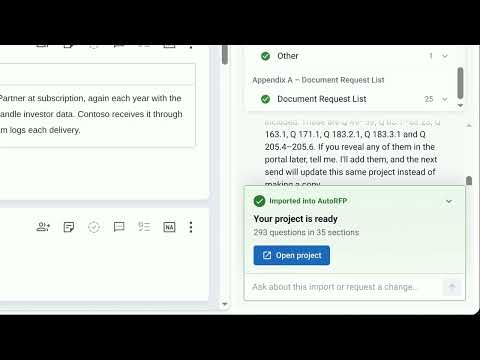
AutoRFP.ai Portal Agent automatically fills out your RFPs, DDQs and security questionnaires in the portals buyers send them through, such as: • SAP Ariba • DiligenceVault • OneTrust • UpGuard • Dasseti • and other web-based procurement, due-diligence and vendor-risk portals Every answer comes from content your team has already approved in AutoRFP.ai. The Portal Agent enters it in the right field, checks that it held, and leaves the Submit button to you. WHAT YOU GET • No more copying answers between tabs. A portal questionnaire with hundreds of questions is filled from your approved answers, field by field. • Answers you can stand behind. Every answer is written from approved content, with a Trust Score and the source it cites. • One source of truth. Edits made in the portal come back to AutoRFP.ai, so your project stays up to date. • No surprises. When the portal and your project disagree, the agent checks before replacing anything, and tells you what it changed and what it kept. HOW IT WORKS 1. Import. Open the questionnaire in your portal, open AutoRFP.ai from the Chrome toolbar (or press Ctrl+Shift+U, ⌘⇧U on a Mac) and press Import. The Portal Agent works through every section and brings each question into a draft, with its answer type. 2. Revise. Ask for changes in plain English: "drop the appendix", "Q 171.2 should be a text question", "you missed the ESG section". The agent changes the draft and tells you anything you should know first. 3. Answer in AutoRFP.ai. Send the draft to a project in one click. Every answer is written from content your team has approved, with a Trust Score and the exact source it cites. Edit, approve, done. 4. Fill. Back on the portal, press Fill. The Portal Agent scans the form, enters each approved answer in the right place (text boxes, rich text editors, tables, dropdowns, Yes/No choices and dates), then reads the page back to check every answer held. If a field can't hold your full answer, it enters what fits, keeps the full text in AutoRFP.ai and tells you where the rest belongs. KEEPS EVERYTHING IN SYNC • Edited an answer in the portal? Import again and AutoRFP.ai shows exactly which answers changed before it updates your project. • Filling a portal that already holds answers? The agent compares each one with your project. It replaces older drafts and defaults, keeps answers written for that portal, and lists both so you can change its mind in one message. WHAT ELSE IT DOES • Chat about the project in front of you: ask which questions still need an answer, or have it tidy up question numbering. • Pick up where you left off. Recent imports and fills are one click away, and an interrupted run resumes from where it stopped. ENTERPRISE READY Trusted by leaders in 44+ countries, and rated 4.8/5 on G2. • SOC 2 Type II and ISO 27001 certified, and independently audited. • We never train AI models on customer data. • Hosted in your region: US, EU or AU. • Single sign-on with Okta, Microsoft Entra and Google Workspace. • The extension reads a page only when you press Import or Fill on it, and only after you grant it site access. GETTING STARTED You need an AutoRFP.ai account. Sign in from the side panel with your work account. New to AutoRFP.ai? Book a demo at autorfp.ai and prove it on your own RFPs in a two-week proof of concept.

Details
- AddressAutomatic Capital Operations Pty Ltd
Level 1/46 Warren St Fortitude Valley, QLD 4006 AU - TraderThis developer has identified itself as a trader per the definition from the European Union and committed to only offer products or services that comply with EU laws.
- D-U-N-S750966005