AuraDev Studio

https://esrok.com/
20 extensions
Item logo image for Normalize Volume

Normalize Volume

ExtensionTools357 users

Balances audio levels across tabs so sudden loud videos or ads don't blast your speakers.

Normalize Volume keeps the sound on websites at a steady, comfortable level. It stops videos, ads, and other audio from suddenly becoming too loud. No more jumping for your volume button when an ad or video starts playing. The extension watches the sound from videos and audio on web pages and automatically keeps the volume even, so everything sounds smooth and easy to listen to. It works great on YouTube, streaming websites, news sites, social media, and any page where sound can suddenly get loud. Good for working, studying, watching videos late at night, or browsing without noise stress. Features • Keeps volume steady and prevents loud sound spikes • Works with most videos and audio on websites • Great for YouTube, streaming sites, news, and social media • Uses very little system power • Turn it on or off anytime from the extension menu • Saves your settings across devices Normalize Volume runs in the background and lets you enjoy the web without sudden loud sounds.

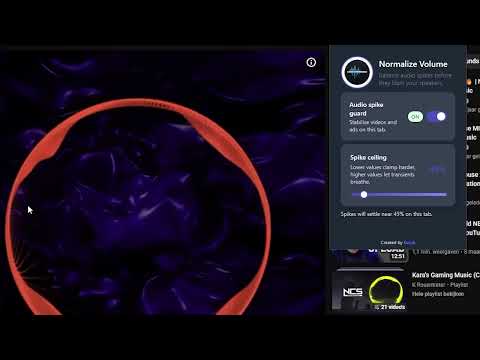
Item media 4 (screenshot) for Normalize Volume
Item video thumbnail
Item media 2 (screenshot) for Normalize Volume
Item media 3 (screenshot) for Normalize Volume
Item media 4 (screenshot) for Normalize Volume
Item video thumbnail
Item media 2 (screenshot) for Normalize Volume
Item media 3 (screenshot) for Normalize Volume
Item media 4 (screenshot) for Normalize Volume

More from AuraDev Studio

Auto Retry Downloads

5.0

Automatically retries failed or interrupted Chrome downloads until they finish successfully.

AuraSync

0.0

AuraSync: Floating avatar bubbles, reactions, life mode & immersive enhancements.

Hide Ad Spaces

5.0

Automatically remove empty ad containers and leftover gaps created by ad blockers.

Reset Forms

0.0

Clears all text fields, checkboxes and inputs on a webpage with one clean reset button.

Blur Private Tabs

0.0

Automatically blurs the content of selected tabs when you switch windows, protecting sensitive information.

Copy Video Timestamp

0.0

Copies the current playback time of any HTML5 video so you can share exact moments instantly.

File Viewer

0.0

File Viewer - Prompt for Visual Coder. Opens images, PDFs, text files and more directly in a clean viewer inside Chrome.

Word Frequency Counter

0.0

Count how often each unique word appears on a page - perfect for SEO and research.

Fix Back Button

0.0

Repairs websites where the back button doesn't work, forcing Chrome to navigate back correctly.

Video Dimming

0.0

Darks out everything around a video player so you can focus on the video like a cinema mode.

Details

  • Website
    Email
    support@aurasync.info
    Phone
    +31 6 10684957
  • Address
    AuraDev Studio
    Voorstraat 24 45 Overijssel Kampen 8261 HS NL
  • Trader
    This developer has identified itself as a trader per the definition from the European Union and committed to only offer products or services that comply with EU laws.
Google apps