
A/B Smartly B.V.

ABsmartly LaunchPad
Visual A/B testing extension for ABsmartly. Create DOM-based experiments with drag & drop editing and real-time preview.
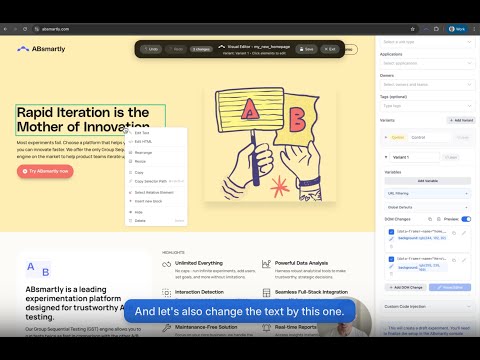
Design, launch, and manage A/B tests visually—directly on your website—without writing code. The extension lets product, growth, and design teams create DOM-based experiments with a point‑and‑click editor, then deliver those changes safely through ABsmartly’s platform and SDK. *What it does* 🎨 Visual editing on any page Select elements and change text, HTML, styles, attributes, classes, or inject scoped JavaScript Drag, move, hide, delete, resize, insert blocks, and copy selectors via a fast context menu Export/import changes as structured JSON for auditability and reuse 🧪 Experiment creation and management Create, edit, start, and stop experiments from a sidebar Define variants and attach DOM changes to each variant as ABsmartly variables (code‑as‑variant) Filter by state, significance, owners, tags, and more to find the right experiment fast ⚙️ Reliable delivery via SDK ・ Variant changes are stored as variables and applied on your site via the ABsmartly JavaScript SDK plugin ・ Works on SPAs and dynamic pages by observing late‑loading content and re‑applying changes as the DOM updates ・ Supports local overrides for instant preview and QA 🧑🤝🧑 Built for teams and scale ・ Aligns with your ABsmartly environment, applications, unit types, and metrics ・Respects governance and analytics so experiments are measurable and safe *Why install it* 🚀 Ship experiments fast without engineering sprints Go from idea to live test in minutes; reduce dev backlog by handling presentation‑layer changes visually 📈 Confident measurement with first‑class analytics All changes flow through ABsmartly—unit assignment, targeting, metrics, SRM detection, significance monitoring 👀 True “what you see is what visitors get” Preview on your real site with your data; reliable application even on SPA routes and dynamic components 🛡️ Governance, auditability, and performance DOM changes are versioned as structured variant variables; the SDK applies them efficiently and deterministically *Key capabilities* 🖱️ Visual Editor: point‑and‑click selection; context actions for Edit Text, Edit HTML, Hide, Delete, Move Up/Down, Rearrange, Resize, Copy, Copy Selector, Insert Block, Select Relative 🧩 DOM change types: Text, HTML, Style (CSS), Class (add/remove/toggle), Attribute, JavaScript (scoped) 🧭 Workflows: create experiments, define traffic and unit types, attach DOM change payloads per variant, start/stop, filter and search 🔌 SDK integration: companion plugin loads the right variant variables and applies changes; options for debugging and dynamic DOM observation 🔍 Advanced filtering: search by name; filter by state, significance, issues (e.g., SRM/cleanup), owners, and tags *How it works (at a glance)* ・Open the extension to show the sidebar on any page you control ・Use the Visual Editor to select elements and make changes ・Save/export changes as JSON; these are attached to variants as ABsmartly variables ・The ABsmartly JS SDK + DOM Changes plugin applies the correct changes for each user’s assigned variant ・ABsmartly tracks metrics and analyzes results for significance *Who it’s for* ・Product managers and growth teams who want to iterate quickly ・Designers and marketers who need no‑code control over presentation changes ・Engineers who want to ship a quick change without a code deployment *Privacy and security* ・Uses your configured ABsmartly API credentials and endpoints ・DOM changes are scoped to your sites and delivered via the ABsmartly SDK ・No extra third‑party analytics—experimentation runs through ABsmartly *Compatibility* ・Chrome/Chromium (Manifest V3), Edge, Firefox, Safari (via Plasmo) ・Works with modern websites, including SPAs and dynamic content Install the ABsmartly Browser Extension to turn your website into a live experimentation canvas. Ship tests faster, learn continuously, and grow with confidence.

Details
- AddressA/B Smartly B.V.
Keizersgracht 520 H Amsterdam 1017EK NL - TraderThis developer has identified itself as a trader per the definition from the European Union and committed to only offer products or services that comply with EU laws.
- D-U-N-S493429725