

수식Chat to HWPX/PDF
4 ratings
)
Overview
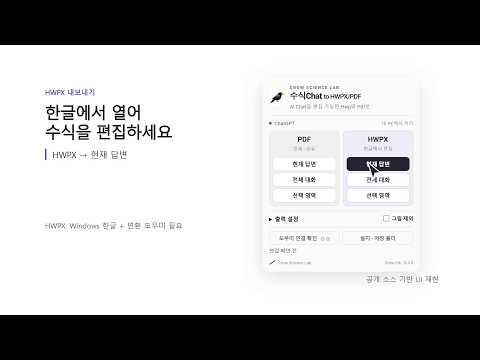
AI Chat을 편집 가능한 Hwp와 Pdf로. ChatGPT·Gemini·Gemini Notebook·Claude의 수식을 HWPX 수식 개체로 보존합니다.
AI 대화의 텍스트·수식·그림을 PDF 또는 편집 가능한 한글 HWPX 문서로 변환하세요. 수식Chat to HWPX/PDF는 ChatGPT, Gemini, Gemini Notebook, Claude 등의 현재 답변·전체 대화·선택 영역을 문서로 내보내는 Chrome 확장 프로그램입니다. 핵심은 지원되는 수식을 그림 대신 한글에서 직접 수정할 수 있는 수식 개체로 변환하는 것입니다. 주요 기능 • 현재 답변·전체 대화·선택 영역을 PDF 또는 HWPX로 내보내기 • MathML·LaTeX를 편집 가능한 한글 수식 개체로 변환 • 자동 / LaTeX 원문 우선 / MathML 구조 우선 선택 • 그림·인포그래픽 기본 포함과 항상 보이는 ‘그림 제외’ 옵션 • ChatGPT, Gemini, Gemini Notebook, Claude 지원 • Grok 및 기타 LLM의 공통 수식 구조와 선택 영역 내보내기 • Gemini Notebook의 메모·보고서·인포그래픽 내보내기 • 질문·답변·제목·날짜 포함 여부와 PDF 용지 방향 선택 • 지원하지 않는 수식·그림은 사유를 안내하고 나머지 문서 저장 • 외부 변환 서버로 대화와 문서를 전송하지 않는 로컬 처리 0.7.1 개선 사항 ChatGPT의 화면 구조 변경으로 현재 답변과 전체 대화를 찾지 못하던 오류를 수정했습니다. 숨겨진 인쇄용 글자가 역할 제목에 섞여도 질문과 답변을 구분하며 이전 화면 구조도 지원합니다. 메시지 경계를 분리하고 숨겨진 복제 메시지와 중복 역할 제목이 문서에 포함되지 않도록 개선했습니다. 페이지 어댑터 갱신과 연속 내보내기도 보완했습니다. 기존 기능과 장점 지원되는 MathML·LaTeX 수식은 한글에서 편집 가능한 수식 개체로 변환합니다. 지원하지 않는 수식은 그림으로 대체하지 않고 생략 표시를 남깁니다. 모든 LaTeX 패키지와 사용자 정의 명령을 지원하는 범용 TeX 변환기는 아니므로 복잡한 수식은 변환 후 확인해 주세요. 그림은 기본 포함합니다. ‘출력 설정’ 오른쪽의 ‘그림 제외’를 선택하면 텍스트·수식만 출력합니다. 큰 그림, 긴 시각화와 지연 로딩 그림 처리를 지원하고 필요한 경우 대화형 시각화를 정적 이미지로 보존합니다. 사이트 구조나 접근 제한으로 일부 그림을 보존하지 못할 수 있습니다. 처리 중에는 해당 대화 탭을 유지해 주세요. 문서 서식은 본문·표11pt, 줄간격150%, 전체제목20pt, 중간제목15pt와 위쪽 빈 줄을 적용합니다. HWPX 여백은 위·아래15mm, 왼쪽·오른쪽20mm, 머리말·꼬리말10mm입니다. PDF 여백은 위·아래15mm와 왼쪽·오른쪽20mm이며 머리말·꼬리말은 Chrome 인쇄 창 설정을 따릅니다. Windows 도우미는 설치 성공 후 버튼이 ‘닫기’로 바뀝니다. 연결 상태는 빨강·초록 LED와 버전 정보로 확인할 수 있습니다. 연결 중복 문구를 정리했고 노란 부리 까마귀 아이콘도 선명하게 표시합니다. ChatGPT 보안 정책에 차단되던 인쇄 코드를 수정한 기능도 유지합니다. 사용 조건 및 업데이트 PDF는 Chrome 인쇄 창에서 저장하며 Windows 도우미나 한글 설치가 필요하지 않습니다. HWPX는 Windows 데스크톱 한글과 별도의 수식Chat Windows 도우미가 필요합니다. 확장의 ‘설치 · 저장 폴더’에서 도우미를 받아 설치하세요. 도우미는 PC에서 문서를 처리하고 지정 폴더에 저장합니다. 확장과 도우미를 모두0.7.1로 맞추고 열려 있는 ChatGPT 대화 탭을 새로고침하세요. 기존 버전 일치 검사 때문에 두 앱을 함께 업데이트해야 합니다. 사이트 호환성과 제한 ChatGPT, Gemini, Claude의 현재 답변·전체 대화·선택 영역과 Gemini Notebook의 메모·보고서·인포그래픽을 지원합니다. Grok과 일부 기타 LLM은 공통 구조 자동 인식 또는 선택 영역을 이용합니다. 자동 인식이 안 되면 필요한 본문을 마우스로 선택한 뒤 ‘선택 영역’을 사용하세요. 그림·인포그래픽은 정적 이미지이며 원본의 상호작용이나 편집 기능은 옮겨지지 않습니다. 출력은 PDF와 HWPX이고 기존 HWP 형식으로 직접 저장하는 기능은 지원하지 않습니다. Google Docs 전용 변환은 이번 버전에 포함되지 않습니다. 개인정보 및 권한 사용자가 내보내기를 실행한 현재 탭의 콘텐츠를 처리합니다. 대화·문서·수식을 Crow Science Lab. 서버로 전송하지 않으며 광고·사용자 추적·분석 코드를 포함하지 않습니다. 그림 보존을 위해 현재 탭을 일시적으로 스크롤하고 캡처할 수 있습니다. 필요한 그림 영역을 문서에 넣으며 전체 탭 캡처는 확장 저장소에 보관하거나 외부로 전송하지 않습니다. 출력 설정과 최근 변환 상태는 Chrome 확장 저장소에 저장됩니다. • activeTab: 사용자가 내보내기를 실행한 탭의 콘텐츠 읽기와 필요한 그림 캡처 • scripting: 현재 탭에서 대화·수식·그림 추출 실행 • storage: 출력 설정과 최근 작업 상태 저장 • nativeMessaging: HWPX 생성과 연결 확인 시 Windows 도우미와 로컬 통신 nativeMessaging은 HWPX 변환 또는 도우미 연결 확인을 사용할 때 요청하는 선택 권한입니다. 이 앱은 한컴의 공식 제품이나 제휴 제품이 아닙니다. 개발: Crow Science Lab. 디자인: Now That Physics, Crow. ──────────────────── Export AI conversations, equations and images to PDF or editable Hancom HWPX documents. Formula Chat to HWPX/PDF exports the current response, entire conversation or selected content from ChatGPT, Gemini, Gemini Notebook, Claude and other AI services. Its core feature converts supported equations into native Hancom equation objects you can edit, rather than saving them as pictures. KEY FEATURES • Export the current response, full conversation or selected content to PDF/HWPX • Convert supported MathML/LaTeX into editable Hancom equations • Choose automatic, LaTeX-first or MathML-first processing • Include images/infographics by default, with an always-visible Exclude images option • Support ChatGPT, Gemini, Gemini Notebook and Claude • Recognize common structures or selected content in Grok and other LLMs • Export Gemini Notebook notes, reports and infographics • Choose question/answer/title/date inclusion and PDF orientation • Explain omitted equations/images while saving the remaining content • Process documents locally without an external conversion server WHAT'S NEW IN 0.7.1 Restores current-response and conversation detection after ChatGPT's page structure changed. Hidden print-only names no longer prevent role recognition. Older layouts remain supported. The release improves message boundaries, filters hidden copies and duplicate role headings, refreshes the page adapter and handles consecutive exports more reliably. EXISTING BENEFITS Supported MathML/LaTeX is converted into editable Hancom equation objects. Unsupported equations are marked as omitted rather than replaced with pictures. This is not a general-purpose TeX converter supporting every package or custom command; check complex equations after conversion. Images are included by default. Select Exclude images beside Output settings to export text and equations only. Large images, long visualizations and lazy-loaded images are handled where possible. Interactive visualizations may be preserved as static images. Site structure and access restrictions can prevent some images from being preserved. Keep the conversation tab active during processing. Formatting: body/table11pt,150% line spacing, title20pt and section headings15pt with a preceding blank line. HWPX margins: top/bottom15mm, left/right20mm, header/footer10mm. PDF margins: top/bottom15mm and left/right20mm; Chrome controls PDF headers and footers. The helper's Install button changes to Close after installation. Connection LEDs and version information make its status visible. Duplicate connection messages have been removed, the crow icon is sharper, and the PDF security-policy fix is retained. REQUIREMENTS AND UPDATING PDF uses Chrome's print dialog and requires neither Hancom Hangul nor the Windows helper. HWPX requires Hancom Hangul for Windows and the separate Formula Chat Windows helper. Download it from Installation / Save folder in the extension. The helper processes data locally and saves files to your selected folder. Update both the extension and helper to 0.7.1, then refresh open ChatGPT tabs. The existing version check requires matching versions. COMPATIBILITY AND LIMITATIONS ChatGPT, Gemini and Claude support current-response, conversation and selection exports. Gemini Notebook supports notes, reports and infographics. Grok and other services may work through common structures or selection export. If detection fails, select the required text and use Selection. Images and infographics are static, without their original interactive/editing features. Outputs are PDF/HWPX; direct export to legacy HWP is not supported. Google Docs-specific conversion is not included. PRIVACY AND PERMISSIONS The extension processes content from the active tab when you start an export. Conversations, documents and equations are not sent to Crow Science Lab.'s servers. There is no advertising, user tracking or analytics code. Image preservation may temporarily scroll and capture the active tab. Relevant figure regions are embedded locally. Full-tab captures are not retained in extension storage or transmitted externally. Output preferences and recent conversion status are stored in Chrome extension storage. • activeTab: read the active tab and capture images when needed after you start an export • scripting: extract conversations, equations and images in that tab • storage: save output preferences and recent task status • nativeMessaging: communicate locally with the Windows helper for HWPX creation and connection checks nativeMessaging is optional and requested when you use HWPX conversion or check the helper connection. This product is not affiliated with Hancom. Development: Crow Science Lab. Design: Now That Physics, Crow.
5 out of 54 ratings
Details
- Version0.7.1
- UpdatedNovember 10, 2026
- Offered bynowthatphysics
- Size111KiB
- Languages한국어
- Developer
Email
nowthatphysics@gmail.com - Non-traderThis developer has not identified itself as a trader. For consumers in the European Union, please note that consumer rights do not apply to contracts between you and this developer.
Privacy

수식Chat to HWPX/PDF has disclosed the following information regarding the collection and usage of your data. More detailed information can be found in the developer's privacy policy.
수식Chat to HWPX/PDF handles the following:
This developer declares that your data is
- Not being sold to third parties, outside of the approved use cases
- Not being used or transferred for purposes that are unrelated to the item's core functionality
- Not being used or transferred to determine creditworthiness or for lending purposes
Support
For help with questions, suggestions, or problems, visit the developer's support site