


Overview
Achieve precise multi-window split-screen functionality with a single click.
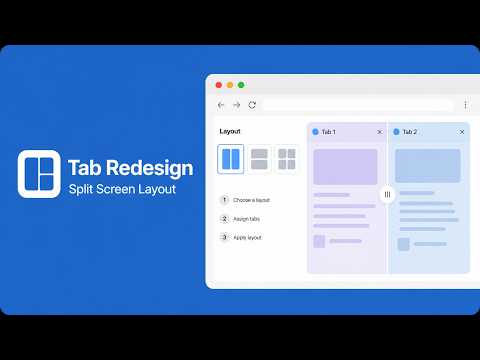
This is a Google Chrome extension designed to improve multitasking efficiency. It allows users to split multiple tabs in the current window and arrange them into a pre-set grid layout with a single click, making split-screen browsing effortless. Whether you need to compare documents, write code, research literature, or monitor multiple information sources, this tool eliminates the tedious task of manually dragging windows and optimizes screen space. Core Functionality and Usage The extension's intuitive workflow allows you to split your screen in just three simple steps: Select a layout: Click the extension icon in the upper right corner of the browser to open a simple interface. The interface displays various pre-set layouts as icons, such as 1x2 (left-right split), 2x1 (top-bottom split), 2x2 (four-grid grid), and 2x3 (six-grid grid). Users can intuitively select a layout based on their needs. Assign tabs to specific locations: After selecting a layout, the interface switches to assign mode. On the left are numbered grids corresponding to the selected layout (for example, selecting a 2x2 layout will result in four grids). On the right, all open tabs in the current browser window are listed. To "assign" a layout, simply click a grid on the left, then a tab on the right. The assigned tab's title will appear in the grid and will be grayed out in the list on the right, indicating it's assigned. Apply and undo with one click: Once you've made all the desired assignments, click the "Apply Layout" button in the lower-right corner. The extension will automatically create a new window based on your settings and move the assigned tabs to the corresponding positions on the screen, precisely arranging them in the grid you selected. If you're not satisfied with the split-screen effect or want to return to the original state, click the "Undo" button on the extension's home screen. All split windows will close and the tabs will merge back into their original windows. Key Highlights Visual Operation: Provides an intuitive layout preview, allowing users to see the split-screen effect at a glance before making any changes. Flexible Tab Allocation: Users can freely decide which tab goes where on the screen, giving them greater control. Powerful Undo Function: No need to worry about making mistakes. A single-click undo function instantly restores all windows and tabs to their original state – safe and reliable. Smart Screen Recognition: The extension automatically detects the monitor the user is currently on and splits the screen within that monitor's workspace, making it particularly user-friendly for multi-monitor users. Lightweight and Efficient: With a simple interface and smooth operation, it focuses on the core split-screen functionality without consuming excessive system resources. In short, this is a productivity tool tailored for users who need to browse multiple web pages simultaneously. It greatly simplifies the complexity of window management and is a powerful tool for boosting productivity.
4.2 out of 55 ratings
Details
- Version1.5
- UpdatedJuly 9, 2026
- Size80.16KiB
- Languages55 languages
- DeveloperWebsite
Email
support@tabredesign.com - Non-traderThis developer has not identified itself as a trader. For consumers in the European Union, please note that consumer rights do not apply to contracts between you and this developer.
Privacy

This developer declares that your data is
- Not being sold to third parties, outside of the approved use cases
- Not being used or transferred for purposes that are unrelated to the item's core functionality
- Not being used or transferred to determine creditworthiness or for lending purposes
Support
For help with questions, suggestions, or problems, please open this page on your desktop browser