


Overview
Translate visible webpage text on-device or with a configured model service.
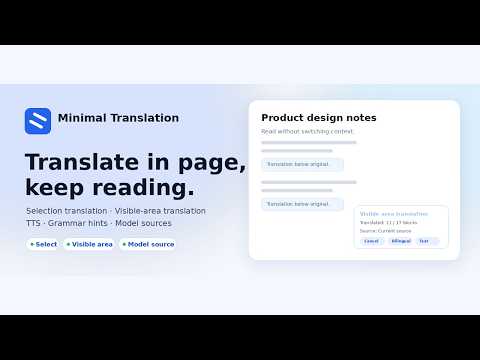
极简翻译是一款专注于网页阅读场景的 Chrome 扩展。 当你在网页中选中单词、句子或段落时,扩展会在当前页面内直接显示译文,帮助你阅读文章、技术文档、博客和资讯时保持上下文,而不是复制文本或频繁切换到外部翻译网站。 核心功能: - 划词后在网页正文附近直接显示译文 - 支持用户主动触发后的可见区域双语翻译,并随滚动补翻新进入视口的内容 - 译文样式低打扰,字号和颜色弱于原文,尽量不破坏网页布局 - 可见区域翻译控制面板可拖动,只保留取消、双语和译文按钮,并显示当前实际生效的翻译源 - 支持 Chrome 侧边栏翻译,可手动输入或带入选中文本 - 支持复制译文、本地最近翻译历史和快捷键入口 - 支持用户明确选择的设备端翻译(Chrome 内置)与浏览器本地翻译(OPUS-MT 英中双向),也可单选用户自行配置的模型源 - 英文单词支持音标、词性、释义、例句和发音入口 - 支持原文朗读,并可调整音色、语速、音高和音量 - 支持英文语法提示和网站黑名单 - 模型源仅支持 OpenAI Chat Completions 兼容协议,Base URL、Model 和 API Key 由用户手动填写 - 模型源提供标准、严格和关闭三档本地内容保护;严格模式支持独立模型站点白名单 适合人群: - 经常阅读英文技术文档、工程文章和开源项目说明的开发者 - 需要阅读跨语言网页、但希望保留原文上下文的用户 - 希望在阅读时顺手查词、朗读和积累最近翻译记录的学习者 隐私与使用边界: - 默认无需账号,设置保存在浏览器本地 - 扩展只在用户主动选中文本、点击入口、打开侧边栏或触发可见区域翻译时处理相关内容 - 可见区域翻译不会预翻译视口外内容,只处理当前显示区域,并可随滚动补翻新进入视口的文本 - Chrome 内置翻译和浏览器本地翻译在设备内处理译文,翻译文本不上传;仅在用户主动准备时下载语言资源或模型数据 - 模型源默认关闭,只有用户切换到模型源并手动填写 Base URL、Model 和 API Key 后才会请求该地址 - 模型内容保护默认使用标准模式,在浏览器本地判断即将发送的 URL、页面标题和文本,不调用远程审核服务 - 当前版本不包含账号系统,不建立自有远程用户数据库,不出售用户数据,不做个性化广告投放 Minimal Translation is an in-page translation and reading assistant for Chrome. When you select a word, sentence, or paragraph on a webpage, the extension shows the translation directly inside the current page. It helps you read articles, technical documentation, blogs, and news while keeping the original context, without copying text into a separate translation website. Key features: - Show translations near the selected text inside the webpage - Translate the visible area after the user starts the action, then continue with newly visible text as the user scrolls - Use low-distraction translation styling with smaller, softer text that respects the page layout - Use a draggable visible-area translation panel with Cancel, Bilingual, and Translation buttons, plus the active source label - Open a Chrome side panel for focused translation, with manual input or selected text - Copy translations, keep a local recent translation history, and use keyboard command entries - Use one explicitly selected on-device translation source (Chrome built-in or browser-local OPUS-MT for English ↔ Chinese), or switch to one user-configured model source - View English word phonetics, parts of speech, definitions, examples, and pronunciation entries - Play source text with configurable voice, rate, pitch, and volume - Use English grammar hints and site blocklist rules - Configure the model source with only the OpenAI Chat Completions compatible protocol, entering Base URL, Model, and API Key manually - Use local standard, strict, or disabled model-content protection, with a separate site whitelist in strict mode Who it is for: - Developers who read English technical documentation, engineering articles, and open-source project documentation - Readers who work with multilingual webpages and want to keep the original page context - Learners who want quick word lookup, pronunciation, and a local recent translation history while reading Privacy and data-use boundary: - No account is required by default, and settings are stored locally in the browser - The extension processes page content only after the user selects text, clicks an action, opens the side panel, or starts visible-area translation - Visible-area translation does not pre-translate off-screen content; it processes the current view and can continue with newly visible text while scrolling - Chrome built-in and browser-local translation process text on the device and do not upload translation text; language resources or model data files are downloaded only when the user actively prepares them - The model-based translation provider is off by default and only requests the address the user entered after the user switches to the model source and fills in Base URL / Model / API Key manually - Model-content protection defaults to standard mode and evaluates the URL, page title, and text locally without a remote moderation service - The extension does not include an account system, does not operate its own remote user database, does not sell user data, and does not use data for personalized ads
5 out of 56 ratings
Details
- Version0.1.13
- UpdatedOctober 30, 2026
- Size3.49MiB
- Languages中文(中国)
- DeveloperWebsite
Email
brendenaudrina6287@gmail.com - Non-traderThis developer has not identified itself as a trader. For consumers in the European Union, please note that consumer rights do not apply to contracts between you and this developer.
Privacy

This developer declares that your data is
- Not being sold to third parties, outside of the approved use cases
- Not being used or transferred for purposes that are unrelated to the item's core functionality
- Not being used or transferred to determine creditworthiness or for lending purposes
Support
For help with questions, suggestions, or problems, visit the developer's support site