

台科大 GPA 查詢助手 V1.0
Overview
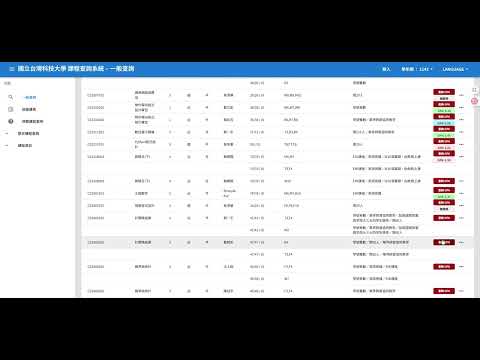
【功能介紹】專為台科大學生開發的選課加速器。解決選課時頻繁切換分頁、手動登入查詢 GPA 的煩惱。本套件能將 GPA 數據直接嵌入「課程查詢系統」介面中,提供最流暢的選課體驗。 ✨ 核心功能亮點: 🚀…
【功能介紹】專為台科大學生開發的選課加速器。解決選課時頻繁切換分頁、手動登入查詢 GPA 的煩惱。本套件能將 GPA 數據直接嵌入「課程查詢系統」介面中,提供最流暢的選課體驗。 ✨ 核心功能亮點: 🚀 背景快速查詢:開啟「快速查詢模式」,無需離開選課網頁,套件自動在背景分頁擷取 GPA 資訊,擷取完畢後自動銷毀分頁,操作不中斷。 🔑 一鍵自動登入:預先儲存 myNTUST 登入資訊,遇到登入介面時自動填寫並提交,徹底擺脫反覆輸入帳密的痛苦。 💾 智慧 GPA 快取:凡是查詢過的課程,重新載入頁面時,數據會立即顯示,無需重複查詢。 📊 視覺化色標:GPA>3.3以綠色標籤顯示,可考慮選修,GPA>3.7以藍色標籤顯示,建議選修。 💡 智能異常偵測:觸發系統人工認證時,顯示提示文字,指引您如何快速恢復功能。 🛑 快捷關閉分頁:在 GPA 詳細頁面提供懸浮關閉按鈕,讓您在查看詳細數據後能一鍵返回選課清單。 【如何開始使用】 安裝與設定:安裝本套件後,點擊工具列圖示,輸入您的 myNTUST 電子郵件與密碼。 進入選課網:開啟「台科大課程查詢系統」。 點擊查詢:在感興趣的課程右側點擊 [查詢 GPA]。 模式切換:關閉「快速查詢模式」查看完整GPA網站,開啟「快速查詢模式」快速查詢GPA。 【隱私與安全性聲明】我們深知帳號安全的重要性,因此您的電子郵件與密碼僅儲存在您個人電腦的 chrome.storage.local 加密空間。 【注意事項】本套件為非官方開發工具,GPA 數據來源為 myntust.com。若遇到系統跳出 Cloudflare 真人驗證(五秒盾),請暫時關閉快速查詢模式,手動完成驗證即可恢復。
0 out of 5No ratings
Details
- Version1.0
- UpdatedDecember 30, 2025
- Size14.13KiB
- Languages中文(台灣)
- Developer
Email
i31119391@gmail.com - Non-traderThis developer has not identified itself as a trader. For consumers in the European Union, please note that consumer rights do not apply to contracts between you and this developer.
Privacy

台科大 GPA 查詢助手 V1.0 has disclosed the following information regarding the collection and usage of your data. More detailed information can be found in the developer's privacy policy.
台科大 GPA 查詢助手 V1.0 handles the following:
This developer declares that your data is
- Not being sold to third parties, outside of the approved use cases
- Not being used or transferred for purposes that are unrelated to the item's core functionality
- Not being used or transferred to determine creditworthiness or for lending purposes