

卡尔画幅|网页录屏准备

Overview
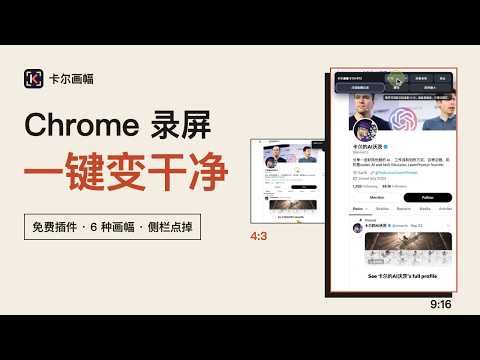
免费的创作者录屏准备工具:六种画幅一键切换,点选隐藏不想展示的网页区域。
录屏前,先把网页整理好。 我平时用 QuickTime、ScreenSage Pro 和 Screen Studio 录教程。这些软件越来越多能直接把窗口调成想要的尺寸,可到了 Chrome 就是不生效。Chrome 窗口上方的标签页、地址栏、书签栏,左边的侧栏,一录进去画面就很脏。所以我做了卡尔画幅。 它是给自媒体创作者的免费 Chrome 插件。录教程、做项目演示之前,它帮你把网页画面准备好,录制本身还是交给你用惯的录屏软件。 点一下扩展图标,当前网页会移进一个没有地址栏和标签栏的干净窗口。在控制条里选 4:3、3:4、16:9、9:16、1:1 或 3:2,网页可视区会按这个比例放到你屏幕能容纳的最大尺寸,控制条上会写出精确的像素。 网页左右的侧栏、推荐栏,或者顶部的 Logo 不想录进去,点「点选隐藏区域」,鼠标移上去会出现红框,点一下就临时收起。红框太小按 ↑ 扩大,太大按 ↓ 缩回,回车确认。撤销能一步步恢复,退出时全部还原,网站本身不会被改动。 整理好以后点「准备录制」,控制条收起。在 Screen Studio、ScreenSage Pro、macOS 自带录屏或其他支持区域录制的软件里,选择区域框住网页就可以开录。录制中页面内跳转也不会让控制条冒出来,按 ⌘⇧U 可以随时叫回。 快捷键:⌘⇧Y 进入或退出,⌘⇧U 显示或隐藏控制条(Windows 为 Ctrl+Shift)。 需要说明的边界:插件只处理普通 http / https 网页,Chrome 内部页面和商店页面不能用;跨域 iframe 里的内容不能点选;刷新页面后隐藏的区域要重新选;成片比例最终取决于录屏软件的选区和导出设置。 插件不会录制或上传任何内容,没有账号,没有统计。只在你点击图标或按快捷键时处理当前这一个网页。
0 out of 5No ratings
Details
- Version0.4.1
- UpdatedOctober 11, 2026
- Offered byCarl_in_aiwarts
- Size29.8KiB
- Languages中文(中国)
- Developer
Email
learnprompt2023@gmail.com - Non-traderThis developer has not identified itself as a trader. For consumers in the European Union, please note that consumer rights do not apply to contracts between you and this developer.
Privacy

This developer declares that your data is
- Not being sold to third parties, outside of the approved use cases
- Not being used or transferred for purposes that are unrelated to the item's core functionality
- Not being used or transferred to determine creditworthiness or for lending purposes
Support
For help with questions, suggestions, or problems, please open this page on your desktop browser