

Zynk AI

Overview
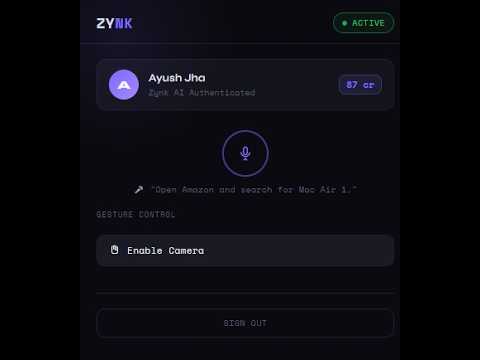
Voice and gesture controlled AI Chrome extension
Zynk AI lets you control your browser using your voice and hand gestures, no keyboard or mouse needed. VOICE CONTROL Say "Hey Zynk" followed by any command: - "Open YouTube and search for lo-fi music" - "Scroll down", "Go back", "Open a new tab" - "Click on Sign In", "Type hello in the search box" GESTURE CONTROL Use your webcam to control your browser with hand gestures: - Point index finger :- move cursor - Pinch :- click - Two fingers up/down :- scroll - Open palm :- tab switcher - Yo gesture (index + pinky) :- next tab AI-POWERED Zynk uses large language models to understand natural language commands and translate them into precise browser actions. PRIVACY Audio is processed for transcription only and never stored. Camera feed is processed locally in the extension popup and never sent to any server. See our full privacy policy at app.zynkai.xyz/privacy.
0 out of 5No ratings
Details
- Version1.0
- UpdatedApril 8, 2026
- Offered byashujha301
- Size12.08MiB
- LanguagesEnglish
- DeveloperAyush Jha
B-208 SM PLATINA KADA AGRAHARA SOMPURA GATE SARJAPUR MAIN ROAD BENGALURU, Karnataka 562125 INEmail
ashujha301@gmail.com - Non-traderThis developer has not identified itself as a trader. For consumers in the European Union, please note that consumer rights do not apply to contracts between you and this developer.
Privacy

Zynk AI has disclosed the following information regarding the collection and usage of your data. More detailed information can be found in the developer's privacy policy.
Zynk AI handles the following:
This developer declares that your data is
- Not being sold to third parties, outside of the approved use cases
- Not being used or transferred for purposes that are unrelated to the item's core functionality
- Not being used or transferred to determine creditworthiness or for lending purposes
Support
For help with questions, suggestions, or problems, please open this page on your desktop browser