

Zustand DevTools

Overview
Free registered-store inspector and timeline for Zustand, plus Pro Trace Sessions: deep diffs, call-sites, shareable traces.
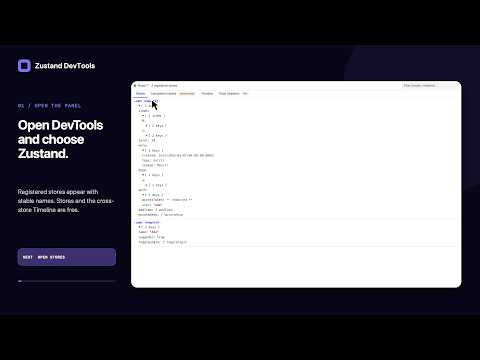
Find which state change caused a bug in your Zustand app, then keep the debugging trace together for review or handoff. TRY A REAL BUG FIRST Open the ready-made cart demo after installing the extension: https://kubaopoczka.github.io/zustand-devtools-site/try-zustand.html It contains two real Zustand stores and an intentional discount bug. Add a lamp, apply the discount, then inspect the action that produced the wrong total. The sample uses fictional data and needs no account or app setup. FREE AND PRO Stores and Timeline are free. Three complete Trace Sessions are included. Pro unlocks continued recording for a one-time base price of EUR 9.99 plus applicable tax. NEW IN 1.2 Search stores by name, state key or displayed value. Pin important stores, copy displayed JSON, and keep state branches expanded during live updates. Filter Timeline by store or replay availability and inspect a snapshot without changing your app. Large state trees open on demand, and tabs support keyboard navigation. WHAT YOU CAN DO • Inspect every store registered through zustand-devtools-bridge. • Follow named actions across registered stores in one searchable timeline. • Time-travel using the original in-memory state, preserving Dates, Maps, Sets and action functions. Replay requires that original state to remain available. • Record a Trace Session while reproducing a bug. Inspect changed paths and best-effort source call-sites, compare two moments, and add notes. • Export a redacted trace for another developer to import and inspect. Imported sessions are view-only. • Use the experimental Component Hooks view for a quick look at React hook values. Those values are not guaranteed to come from Zustand. • Match your Chrome DevTools light or dark theme. USE IT IN YOUR OWN APP Install zustand-devtools-bridge and wrap your store creator with withDevtoolsBridge, giving the store a name. Enable the bridge only in development. Reload your app, open Chrome DevTools, and select the Zustand tab. Setup instructions: https://github.com/KubaOpoczka/zustand-devtools#install PRIVACY AND PERMISSIONS Application state and traces are processed locally. There is no analytics or telemetry. The only outbound network requests are optional Gumroad purchase-verification calls after disclosure and consent. Those calls contain the licence key, this product's public ID and a use-count flag; never application state, traces, inspected URLs or source paths. The storage permission keeps recent sessions, the preview counter and a validated licence record locally. Page scripts install a compatibility hook so the panel can inspect registered stores and React components. Component inspection runs when DevTools opens the Zustand panel. Apps that opt into the bridge can keep bounded, redacted action history; disable the bridge in production. SUPPORT https://github.com/KubaOpoczka/zustand-devtools/issues
0 out of 5No ratings
Details
- Version1.2.0
- UpdatedSeptember 22, 2026
- FeaturesOffers in-app purchases
- Offered bykuba.opoczka
- Size50.62KiB
- LanguagesEnglish
- DeveloperKuba Opoczka
Newtownmountkennedy 9 Glenbrook Meadows Newtownmountkennedy, Co. Wicklow A63 HX56 IEEmail
kuba.opoczka@gmail.comPhone
+353 89 452 1204 - TraderThis developer has identified itself as a trader per the definition from the European Union and committed to only offer products or services that comply with EU laws.
Privacy

Zustand DevTools has disclosed the following information regarding the collection and usage of your data. More detailed information can be found in the developer's privacy policy.
Zustand DevTools handles the following:
This developer declares that your data is
- Not being sold to third parties, outside of the approved use cases
- Not being used or transferred for purposes that are unrelated to the item's core functionality
- Not being used or transferred to determine creditworthiness or for lending purposes
Support
For help with questions, suggestions, or problems, visit the developer's support site