

Zoom Video & Transcript Downloader

Overview
Download Zoom recordings and transcripts from zoom.us, zoomgov.com, events.zoom.us, and Zoom clips with one click.
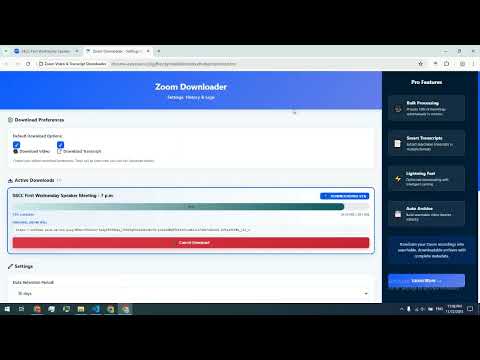
Zoom Video & Transcript Downloader Stop waiting for Zoom processing — extract direct MP4 download links and transcripts in seconds. FEATURES - Direct MP4 Downloads: Extract instant download links from Zoom Recordings, Events, and Clips - Government Zoom (zoomgov.com): Works with government recordings too — agencies, courts, and public-meeting recordings - Automatic Transcript Extraction: Get searchable, selectable transcripts alongside video downloads, exportable as SRT subtitles - Download Queue: Download multiple recordings reliably, one after another - Local-Only Processing: Everything runs securely in your browser — no external servers - Smart History: Save recent extractions with metadata and timestamps - One-Click Operations: Copy links or download files with single clicks SUPPORTED ZOOM PAGES - Recordings: zoom.us/rec/ and zoomgov.com/rec/ - Events: events.zoom.us - Clips: zoom.us/clips/ HOW IT WORKS 1. Navigate to any Zoom recording, event, or clip page 2. Click the extension icon and select "Extract Video & Transcript" 3. Access direct download links and view extracted transcripts instantly 4. Download MP4 files and transcript text with one click TRANSCRIPT CAPABILITIES - Instant Extraction: Get transcripts at the same time as video links - Searchable Text: Full selectable and copyable transcript content - Speaker Labels: Clean, readable layout with speaker identification - SRT Export: Save transcripts as subtitle files - Quick Copy: One-click copying with visual feedback PRIVACY & SECURITY - Local Processing: All extraction happens in your browser — no data sent to external servers - User-Controlled Storage: History and transcripts saved locally only - Authorized Use Only: Works only with recordings you have permission to view NEED HELP OR FOUND A BUG? Click the feedback (chat) icon in the extension to report an issue — no account needed. LEGAL For authorized use only. Only access content you have permission to download. Not affiliated with Zoom Video Communications. Support: flowextractapi@outlook.com Website: https://flowextractapi.com/zoom-downloader/
4.7 out of 515 ratings
Details
- Version1.0.5
- UpdatedAugust 11, 2026
- Size62.18KiB
- LanguagesEnglish
- DeveloperWebsite
Email
flowextractapi@outlook.com - Non-traderThis developer has not identified itself as a trader. For consumers in the European Union, please note that consumer rights do not apply to contracts between you and this developer.
Privacy

This developer declares that your data is
- Not being sold to third parties, outside of the approved use cases
- Not being used or transferred for purposes that are unrelated to the item's core functionality
- Not being used or transferred to determine creditworthiness or for lending purposes
Support
For help with questions, suggestions, or problems, visit the developer's support site