

Zoom Page TL
1 rating
)
Overview
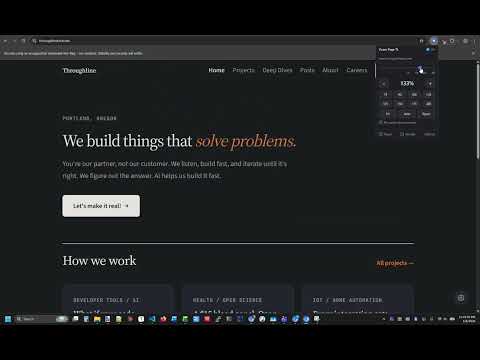
Per-site full-page zoom via CSS, with no browser zoom bubble. Independent replacement for Zoom Page WE (full mode only).
Zoom Page TL gives every website its own zoom level - and remembers it. Set a site to 150% once and it loads at 150% every time, applied before the page even paints. No more re-zooming the same sites over and over. It also gets rid of Chrome's native zoom popup. The little "100% / - / +" bubble that flashes in the address bar on every zoom change never appears, because Zoom Page TL uses real CSS page zoom and keeps the browser's own zoom out of the way. FEATURES - Per-site zoom, remembered by website. Different levels for different sites. - A live zoom slider - drag and the page zooms as you go, with soft detents at the common levels (100%, 125%, 150%...) that you can slide right past. - Type an exact percentage, or nudge by 1% with the arrow keys. - Fit-to-width: size a page to your window in one click. Optional Auto mode re-fits a site every time it loads. - Keyboard shortcuts: the familiar Ctrl + / - / 0 keep working (no zoom bubble). Set your own shortcuts (any chord, like Ctrl+Alt+[) for on/off, zoom in/out, reset, default zoom, Fit and Auto, plus rebindable Alt+Shift shortcuts. - A global default zoom for sites you have not customized. - Pause or Exclude any site that misbehaves under zoom - it hands control back to the browser for that site. - Re-center: an opt-in per-site fix for sites whose content drifts sideways when you zoom in. - Keep page top at 100%: an opt-in per-site setting for smaller mastheads, navigation and headlines while the article remains enlarged. - Page Up/Down and Space/Shift+Space while zoomed account for sticky bars and leave a reading overlap. - Import / export your settings as a JSON backup. NEW IN 1.2.0 Keep page tops at 100%, page through zoomed articles with better reading overlap, and enjoy more reliable Washington Post centering and text width. Sticky bars align correctly, and reading-progress updates no longer cause scroll jitter. Compact-top preferences are included in backups. No new permissions or tracking. PRIVATE BY DESIGN Zoom Page TL collects nothing and sends nothing anywhere. All of your settings are stored locally in your browser. There is no account, no analytics, no tracking, and no remote server - the extension makes no network requests at all. It uses the current tab's hostname and inspects page layout locally to apply your zoom preferences and scrolling corrections. It never collects or transmits page text or media. Open source (MIT) at https://github.com/ThroughlineTech/zoom-page-tl Zoom Page TL is an independent reimplementation, in spirit, of the unmaintained "Zoom Page WE", focused on the one feature most people used: fast, per-site full-page zoom.
5 out of 51 rating
Details
- Version1.2.0
- UpdatedNovember 8, 2026
- Offered bythroughline
- Size49.2KiB
- LanguagesEnglish
- Developer
Email
dan@throughlinetech.net - Non-traderThis developer has not identified itself as a trader. For consumers in the European Union, please note that consumer rights do not apply to contracts between you and this developer.
Privacy

This developer declares that your data is
- Not being sold to third parties, outside of the approved use cases
- Not being used or transferred for purposes that are unrelated to the item's core functionality
- Not being used or transferred to determine creditworthiness or for lending purposes
Support
For help with questions, suggestions, or problems, visit the developer's support site