


Overview
Context-aware code analysis for Zoho Deluge scripts — powered by your org's live schema.
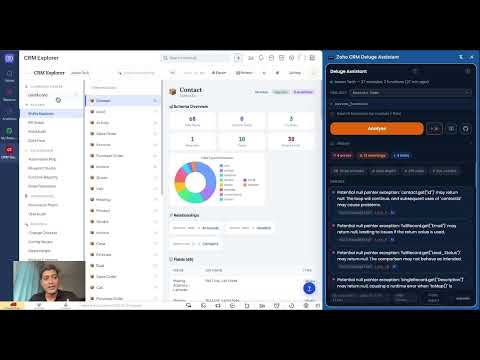
Zoho CRM Deluge Assistant adds developer tools directly inside the Zoho CRM Deluge script editor. It connects to your live org schema so suggestions and validations are specific to your actual modules and fields. FIELD AUTOCOMPLETE Type record.get(" or map.put(" and see instant field suggestions from your org schema, filtered by module context. Suggestions include the field display label and data type. No more guessing API names or switching between tabs. INLINE STATIC ANALYSIS Squiggles appear under problem code as you type, flagging common Deluge mistakes before you run: - .get() calls without isNull() or ifnull() guards - API calls inside for-each loops (performance risk) - Hardcoded record IDs - Empty catch blocks that swallow errors - Field API names that do not exist in your org schema SCRIPT MAP Every time you are in the editor the panel shows which modules your function reads, writes, and deletes, plus an estimated API credit cost per execution. No button to click - it updates automatically. IMPACT RADAR Before saving, see how many workflows, blueprints, and automations call this function. The radar shows every caller so you understand the impact of your change across the org. VARIABLE TYPE INFERENCE Write leads = zoho.crm.getRecords("Leads") and then type leads.get(" - the assistant recognises that leads is a Leads record and suggests the correct fields. Works with for-each loop variables too. HOVER TOOLTIPS Hover over any field name inside a .get() or .put() call to see the display label, data type, module, and picklist values without leaving the editor. CONTEXT-AWARE SNIPPETS Press Ctrl+Shift+Space to open a snippet picker. Templates for fetch, update, bulk update, search, and more are pre-filled with your org's actual module and field names, ready to insert at the cursor. HOW IT WORKS Run the included CRM Explorer audit once to capture your org schema (modules, fields, functions). The assistant uses this snapshot entirely on your local device. No schema data leaves your browser. REQUIREMENTS - Zoho CRM account with access to the Functions or Workflow editor - One-time CRM Explorer snapshot (takes approximately 30 seconds) (refer: https://aaxonix.com/built-by-aaxonix/crm-explorer) to install CRM explorer - Optional: Anthropic or OpenAI API key for AI-powered code analysis
0 out of 5No ratings
Details
- Version1.1.0
- UpdatedApril 29, 2026
- Size80.18KiB
- LanguagesEnglish
- DeveloperWebsite
Email
amit.v.prabhu@gmail.com - Non-traderThis developer has not identified itself as a trader. For consumers in the European Union, please note that consumer rights do not apply to contracts between you and this developer.
Privacy

Zoho CRM Deluge Assistant has disclosed the following information regarding the collection and usage of your data. More detailed information can be found in the developer's privacy policy.
Zoho CRM Deluge Assistant handles the following:
This developer declares that your data is
- Not being sold to third parties, outside of the approved use cases
- Not being used or transferred for purposes that are unrelated to the item's core functionality
- Not being used or transferred to determine creditworthiness or for lending purposes
Support
For help with questions, suggestions, or problems, visit the developer's support site