

ZipIt: Web to Figma, Web Inspector, Code, Fonts & Asset Extractor

Overview
Download any website as a ZIP file instantly.
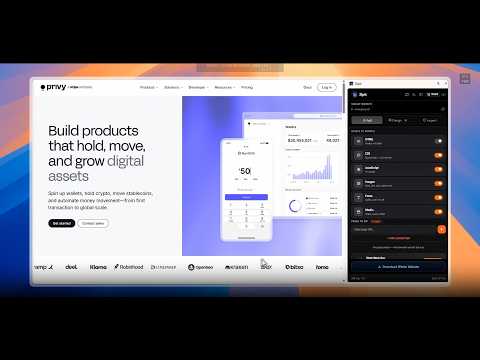
🚀 ZipIt: Website to ZIP — Web to Figma, Inspector & Asset Extractor ⚡ Export websites into reusable code, assets, design systems, and editable Figma designs. ZipIt is a powerful Chrome Extension + Web App for designers and developers to analyze modern websites, download complete websites as ZIP files, extract assets, inspect UI components, export designs to Figma, and create reusable design references. ⚙️ How It Works Open Any Website Click the ZipIt icon in your Chrome toolbar to open the extraction panel. Choose Your Mode Select Download mode, Design Mode, Inspect Mode, or AI Recreation based on what you want to capture. Inspect mode Click & Extract Hover over components to inspect them individually, or extract an entire page with a single click. Export & Organize Copy code, export designs to Figma, download assets, or save your captures to your ZipIt workspace. 📦 ZIP Bundle Download Download a complete, organized ZIP package of a website for offline research, archiving, or development. Extract: 📝 HTML, CSS & JavaScript 🖼️ Images 🧩 SVGs & icons 🔤 Custom fonts 🎬 Videos 🎞️ Lottie animations 📁 Website resources and assets --- 🎨 Design Mode Turn any live website into a reusable design-system reference. Automatically extract: 🌈 Colors & gradients ✍️ Font families, weights & typography 📏 Spacing rules 🌑 Shadows 🎛️ CSS variables 🧱 Design tokens --- 🔍 Inspect Mode Inspect any element on a page instantly — no DevTools required. 📐 Analyze layouts, dimensions, spacing, and styles. 💻 Export clean HTML, CSS, or Tailwind CSS 🎨 Export website designs directly to Figma as editable layers and components 🧩 Capture individual components or complete page layouts for design exploration and recreation. 📚 Save reusable components and design references to your ZipIt workspace. 🤖 AI UI Recreation Turn websites into AI-ready implementation prompts. ZipIt analyzes the page hierarchy and generates structured information including: 🧩 Page & component hierarchy 🎨 Design tokens 📐 Layout structure ✍️ Typography 📏 Spacing 💻 Frontend implementation guidance Use the generated prompt with your favorite AI coding and design tools to recreate interfaces faster. 🧪 Built-In Site Audits Evaluate live websites with automated checks for: 🔎 Technical SEO ⚡ Performance & Core Web Vitals ♿ WCAG accessibility 🎨 Color contrast 🧠 Usability barriers --- 🚀 What's New in ZipIt 2.1 ZipIt 2.1 brings a faster extraction engine, improved Figma exports, cleaner code extraction, and a new Shelf Mode. 🎯 Improved Figma Exports Export website interfaces with improved accuracy for: Layouts Complex shapes Transparency Typography Colors Components ⚡ Interactive Website Capture Preserve modern website interactions such as: 🎠 Sliders 🔄 Carousels ✨ Hover states ⚙️ Dynamic UI elements 🧹 Cleaner Code Extraction ZipIt automatically removes inspection overlays and selection highlights from exported code. ✨ Refreshed Interface A modern glass-inspired interface designed for faster website analysis and extraction. 🗂️ Shelf Mode — Your Dedicated Web Clipboard Turn ZipIt into an always-ready clipboard for everything you collect while browsing. 📋 Capture text, colors, fonts, links, images, SVGs & more. ⚡ Keep everything accessible while browsing. 🎨 Collect design inspiration as you go. 📤 Export directly to **Figma** and your workflow. 🧩 Organize by Images, Colors, Typography, Links & Assets. Browse → Collect → Copy → Create. --- 👥 Who It's Built For 🎨 Designers & UX Teams Collect high-fidelity inspiration, analyze digital experiences, extract design systems, and build component libraries. 💻 Developers Inspect modern interfaces, extract assets and code, and accelerate frontend development. 🚀 Founders & Agencies Research websites, explore product ideas, analyze competitors, and organize useful web references. Why ZipIt? ⚡ One-click website capture 📦 Download websites as ZIP files 🎨 Automatic design system extraction 🎯 Export website designs directly to Figma 🔍 Visual inspection without DevTools 💻 HTML, CSS & Tailwind exports 🤖 AI-ready recreation prompts 🧪 SEO & accessibility audits 🗂️ Dedicated web clipboard with Shelf Mode ☁️ Cloud workspace for reusable libraries 🚀 Built for modern websites 🌐 Chrome Extension + Web App 🔒 Privacy-friendly local extraction options One tool. Inspect anything. Capture everything.
5 out of 517 ratings
Details
- Version2.1
- UpdatedOctober 13, 2026
- FeaturesOffers in-app purchases
- Size8.79MiB
- Languages9 languages
- DeveloperWebsite
Email
bharatmodi2012@gmail.com - Non-traderThis developer has not identified itself as a trader. For consumers in the European Union, please note that consumer rights do not apply to contracts between you and this developer.
Privacy

This developer declares that your data is
- Not being sold to third parties, outside of the approved use cases
- Not being used or transferred for purposes that are unrelated to the item's core functionality
- Not being used or transferred to determine creditworthiness or for lending purposes
Support
For help with questions, suggestions, or problems, please open this page on your desktop browser