

ZIP Attachments for Gmail
1 rating
)
Overview
Send multiple files as one ZIP attachment directly from Gmail
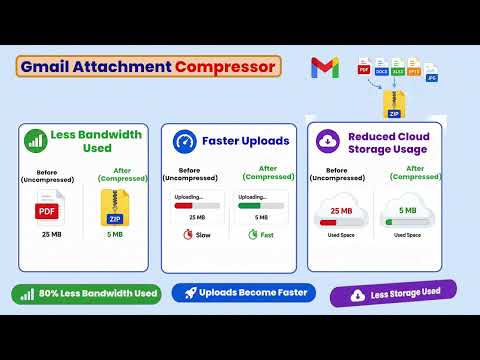
🗜️ **Send Multiple Files as ONE ZIP Attachment in Gmail** Tired of attaching files one by one in Gmail? **ZIP Attachments for Gmail** lets you select multiple files and turn them into a single ZIP attachment — right from your Gmail compose window. ### 🚀 How it works 📁 **Select multiple files** Choose documents, images, reports, invoices, or any other files you want to send. 🗜️ **Create one ZIP attachment** The extension combines your selected files into a single ZIP file automatically. 📎 **Attach it to Gmail** The ZIP file is added to your email as a normal Gmail attachment. ✉️ **Send your email** That's it. One attachment instead of a long list of individual files. ### ✨ Why use ZIP Attachments for Gmail? ✅ Send **many files as one attachment** ✅ Avoid attaching files individually ✅ Keep your Gmail messages clean and organized ✅ Convenient for documents, invoices, photos, reports & project files ✅ Works directly inside Gmail ✅ **Your files are compressed locally in your browser** 🔒 **No file uploads to our servers** ### 💼 Perfect for 👨💼 Business & office documents 📊 Reports & spreadsheets 🧾 Invoices & accounting files 📷 Collections of photos 📚 Students & assignments 🏗️ Project files & documents 🤝 Sending multiple files to clients or colleagues ### 🔐 Privacy Your files are processed **locally on your device**. They are not uploaded to an external server for compression. **Select → ZIP → Attach → Send.** Make Gmail attachment management simpler.
5 out of 51 rating
Details
- Version3.1
- UpdatedSeptember 6, 2026
- Offered byanikadigitalseva
- Size34.6KiB
- LanguagesEnglish (United States)
- Developer
Email
anikadigitalseva@gmail.com - Non-traderThis developer has not identified itself as a trader. For consumers in the European Union, please note that consumer rights do not apply to contracts between you and this developer.
Privacy

This developer declares that your data is
- Not being sold to third parties, outside of the approved use cases
- Not being used or transferred for purposes that are unrelated to the item's core functionality
- Not being used or transferred to determine creditworthiness or for lending purposes
Support
For help with questions, suggestions, or problems, please open this page on your desktop browser