

Export Data from Zillow - Excel, CSV & JSON

Overview
Export data from Zillow listings, search results, and saved homes to Excel, CSV, or JSON.
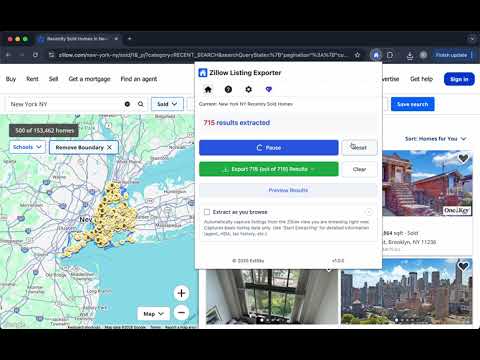
Export data from Zillow listings, search results, and saved homes into spreadsheet-ready files. Use the extension on supported Zillow search pages or saved homes pages to collect listing rows, review available property fields, and export the data to CSV, Excel XLSX, or JSON. It is built for comps, saved homes tracking, market research, lead review, and internal reporting. Exported files are generated locally in your browser. We do not store your Zillow listing data on our servers. WHY USE THIS Zillow DATA EXPORTER? Manually copying Zillow listings into a spreadsheet is slow and error-prone. This extension helps you: • Export Zillow search result listings • Export saved homes or favorite listings when visible in your browser • Collect property rows for comps and market review • Save listing data to CSV, Excel XLSX, or JSON • Preview captured rows before export • Reduce copy-paste work and spreadsheet cleanup WHAT YOU CAN EXPORT • Search result listings from supported Zillow pages • Saved homes and favorite listings when visible in your browser • For-sale, for-rent, and sold listings when supported • Listing fields such as price, address, beds, baths, area, home type, status, and listing URL • Image URLs and available detail fields when supported • Multiple listing rows for spreadsheet workflows CORE FEATURES ★ Search Results Export Open a supported Zillow search results page, start the extension, preview detected listing rows, and export the data into a clean spreadsheet-ready file. ★ Saved Homes Export Open a supported Zillow saved homes or favorites page, then export visible saved listings into CSV, Excel XLSX, or JSON for tracking, review, and comparison. ★ Spreadsheet-Ready Files Export listing data in formats that fit your workflow: • CSV for Google Sheets, Excel, and CRM imports • Excel XLSX for comps, reports, and internal review • JSON for custom workflows and data processing ★ Listing Row Preview Preview captured Zillow listing rows before export, so you can check the data before downloading the file. ★ Field Selection Keep your export clean by choosing only the listing fields you need for your workflow. ★ Local Browser Processing Exported files are generated on your own computer. We do not store your Zillow listing data on our servers. ACCESS AND UPGRADES You can start with the free workflow to export sample Zillow listings and confirm that the tool fits your process. For larger saved homes lists, repeated search result exports, and higher-volume spreadsheet workflows, Pro unlocks more export capacity and additional available fields. SMART LISTING DETECTION Zillow Listing Exporter is optimized for listing-based workflows. It detects available rows from supported Zillow pages, lets you preview the data, and helps you keep only the fields you need. FAST. LOCAL. SECURE. • Browser-based processing • Exported files are generated on your own computer • We do not store your Zillow listing data on our servers • No coding, scraper setup, or manual copy-paste required HOW TO EXPORT DATA FROM Zillow 1. Install the extension. 2. Open a supported Zillow search results page or saved homes page. 3. Click the extension icon. 4. Preview the detected listing rows. 5. Export the listings to CSV, Excel XLSX, or JSON. WHO USES THIS TOOL? • Real estate agents comparing listings • Investors tracking saved homes and opportunities • Analysts building spreadsheet datasets • Virtual assistants collecting property rows • Marketing and operations teams preparing reports • Users who want Zillow listings in Excel, CSV, or JSON USE CASES Zillow Listing Exporter is useful for: • Search result export • Saved homes tracking • Favorite listings review • Comp analysis • Market research • Lead review • Spreadsheet reporting IMPORTANT DISCLAIMER This extension is an independent utility and is not affiliated with, endorsed by, sponsored by, or officially connected with Zillow. All supported listing detection and export actions are performed locally in your browser.
5 out of 51 rating
Details
- Version1.2.3
- UpdatedJuly 16, 2026
- FeaturesOffers in-app purchases
- Size2.86MiB
- Languages44 languages
- DeveloperWebsite
Email
support@extsky.com - Non-traderThis developer has not identified itself as a trader. For consumers in the European Union, please note that consumer rights do not apply to contracts between you and this developer.
Privacy

Export Data from Zillow - Excel, CSV & JSON has disclosed the following information regarding the collection and usage of your data. More detailed information can be found in the developer's privacy policy.
Export Data from Zillow - Excel, CSV & JSON handles the following:
This developer declares that your data is
- Not being sold to third parties, outside of the approved use cases
- Not being used or transferred for purposes that are unrelated to the item's core functionality
- Not being used or transferred to determine creditworthiness or for lending purposes