


Overview
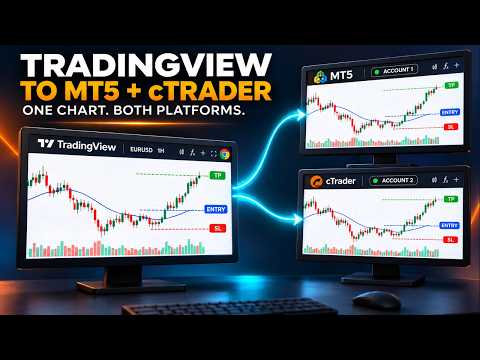
Trade from TradingView. Size with precision. Manage MT5 and cTrader positions from one panel.
📈 Your trade starts on the chart. Keep it there. Zikiman Trading Panel adds a compact trading panel to TradingView and connects it to the Zikiman MetaTrader 5 EA or cTrader cBot running on your computer. Set your levels, review the risk and lot size, then send your order to the terminal you choose. ━━━━━━━━━━━━━━━━━━━━ 🎯 PLAN WITH ENTRY, STOP LOSS AND TAKE PROFIT ✅ Drag the Entry, SL and TP lines on the TradingView chart ✅ Choose which information appears in each label: estimated risk, volume, potential profit and risk-to-reward where applicable ✅ With multiple compatible accounts, expand a line label to see each account's values 🧮 Position size calculator • Equity percentage • Cash amount in the account currency • Fixed lots The connected terminal calculates size using its broker's contract specifications and volume step. ━━━━━━━━━━━━━━━━━━━━ ⚡ TRADE THROUGH MT5 OR CTRADER ✅ Place Buy or Sell market orders ✅ Prepare limit and stop orders and manage pending-order expiry ✅ Symbol mapping connects TradingView symbols to broker instruments with different names or suffixes 🖥️ Connect one MT5 terminal with the current Standard EA. 🖥️🖥️ Use MT5 Pro or compatible cTrader cBots for account groups and multi-terminal workflows. Each selected account receives its own sizing calculation and reports its own result. ━━━━━━━━━━━━━━━━━━━━ 🛡️ MANAGE LIVE POSITIONS With current compatible receivers: ✅ Full and partial closes ✅ B/E Now, break-even activation and profit lock ✅ Trail Now and trailing stops ✅ Up to three partial take-profit targets ✅ Adjust live SL and TP levels ✅ Cancel pending orders ✅ Schedule a position to close at a selected local time or before its broker trading session ends ⚠️ Keep the desktop terminal and receiver running for these actions. 📋 Activity keeps command outcomes available, with details you can copy for support. ━━━━━━━━━━━━━━━━━━━━ 🎨 MAKE THE PANEL YOURS ✅ Light or dark themes ✅ Chart line colors and thickness ✅ Chart labels focused on the values you use ✅ Minimize the panel for more chart space and optionally show live position summaries ⚡ MT5 Pro and cTrader support minimized quick entry. ℹ️ MT5 Standard uses the expanded panel for new orders and supports one terminal at a time. ━━━━━━━━━━━━━━━━━━━━ 🚀 GUIDED DESKTOP SETUP 1️⃣ Open a TradingView chart in Chrome and click Zikiman Trading Panel. 2️⃣ Go to More → Terminals → Setup. 3️⃣ Choose MT5 or cTrader and follow the Windows or macOS guide. 4️⃣ Connect the matching Zikiman EA or cBot, then select your terminal. 📁 MT5 and cTrader use separate local folders that you approve in Chrome. The MT5 setup command prepares its shared folder. The local cBot creates the cTrader folder, which you can find under Settings → Chrome folder. Browser folder permissions remain controlled by Chrome. ━━━━━━━━━━━━━━━━━━━━ 🔗 GET THE MATCHING EA OR CBOT 🖥️ MT5 Pro (multi-terminal): https://www.mql5.com/en/market/product/210612 🖥️ MT5 Standard (one terminal): https://www.mql5.com/en/market/product/210613 🟦 cTrader cBot (free trial available): https://ctrader.com/products/6659 ━━━━━━━━━━━━━━━━━━━━ ℹ️ GOOD TO KNOW 🔌 The Chrome extension is the chart interface; the matching Zikiman desktop EA or cBot is required and may be a separate download or purchase. Product availability and pricing are shown in the relevant store. 🙋 Entries are user-directed. This extension does not convert TradingView alerts into automatic orders. ⚠️ Estimates on the chart can differ from broker execution. ━━━━━━━━━━━━━━━━━━━━ ✨ Connect your terminal, open your chart and review your first setup. Zikiman is an independent product developer and is not affiliated with, endorsed by, or sponsored by TradingView.
0 out of 5No ratings
Details
- Version0.8.130
- UpdatedNovember 24, 2026
- Size1.58MiB
- LanguagesEnglish
- DeveloperWebsite
Email
contact@zikiman.com - Non-traderThis developer has not identified itself as a trader. For consumers in the European Union, please note that consumer rights do not apply to contracts between you and this developer.
Privacy

Zikiman Trading Panel has disclosed the following information regarding the collection and usage of your data. More detailed information can be found in the developer's privacy policy.
Zikiman Trading Panel handles the following:
This developer declares that your data is
- Not being sold to third parties, outside of the approved use cases
- Not being used or transferred for purposes that are unrelated to the item's core functionality
- Not being used or transferred to determine creditworthiness or for lending purposes
Support
For help with questions, suggestions, or problems, visit the developer's support site