

Zight Screen Recorder, Screenshot App

Tổng quan
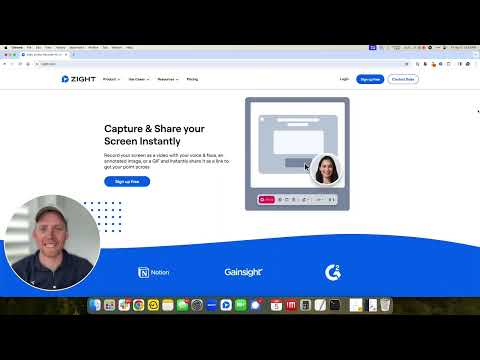
The best screen recorder for Chrome. Capture your screen, webcam, and instantly share videos and screenshots in seconds.
The Ultimate Screen Recorder, Screenshot Tool, and GIF Maker for Chrome Capture your screen, webcam, annotate, and instantly share videos and screenshots in seconds. 🚀 Top 10 Reasons to Choose Zight: 1️⃣ Trusted by Over 5 Million Users Worldwide 🌍 2️⃣ Screen Recording and Screenshot Capture All-in-One 📷🎥 3️⃣ Instant Sharing with Shortlink URLs 🔗 4️⃣ Annotate Screenshots and Recordings Easily ✏️ 5️⃣ Capture Screen, Voice, and Webcam Together 🎤📹 6️⃣ Integrates Seamlessly with Your Favorite Apps 🤝 7️⃣ High-Quality HD Video Recording 🖥️ 8️⃣ Secure Sharing with Public or Private Links 🔒 9️⃣ Boost Productivity with Visual Communication ⚡ 🔟 Fast, Easy to Use, and No Ads 😊 Features: 🎥 Screen Recording • Capture your screen, webcam, and microphone at the same time • Record your desktop, a specific window, or just your webcam • Automatically upload and generate a shareable link when done • Share directly into Slack, Gmail, Jira, Asana, and other tools • Trim and edit recordings as needed 📸 Screenshot Capture • Capture Screenshots • Capture your entire screen or select specific areas. • Annotate Screenshots • Add text, arrows, lines, shapes, and emojis. • Highlight important parts or blur sensitive information. • Resize or crop screenshots as needed. • Save & Share • Instantly share with a shortlink URL. • Copy screenshots directly for quick pasting. ✏️ Annotation Tools • Add markups to screenshots and recordings • Use arrows, lines, shapes, text, or freehand drawing • Customize colors and callouts to communicate clearly and quickly ✨ Request Video • Generate a unique Request Video link • Anyone can record a video for you without installing anything or creating an account • You can reuse or expire the link at any time • Request Logs mode automatically captures browser console logs, network requests, and device info • Ideal for bug reporting, QA, customer support, and product feedback • Every submission is delivered as a video plus technical logs for complete developer-ready context 🌐 Instant Sharing • Share with a simple URL • Paste links into Slack, Gmail, Jira, Notion, and countless tools • Control privacy with public, private, and password-protected settings • Rich previews in email and collaboration apps, like Gmail • Embed files in blogs, docs, help centers, and more 🏃♂️Helpful Shortcuts • Alt + Shift + V: Capture visible area • Alt + Shift + F: Capture full page • Alt + Shift + L: Start video recording ✨ Zight AI • Smart Actions convert videos into step-by-step guides, SOPs, FAQs, or bug reports • Automatic transcription and captioning • Smart Titles created instantly for every video • Smart Summaries to help viewers consume content quickly • Full-text search across your video library • Transcribe in 50-plus languages • Smart Chapters for structured navigation and fast insight extraction Get Started for Free Sign up with no credit card required. Free and paid plans available. Zight for Teams, Business, and Enterprise • Single Sign-On • Custom branding on all download and share pages • Use your own custom domain • Advanced security controls • Embed anywhere across your knowledge base, docs, or product Learn more at: https://www.zight.com/enterprise/ Connect With Us: • X: @zightapp • LinkedIn: Zight • Website: zight.com
4,5/5509 lượt xếp hạng
Chi tiết
- Phiên bản8.5.0
- Đã cập nhật22 tháng 11, 2025
- Kích thước2.07MiB
- Ngôn ngữEnglish (United States)
- Nhà phát triểnZight, IncTrang web
548 Market St Pmb 35577 San Francisco, CA 94104-5401 USEmail
support@zight.comĐiện thoại
+1 805-455-7235 - Người bán thương mạiTheo định nghĩa của Liên minh Châu Âu, nhà phát triển này đã tự nhận mình là người bán và cam kết chỉ cung cấp những sản phẩm hoặc dịch vụ tuân thủ luật pháp của Liên minh Châu Âu.
- D-U-N-S080679513
Quyền riêng tư

Zight Screen Recorder, Screenshot App đã công bố thông tin sau đây liên quan đến việc thu thập và sử dụng dữ liệu của bạn. Bạn có thể xem thêm thông tin chi tiết trong privacy policy của nhà phát triển.
Zight Screen Recorder, Screenshot App xử lý dữ liệu sau:
Nhà phát triển này tuyên bố rằng dữ liệu của bạn
- Không được bán cho bên thứ ba, ngoài những trường hợp sử dụng đã được phê duyệt
- Không được sử dụng hoặc chuyển nhượng cho các mục đích không liên quan đến chức năng chính của mặt hàng
- Không được sử dụng hoặc chuyển nhượng để xác định khả năng thanh toán nợ hoặc phục vụ mục đích cho vay
Hỗ trợ
Nếu bạn có câu hỏi, ý kiến đề xuất hoặc gặp vấn đề, vui lòng mở trang này bằng trình duyệt dành cho máy tính để được trợ giúp