


Visão geral
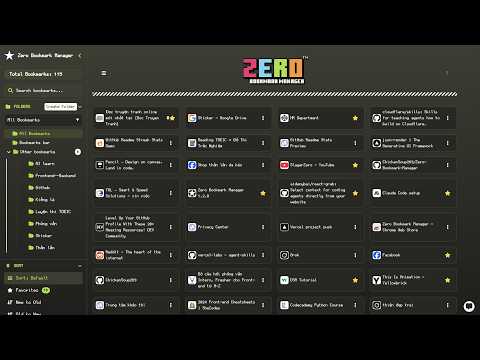
A sleek and intuitive Chrome extension to manage bookmarks with search, sort, folder management, and export/import features.
# Bookmark Manager - Chrome Web Store Description ---- Bookmark Manager is a powerful and intuitive Chrome extension designed to help you organize and manage your bookmarks effortlessly. With a modern interface, it allows you to view, search, sort, and customize bookmarks efficiently. ---- You can bookmark the current page using the universal browser shortcut: - Windows / Linux: Ctrl + D - Mac: Command (⌘) + D - Pro Tip: + Bookmark all open tabs into a single folder: + Windows / Linux: Ctrl + Shift + D + Mac: ⌘ + Shift + D ---- Key Features: - View Bookmarks: Flat list, tree view, or detailed view. - Search & Sort: Instantly find bookmarks by title or URL. Sort by date, last opened, A–Z, most visited, or favorites. - Folder Management: Create, rename, delete, and move folders. - Bookmark Editing: Rename, move, delete, favorite, tag (with colors), and view details. - Duplicate Management: Auto-detect and clean duplicates. - Export/Import: JSON, HTML, CSV (with duplicate detection on import). - Themes & Fonts: Light, Dark, Dracula, Tet, and more. Custom fonts with Nerd Fonts support. - Multilingual Support: English & Vietnamese. - Tags & Pinning: Tag bookmarks and pin important ones. - Link Health Check: Verify availability and safety of links. - QR Code Generator: Create QR codes for quick sharing. - Chatbot (Beta): Manage bookmarks and UI via natural language. - Visit Count Tracking: Tracks how many times each bookmark is opened inside the extension and in normal browsing (uses the `webNavigation` permission). - Visit Count Icon: Displays a quick icon indicator showing total visits per bookmark. - Configurable Click Action: Choose whether clicking the extension icon opens a popup, the full page, or the side panel. ---- Privacy & Security: - No personal data is collected or transmitted. - All data is processed locally within your browser. - No remote code, analytics, or third-party services. ---- Source Code: GitHub Repository: https://github.com/ChickenSoup269/Zero-Bookmark-Manager ---- View All Releases version here: https://github.com/ChickenSoup269/Zero-Bookmark-Manager/releases ---- Known Issues: Some UI elements may not refresh correctly after moving or editing bookmarks/folders. Refresh the page (F5) or toggle the extension off/on as a temporary fix.
5 de 52 notas
Detalhes
- Versão1.2.0
- Atualização9 de março de 2026
- Oferecido porChickenSoup269
- Tamanho253KiB
- IdiomasEnglish
- Desenvolvedor
E-mail
thientran01345@icloud.com - Não negocianteEsse desenvolvedor não se identificou como comerciante. Caso você seja da União Europeia, observe que os direitos do consumidor não se aplicam a contratos firmados entre você e esse desenvolvedor.
Privacidade

O desenvolvedor declara que seus dados
- Não são vendidos a terceiros, exceto nos casos de uso aprovados
- Não são usados ou transferidos para fins não relacionados à função principal do item
- Não são usados ou transferidos para informações de crédito ou empréstimo