


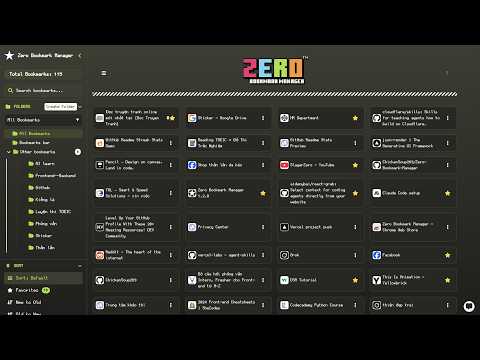
Overview
A sleek and intuitive Chrome extension to manage bookmarks.
# Zero Bookmark Manager - The Ultimate All-in-One Bookmark Workspace Zero Bookmark Manager is a powerful, privacy-first, and ultra-fast Chrome extension designed to help you organize, search, and manage your bookmarks effortlessly with modern aesthetics and deep automation tools. ---- ** Universal Browser Shortcuts: - Bookmark Current Tab: Ctrl + D (Mac: ⌘ + D) - Bookmark All Open Tabs: Ctrl + Shift + D (Mac: ⌘ + Shift + D) - Quick Save Multi-Tab Window: Ctrl + Shift + Y (Mac: ⌘ + Shift + Y) - Open Command Palette: Ctrl + K (Mac: ⌘ + K) ---- * KEY FEATURES * : ** 8 Versatile Display Modes Tailor your layout to your exact workflow: - Nested Tree: Classic hierarchical folder navigation. - Grid Cards: Clean visual preview cards. - Detailed View: Full metadata with instant in-modal Web Previews. - Compact & Flat Lists: Ultra-dense lists for maximum productivity. - Bento Grid: Modern responsive widget-style layout. - Kanban Split Board: Column-based folder workflow. - Visual Mockup: Beautiful presentation view. ** AI-Powered Productivity - Smart Chatbot: Manage, find, and categorize bookmarks using natural language. - AI Auto-Tagging: Automatically generates relevant tags via Google Gemini or Chrome Built-in AI. ** Folder Studio & Intelligent Organizer - Split-View Hierarchy Studio: Drag-and-drop tree reordering with context menu. - Merge Duplicate Folders: Merge redundant folder trees seamlessly. - Auto-Sort A-Z: Automatically alphabetize folders and bookmarks. - Clean Empty Folders: Sweep away empty folders with one click. - Raindrop-style Sidebar: Collapsible sidebar with adjustable width. ** Analytics & Insights Dashboard - Comprehensive metrics: Total links, folders, tags, and health status. - Activity trends: Track library growth and access frequency over time. - Smart suggestions: Surface unused bookmarks and organize domains. ** Advanced Maintenance & Tools - Link Health & Wayback Archive: Detect 404/dead links and view archived snapshots on the Wayback Machine. - Snooze & Read Later: Set scheduled reminder alarms with native desktop notifications. - Reading Queue: Keep temporary articles separate from your permanent collection. - Smart Cleanup: Find duplicate URLs and auto-group bookmarks by domain. - Fuzzy Search: Lightning-fast search across titles, URLs, tags, and markdown notes. - QR Code Generator: Instant mobile sharing. - Personal Notes: Add markdown notes directly to any bookmark. ** Customization & Privacy - 10+ Professional Themes: Tokyo Night, Dracula, Monokai, One Dark, GitHub, and more. - Custom Fonts: Support for Nerd Fonts, Pixel fonts, and system fonts. - Cloud Backup & Sync: Direct, encrypted backup & restore via Google Drive. - Multi-format Export/Import: Full metadata support for JSON, HTML, and CSV. - Side Panel & Popup: Seamless multitasking while browsing. - 100% Privacy-First: All data is processed locally. Zero tracking, zero telemetry. ---- ** Source Code & Community: https://github.com/ChickenSoup269/Zero-Bookmark-Manager ** Release Changelogs: https://extension-changelogs.vercel.app/changelog?ext=Zero+Bookmark+Manager
4.3 out of 57 ratings
Details
- Version1.8.0
- UpdatedOctober 15, 2026
- Offered byChickenSoup269
- Size503KiB
- Languages2 languages
- Developer
Email
thientran01345@icloud.com - Non-traderThis developer has not identified itself as a trader. For consumers in the European Union, please note that consumer rights do not apply to contracts between you and this developer.
Privacy

This developer declares that your data is
- Not being sold to third parties, outside of the approved use cases
- Not being used or transferred for purposes that are unrelated to the item's core functionality
- Not being used or transferred to determine creditworthiness or for lending purposes