

ZenX
2 ratings
)
Overview
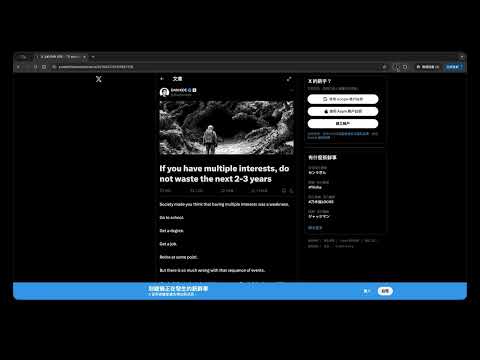
Distraction-free reader mode for X.com (Twitter) articles
ZenX — One-click zen reading mode for X.com articles. Tired of distractions when reading posts on X.com (Twitter)? ZenX strips away the noise and gives you a clean, focused, distraction-free reading experience — like a reader mode built for X. ✦ What it does: • Hides comments, replies, and interaction buttons • Removes left navigation, right sidebar, and floating drawers (Grok, chat) • Hides Premium ads, Grok button, and sticky navigation bar • Expands the article to a comfortable reading width (golden ratio) • Fixes image display for full-width viewing • Click any image to open X's native image viewer — works seamlessly in Zen mode • Automatically scrolls to the top for a fresh start • Toggle on/off with a single click — exits cleanly without reloading the page ✦ How to use: 1. Navigate to any post on X.com (x.com/*/status/*) 2. Click the ZenX icon in your toolbar 3. Enjoy distraction-free reading 4. Click the icon again to restore the original page — no reload needed The extension button is only active on X.com article pages — it stays grayed out everywhere else, so it never gets in your way. ✦ Privacy first: ZenX does not collect, store, or transmit any data. Everything runs locally in your browser. No analytics, no cookies, no third-party services. ✦ Permissions explained: • activeTab — to modify the current page when you click • scripting — to inject zen-mode styles • declarativeContent — to enable the button only on article pages Open source: https://github.com/TimJi/zen-x
5 out of 52 ratings
Details
- Version1.3.0
- UpdatedApril 19, 2026
- Offered byTimJi.dev
- Size16.41KiB
- LanguagesEnglish (United States)
- Developer
Email
timji0210@gmail.com - Non-traderThis developer has not identified itself as a trader. For consumers in the European Union, please note that consumer rights do not apply to contracts between you and this developer.
Privacy

This developer declares that your data is
- Not being sold to third parties, outside of the approved use cases
- Not being used or transferred for purposes that are unrelated to the item's core functionality
- Not being used or transferred to determine creditworthiness or for lending purposes
Support
For help with questions, suggestions, or problems, visit the developer's support site