Item logo image for ZenTube: Focus Mode for Learning

ZenTube: Focus Mode for Learning

4.0(

1 rating

)
ExtensionEducation5 users
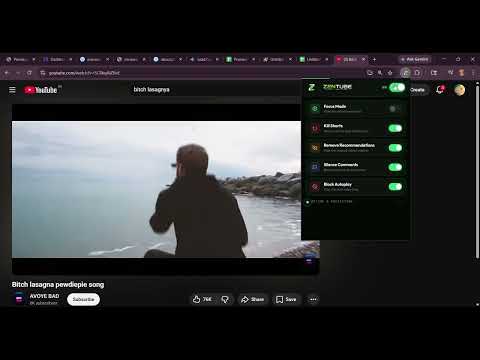
Item media 2 (screenshot) for ZenTube: Focus Mode for Learning
Item video thumbnail
Item media 2 (screenshot) for ZenTube: Focus Mode for Learning
Item video thumbnail
Item media 2 (screenshot) for ZenTube: Focus Mode for Learning

Overview

Helps students avoid distractions while learning on YouTube by hiding feeds, shorts, and comments.

YouTube Focus Mode for Learning YouTube Focus Mode for Learning is a powerful productivity Chrome extension designed to help students, professionals, and lifelong learners stay focused while studying on YouTube. By removing distracting elements like recommendations, Shorts, comments, and autoplay suggestions, this extension transforms YouTube into a clean, distraction-free learning environment. Whether you're watching programming tutorials, academic lectures, online courses, or educational videos, this extension ensures that your attention stays on the content that matters most. Why You Need YouTube Focus Mode? YouTube is one of the largest learning platforms in the world, but it’s also full of distractions. Endless recommendations, viral Shorts, comment debates, and autoplay suggestions can easily pull you away from your original purpose. YouTube Focus Mode for Learning solves this problem by turning YouTube into a minimal, distraction-free study platform. This extension helps you maintain concentration, increase productivity, and develop better digital study habits. Key Features Hide YouTube Recommendations Remove the distracting recommended videos on the homepage and sidebar so you can focus only on the video you intentionally chose to watch. Block YouTube Shorts Short-form content is designed to keep you scrolling endlessly. This extension hides YouTube Shorts so you can stay focused on educational videos. Remove Comments Section Comments can often lead to unnecessary debates, negativity, or distractions. This extension hides the comments section to keep your attention on learning. Clean Learning Interface Transform YouTube into a minimal learning interface that prioritizes content over distractions. Perfect for Students and Professionals Ideal for: Students preparing for exams Developers learning programming Professionals taking online courses Anyone using YouTube as a learning tool Lightweight and Fast The extension runs efficiently in the background without slowing down your browser. How It Helps You Stay Productive With YouTube Focus Mode, you can: ✔ Stay focused on tutorials and lectures ✔ Avoid endless YouTube scrolling ✔ Improve study productivity ✔ Reduce digital distractions ✔ Turn YouTube into a powerful learning platform Who Should Use This Extension This Chrome extension is perfect for: Students studying from YouTube Developers learning coding tutorials Researchers watching educational content Professionals taking online training Anyone struggling with YouTube distractions Keywords & Use Cases YouTube Focus Mode for Learning is perfect if you are searching for: YouTube distraction blocker YouTube study mode extension Hide YouTube recommendations Block YouTube Shorts extension Remove YouTube comments YouTube productivity extension Distraction free YouTube YouTube learning mode Study with YouTube without distractions Privacy First This extension respects your privacy. It does not collect, store, or track any personal data. Everything runs locally in your browser. Turn YouTube Into a Learning Tool Stop getting distracted by endless videos and start using YouTube the way it was meant to be used — for learning and growth. Install YouTube Focus Mode for Learning today and take control of your study time.

Details

  • Version
    1.1
  • Updated
    March 16, 2026
  • Offered by
    Digifluence Online Private Limited
  • Size
    416KiB
  • Languages
    English
  • Developer
    Email
    niknikhil554@gmail.com
  • Non-trader
    This developer has not identified itself as a trader. For consumers in the European Union, please note that consumer rights do not apply to contracts between you and this developer.

Privacy

Manage extensions and learn how they're being used in your organization
The developer has disclosed that it will not collect or use your data. To learn more, see the developer’s privacy policy.

This developer declares that your data is

  • Not being sold to third parties, outside of the approved use cases
  • Not being used or transferred for purposes that are unrelated to the item's core functionality
  • Not being used or transferred to determine creditworthiness or for lending purposes
Google apps