

Zenith - Peak Productivity Timer & Focus Tracker
1 rating
)
Overview
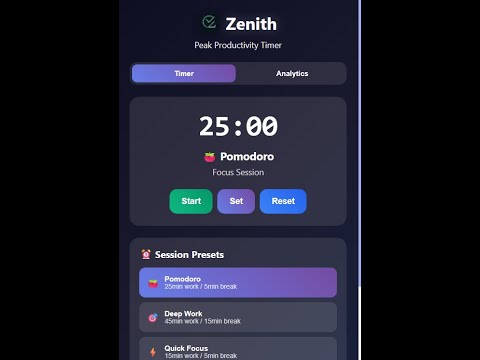
Advanced productivity timer with real browser activity tracking, focus sessions, and detailed analytics.
Zenith - Peak Productivity Timer & Focus Tracker ## 🚀 Transform Your Productivity with Real Browser Activity Tracking Zenith isn't just another timer - it's an intelligent productivity companion that tracks your actual browser activity to provide genuine insights into your focus patterns and work habits. ## ✨ Key Features ### 🎯 **Smart Focus Tracking** - **Real-time browser monitoring** - Track time spent on every website - **Automatic activity detection** - Knows when you're actively working vs. idle - **Tab switching analysis** - Understand your multitasking patterns - **Focus session scoring** - Get productivity ratings based on your activity ### ⏱️ **Advanced Timer System** - **Pomodoro & custom timers** - Set work and break sessions - **Background operation** - Timer runs even when popup is closed - **Smart notifications** - Get alerted when sessions complete - **Pause & resume** - Full control over your timing ### 📊 **Detailed Analytics** - **Site-by-site breakdown** - See exactly where your time goes - **Visual productivity reports** - Charts and graphs of your focus patterns - **Historical tracking** - Review past sessions and improvements - **Export capabilities** - Download your data for further analysis ### 🔒 **Privacy-First Design** - **100% local storage** - All data stays on your device - **No cloud sync required** - Works completely offline - **No personal data collection** - Only tracks website domains and time - **Full user control** - Start/stop tracking anytime ## 🔐 Why Zenith Needs Broad Permissions **"Access your data on all websites"** - **Purpose:** Track time spent across all sites you visit - **Benefit:** Generate accurate productivity analytics - **Privacy:** Only domain names are stored (e.g., "github.com"), not specific URLs or content **"Read your browsing history"** - **Purpose:** Detect tab switches and calculate precise time tracking - **Benefit:** Understand your multitasking patterns and focus duration - **Privacy:** No browsing history is stored - only real-time activity monitoring **"Display notifications"** - **Purpose:** Alert you when timer sessions complete - **Benefit:** Stay on track with your productivity goals ## 🛡️ Your Data, Your Control ### What We Track (Locally Only): ✅ Website domains (github.com, stackoverflow.com, etc.) ✅ Time spent on each site ✅ Tab switching frequency ✅ Active vs. idle time ✅ Timer session data ### What We DON'T Track: ❌ Personal information ❌ Passwords or sensitive data ❌ Specific page content ❌ Incognito browsing ❌ Data sent to external servers ## 🎯 Perfect For: - **Developers** tracking coding productivity - **Students** monitoring study habits - **Remote workers** analyzing focus patterns - **Freelancers** tracking billable time - **Anyone** wanting to improve their digital focus ## 🚀 How It Works 1. **Install & Start** - Click the Zenith icon to begin tracking 2. **Work Naturally** - Browse and work as usual while Zenith monitors 3. **Review Insights** - Check your productivity analytics anytime 4. **Improve Focus** - Use data to optimize your work habits ## 📈 Real Productivity Insights Unlike basic timers that just count minutes, Zenith provides: - **Engagement scoring** based on actual activity - **Distraction analysis** showing time spent on non-work sites - **Focus pattern recognition** identifying your most productive hours - **Productivity trends** tracking improvement over time ## 🔧 Technical Features - **Manifest V3** - Latest Chrome extension standards - **Lightweight** - Minimal impact on browser performance - **Reliable** - Continues tracking even if popup is closed - **Secure** - All data encrypted in local Chrome storage ## 📞 Support & Feedback - **GitHub:** [AnniiiM21/zenith](https://github.com/AnniiiM21/zenith) - **Developer:** Aniruddha from LifexInvader - **Privacy Policy:** Full details available in extension --- **Ready to unlock your true productivity potential? Install Zenith and discover where your time really goes!** _Note: Zenith requires broad permissions to provide accurate activity tracking. All data remains private and local to your device. See our detailed privacy policy for complete transparency._
5 out of 51 rating
Details
- Version1.0.1
- UpdatedSeptember 16, 2025
- Offered byaniruddha212004
- Size46.51KiB
- LanguagesEnglish (United States)
- Developer
Email
aniruddha212004@gmail.com - Non-traderThis developer has not identified itself as a trader. For consumers in the European Union, please note that consumer rights do not apply to contracts between you and this developer.
Privacy

Zenith - Peak Productivity Timer & Focus Tracker has disclosed the following information regarding the collection and usage of your data. More detailed information can be found in the developer's privacy policy.
Zenith - Peak Productivity Timer & Focus Tracker handles the following:
This developer declares that your data is
- Not being sold to third parties, outside of the approved use cases
- Not being used or transferred for purposes that are unrelated to the item's core functionality
- Not being used or transferred to determine creditworthiness or for lending purposes
Support
For help with questions, suggestions, or problems, please open this page on your desktop browser