


Overview
Automatically organize your ChatGPT conversations for a cleaner, more focused workspace. All data stored locally.
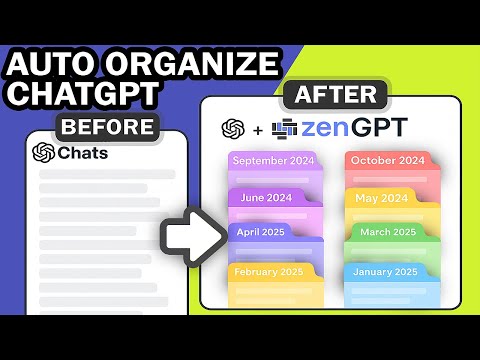
Transform your ChatGPT experience with intelligent conversation management. ZenGPT automatically organizes your chats into intuitive month and year folders, so you can focus on what matters—having great conversations—not hunting through endless lists. Like many ChatGPT users, I found myself drowning in an ever-growing wall of conversations. Scrolling endlessly to find that brilliant coding solution from last week or that research note from two months ago became a daily frustration. So I built zenGPT—first as a personal tool to solve my own problem, and now I'm sharing it with the ChatGPT community because everyone deserves a better way to manage their conversations. Whether you're a student managing research notes, a developer tracking project discussions, or a professional organizing client consultations, zenGPT brings structure to your ChatGPT workspace without any manual effort. ━━━━━━━━━━━━━━━━━━━━━━━━━━━━━━━━━━━━━━━━ **AUTOMATIC ORGANIZATION** • Conversations automatically sorted into month and year folders (e.g., "January 2025", "December 2024") • No manual filing required—just chat and let zenGPT organize • Chronological structure makes finding past conversations effortless **POWERFUL SEARCH & FILTERING** • Full-text search across all conversations instantly • Filter by date: Today, Yesterday, Last 7 Days, Last 30 Days, and more • Quickly locate any conversation, no matter how old **CUSTOM FOLDERS** • Create unlimited custom folders for projects, topics, or clients • Organize conversations your way alongside automatic date-based sorting • Rename, delete, and manage folders with ease 💡 **SMART FEATURES** • Bookmark important conversations for quick access in dedicated Bookmarked view • Bulk delete: Remove multiple conversations at once to clean up your workspace • Soft delete with trash view: Deleted conversations go to Trash folder with full restore capability—never lose a conversation by accident • Export conversations to HTML with search functionality built-in • Virtual scrolling for lightning-fast performance (even with 1000+ chats) • Health dashboard with diagnostics and error logs **SEAMLESS INTEGRATION** • Dark and light theme support (automatically matches ChatGPT's theme) • Clean, intuitive interface that feels like a natural part of ChatGPT • No learning curve—start organizing immediately **PRIVACY & SECURITY FIRST** • 100% local storage—all data stays on YOUR device • No external servers, no cloud uploads, no data collection • No tracking, no analytics, no third-party access • Your conversations remain completely private • Enterprise-grade security: sanitization, input validation, strict Content Security Policy • Incognito mode support with automatic data isolation **BUILT FOR ALL USERS** • Handles thousands of conversations without slowdown • Incremental sync: Updates in 1-2 seconds instead of minutes • Cross-tab coordination prevents duplicate imports • Automatic account switching detection ━━━━━━━━━━━━━━━━━━━━━━━━━━━━━━━━━━━━━━━━ 🚀 **COMING SOON** • Cloud sync & multi-account support: Access your organized conversations across all your devices • Additional export formats: JSON, CSV, Markdown, PDF • Conversation analytics: Track your ChatGPT usage patterns • AI-powered categorization: Automatic topic detection and folder suggestions ━━━━━━━━━━━━━━━━━━━━━━━━━━━━━━━━━━━━━━━━ **FREQUENTLY ASKED QUESTIONS** Q: Is my data safe? A: Absolutely. All your conversations are stored locally in your browser using IndexedDB. Nothing is sent to external servers. We don't collect, track, or have access to your data. Period. Q: Is it free? A: Yes. Q: Will this slow down ChatGPT? A: No. zenGPT uses advanced virtual scrolling and optimized performance techniques. Even with thousands of conversations, the interface remains lightning-fast and responsive. Q: Do I need to manually organize my conversations? A: Nope! Conversations are automatically organized into month and year folders as soon as you create them. You can optionally create custom folders for additional organization, but the basic structure is completely automatic. Q: What happens if I switch ChatGPT accounts? A: zenGPT automatically detects account switches and keeps your data separate for each account. When you switch accounts, you'll see the conversations for that specific account only. Q: Can I export my conversations? A: Yes! Export to HTML with built-in search functionality. More formats (JSON, CSV, Markdown, PDF) are coming soon. Q: Does this work in incognito mode? A: Yes. zenGPT fully supports incognito mode. Data stored in incognito is automatically isolated and cleared when you close incognito windows, respecting Chrome's privacy model. Q: How do I open zenGPT? A: Click the zenGPT icon at the bottom of the ChatGPT sidebar, or click the zenGPT extension icon in your Chrome toolbar and select "Open zenGPT". Q: Will this work with ChatGPT Plus/Team/Enterprise? A: Yes! zenGPT works with all ChatGPT account types: Free, Plus, Team, and Enterprise. Q: What about cloud sync across devices? A: Cloud sync with multi-device support is coming soon! This will allow you to access your organized conversations on any device where you use ChatGPT. ━━━━━━━━━━━━━━━━━━━━━━━━━━━━━━━━━━━━━━━━ **PERFECT FOR:** • Students managing research and study notes • Developers tracking project discussions and code reviews • Writers organizing creative brainstorming sessions • Professionals managing client consultations • Researchers cataloging experiments and findings • Anyone who needs better ChatGPT organization ━━━━━━━━━━━━━━━━━━━━━━━━━━━━━━━━━━━━━━━━ **WHY USERS LOVE zenGPT:** "Finally! No more endless scrolling to find that conversation from two weeks ago." "The automatic organization by month is genius—I don't have to think about it." "Bulk actions saved me hours of manual cleanup. Game changer!" "Privacy-first approach gives me peace of mind. Everything stays local." ━━━━━━━━━━━━━━━━━━━━━━━━━━━━━━━━━━━━━━━━ 🎯 **GET STARTED IN SECONDS:** 1. Install zenGPT 2. Open ChatGPT (chatgpt.com) 3. Click the zenGPT icon at the bottom right or use the extension icon in Chrome toolbar 4. Your conversations are now organized! No configuration needed. No account creation. No credit card. Just install and go. Take control of your ChatGPT workspace today. Install zenGPT and experience the difference that intelligent organization makes.
0 out of 5No ratings
Details
- Version1.0.4
- UpdatedOctober 24, 2025
- Size330KiB
- LanguagesEnglish
- DeveloperWebsite
Email
ideatoalgorithm@gmail.com - Non-traderThis developer has not identified itself as a trader. For consumers in the European Union, please note that consumer rights do not apply to contracts between you and this developer.
Privacy

This developer declares that your data is
- Not being sold to third parties, outside of the approved use cases
- Not being used or transferred for purposes that are unrelated to the item's core functionality
- Not being used or transferred to determine creditworthiness or for lending purposes
Support
For help with questions, suggestions, or problems, please open this page on your desktop browser