

Zenbrowse: The Ultimate Web Toolkit

Overview
The ultimate web suite: unblock right-click, OCR image extraction, Clipboard Vault, Dark Mode, and Full-Page Screenshots!
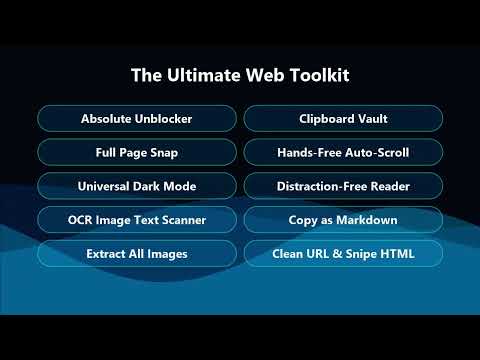
Zenbrowse: The Ultimate Web Toolkit Take back control of your browser. Zenbrowse is a lightweight, all-in-one productivity extension designed to remove web annoyances and give you ultimate freedom. Whether you're trying to copy text from a restricted site, extract an image hidden behind an overlay, or simply read an article without distractions, Zenbrowse has a tool for it. 🌍 Now available in 41 languages — the entire interface automatically matches your browser's language. ✨ Core Features 🛡️ Unblock Copy & Right-Click Tired of websites blocking your ability to copy text or use the context menu? Zenbrowse instantly defeats artificial copy protections, re-enabling text selection and right-clicking so you can interact with the web freely. 🎯 Element Sniper & Image Extraction Some websites use invisible overlays or CSS tricks to prevent you from saving images. Activate Sniper Mode to surgically remove any annoying element, or use "Extract Images" to instantly pull all media into a clean, downloadable gallery. 🔍 High-Speed Image OCR Need to copy text out of a video, presentation, or infographic? Our integrated OCR tool instantly scans any area of your screen and extracts the text straight to your clipboard. 📖 Zen Reader Mode & Auto-Scroll Transform cluttered, ad-heavy articles into beautiful, distraction-free reading environments. Combine it with adjustable Auto-Scroll to read long documents completely hands-free. 📝 Copy as Markdown & Clean URL Copy formatted content ready for Notion or Obsidian, and copy share-links stripped of tracking parameters. 🌙 Universal Dark Mode Protect your eyes. Instantly force a sleek dark theme on any website that doesn't natively support it. 🗄️ Clipboard Vault Never lose a copied snippet again. The built-in Vault tracks your recent copies so you can retrieve lost links, text, or code snippets directly from the popup. 📸 Full Page Capture Snap high-quality screenshots of entire webpages, from top to bottom, with a single click. 🔒 Privacy First Incredibly lightweight, with zero tracking scripts or analytics. Your vault, highlights, and settings stay on your device — your data is never collected or sold. ☕ Support the Developer Zenbrowse is proudly free and actively maintained. If it saves you time, please consider buying me a coffee to support future updates! 👉 https://buymeacoffee.com/vgexperiments Version 7.4.0 Complete UI available in 41 languages with automatic browser-language detection Modern dark-mode interface Upgraded, high-speed OCR extraction engine Improved copy-protection bypass algorithms
5 out of 51 rating
Details
- Version7.4.0
- UpdatedSeptember 13, 2026
- Size115KiB
- Languages41 languages
- DeveloperWebsite
Email
vishwaroopg8@gmail.com - Non-traderThis developer has not identified itself as a trader. For consumers in the European Union, please note that consumer rights do not apply to contracts between you and this developer.
Privacy

This developer declares that your data is
- Not being sold to third parties, outside of the approved use cases
- Not being used or transferred for purposes that are unrelated to the item's core functionality
- Not being used or transferred to determine creditworthiness or for lending purposes