

Zen Essentials in Chrome

Overview
Pinned tabs shared by every window, a new tab overlay that opens nothing until you pick, and one click to clear the other tabs.
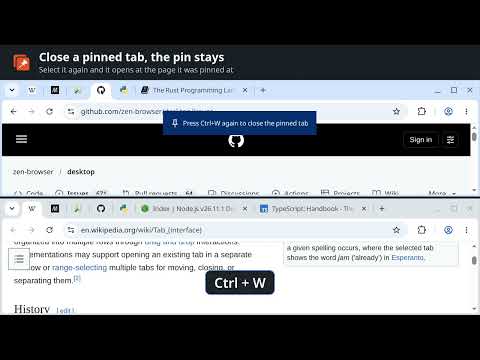
The tab handling of the Zen browser in Chrome: the same pinned tabs in every window, like Zen's Essentials, a new tab overlay that opens no tab until you pick where to go, and a toolbar button that clears away the other tabs. Pinned tabs in every window. Each pinned tab is open in one window. Your other windows show it in the same place, with its icon, and selecting it there brings the page over as it is: nothing reloads, a video keeps playing, a half-typed message stays. Pin, unpin or reorder a pinned tab in any window and every window follows. Closing a pinned tab closes its page, but the pin stays: select it again and it opens at the address it was pinned at. Unpin it to remove it. New tab overlay. Press Ctrl+Shift+Space, or Ctrl+T once you set it up from the overlay, and a search bar opens over the page. Type an address or a search and press Enter to open it in a new tab, type part of a tab's title to switch to it, find sites from your history once you allow it, or type an action such as pin tab, duplicate or reload to run it. Escape closes it without leaving a tab behind. Clearing tabs. The toolbar button closes every tab of its window that is neither pinned nor in a tab group, apart from the one you are on, and shows how many. Click it again and the overlay opens over the tab you are on, which gives way to whatever you pick there. Nothing is collected or sent anywhere. Source: https://github.com/nanbiz/synced-pins
0 out of 5No ratings
Details
- Version1.1.13
- UpdatedNovember 9, 2026
- Offered bynanea.biznes
- Size50.6KiB
- LanguagesEnglish
- Developer
Email
nanea.biznes@gmail.com - Non-traderThis developer has not identified itself as a trader. For consumers in the European Union, please note that consumer rights do not apply to contracts between you and this developer.
Privacy

This developer declares that your data is
- Not being sold to third parties, outside of the approved use cases
- Not being used or transferred for purposes that are unrelated to the item's core functionality
- Not being used or transferred to determine creditworthiness or for lending purposes
Support
For help with questions, suggestions, or problems, visit the developer's support site