

YT Repeater Pro

概要
YouTube区間ループ再生 Pro — 無制限ピン・ドラッグ移動・ピン記憶・秒数スキップ
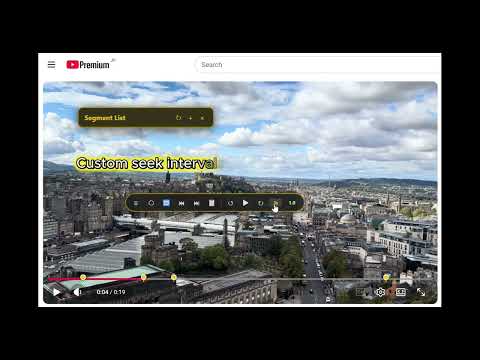
# Chrome ウェブストア用 説明文(区間リスト紹介付き) --- YouTubeの好きな区間だけをループ再生。ピンで開始・終了を指定し、ドラッグで調整。通常版とPro版(ライセンスで全機能解放)の1本で提供。 Loop any part of a YouTube video. Set start/end with pins, drag to adjust. One extension: standard edition + Pro (unlock all features with a license key). --- **YT Repeater Pro** は、YouTubeで「指定した区間だけ」を繰り返し再生するChrome拡張機能です。語学学習・楽器練習・ダンスの反復練習などに最適です。 **■ 1本のアプリで2つのエディション** - **通常版**:区間ループの基本機能をそのままお試しいただけます(ピン数・一部機能に制限あり)。 - **Pro版**:ライセンスキーを入力すると全機能が解放されます(ピン無制限・区間リスト・秒数スキップのカスタム・再生速度調節など)。 **■ 主な機能(Features)** ・**区間ループ再生** 開始・終了をピンで指定した区間だけを自動でループ再生します。 ・**ピン操作** プログレスバー上にピンを置き、ドラッグで開始・終了位置を直感的に調整。秒数はリアルタイムで表示されます。Pro版ではピン数に制限がありません。 ・**ピン記憶** 動画ごとにピン設定を保存。同じ動画を再度開いたとき、前回の区間がそのまま復元されます。 ・**区間リスト(メモ付き)(Pro版)** 区間一覧を一つのパネルで表示。クリックでその区間の先頭へワンタップジャンプ。各区間にメモを付けて内容を残せるため、設定区間の移動や内容把握が楽になります。 ・**秒数スキップ** 1秒・3秒・5秒など、指定した秒数で前後にスキップ。Pro版ではスキップ秒数(1・3・5・7・10秒)を自由に変更できます。 ・**再生速度調節(Pro版)** 動画の再生速度を細かく調整できます。 **■ ライセンスについて** Pro版をご利用になる場合は、別途ライセンスキー(有料)の購入が必要です。拡張機能のアイコンを右クリック → 「ライセンス設定」からキーを入力してください。通常版のままでも、区間ループの基本機能は問題なくお使いいただけます。 ## 注意・仕様 プレイヘッドの表示について **ナビゲートボタン**(前へ・次へ)や**区間リスト**から区間を選んでジャンプした直後は、再生位置は正しくその区間に移りますが、**プログレスバー上のプレイヘッド(赤いバー・丸いヘッド)の表示が、一瞬だけ元の位置のままになる場合があります**。 - 再生そのものは、指定した区間の先頭から正しく始まっています。 - マウスをコントローラーから外すなどすると、プレイヘッドは現在の再生位置に追従して表示されます。 これは YouTube のプレイヤー内部の描画タイミングによるもので、拡張側ではリアルタイムでプレイヘッドを同期することが難しいためです。操作や再生には支障ありません。 --- **YT Repeater Pro** is a Chrome extension that repeats only a selected portion of a YouTube video. Ideal for language learning, instrument practice, dance drills, and more. **■ Two editions in one extension** - **Standard edition**: Try the core loop feature with some limits (e.g. limited number of pins and some options). - **Pro edition**: Enter a license key to unlock all features (unlimited pins, segment list with notes, customizable skip interval, playback speed control, and more). **■ Key features** ・**Loop a segment** Set start and end with pins; only that segment is repeated automatically. ・**Pin control** Place pins on the progress bar and drag to adjust the loop range. Time is shown in real time. Pro removes the pin limit. ・**Pin memory** Saves pin positions per video. When you open the same video again, your previous segment is restored. ・**Segment List with notes (Pro)** View all segments in one panel. Tap a row to jump to the start of that segment. Add notes per segment so you can remember what each part is for—moving between segments and grasping content at a glance is easy. ・**Skip by seconds** Jump forward or backward by a set number of seconds (e.g. 1s, 3s, 5s). Pro allows custom skip intervals (1, 3, 5, 7, 10 seconds). ・**Playback speed (Pro)** Fine-tune video playback speed. **■ License** Pro features require a separate license key (paid). Right-click the extension icon → “License settings” to enter your key. The standard edition still lets you use the core loop feature without a license. **Notes & Limitations About the Playhead Display Immediately after jumping to a segment using the navigation buttons (Previous / Next) or by selecting a segment from the Segment List, playback will correctly move to the selected segment. However, the playhead on the progress bar (the red bar and circular handle) may briefly remain at its previous position. Playback itself starts correctly from the beginning of the selected segment. Once you move the mouse away from the controller, the playhead will update and follow the current playback position. This behavior is caused by YouTube’s internal player rendering timing, and it is difficult for the extension to synchronize the playhead in real time. It does not affect playback or functionality.
5 点満点で 0評価なし
詳細
- バージョン2.2.3
- 更新:2026年4月19日
- 機能アプリ内購入ができます
- 提供元okyo206
- サイズ31.53KiB
- 言語English
- デベロッパー
メール
okyo206@icloud.com - 非取引業者このデベロッパーは取引業者として申告していません。EU 加盟国の消費者とこのデベロッパーとの間に締結された契約には、消費者の権利が適用されません。
プライバシー

このデベロッパーは、お客様のデータについて以下を宣言しています
- 承認されている以外の用途で第三者に販売しないこと
- アイテムの中心機能と関係のない目的で使用または転送しないこと
- 信用力を判断する目的または融資目的で使用または転送しないこと
サポート
質問や提案、問題がある場合は、デベロッパーのサポートサイトにアクセスしてください。