

YoutubeNote - AI Notes for YouTube Videos

Overview
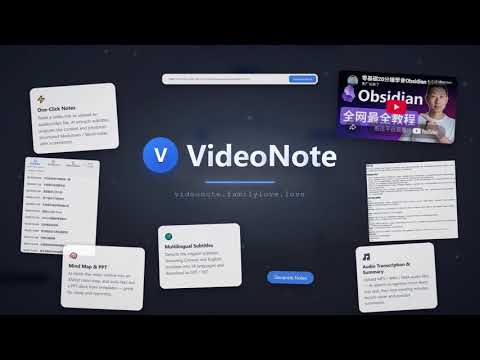
YoutubeNote: AI notes for YouTube videos - transcript, summary, chat, mind map and AI PPT.
YoutubeNote is an AI note-taking assistant that lives right beside the YouTube player. Open any YouTube video and YoutubeNote turns it into structured notes you can read, search, reuse and share — without switching tabs or copying timestamps by hand. Everything happens in a compact panel on the watch page, so the video, the transcript and your notes stay in one place. WHAT YOU CAN DO • Transcript — Pull the full transcript of a YouTube video in seconds, with timestamps you can click to jump to that exact moment. • AI Summary — Generate a clear, structured summary of the video so you can review a long talk in a minute. • Chat — Ask questions about the video and get answers grounded in its actual content, instead of guessing from the title. • Mind Map — Turn the video's key ideas into an interactive mind map you can expand and follow. • AI PPT — Generate presentation slides from the video, ready to edit and reuse. • Notes Library — Save every note to your account and come back to it later from any device. • Share — Publish a read-only link to a note so classmates, teammates or readers can open it without an account. HOW IT WORKS 1. Install YoutubeNote and sign in with Google or your email address. 2. Open any YouTube video. The YoutubeNote panel appears next to the player. 3. Pick a tool: Transcript, Summary, Chat, Mind Map or AI PPT. That's it — no setup required. WHO IT'S FOR YoutubeNote is built for students working through lectures, researchers and analysts reviewing long talks, and creators who want to turn their own videos into written material and slides. If you learn from YouTube, YoutubeNote is meant to cut the time between watching and actually remembering. WHY PEOPLE USE IT • No copy-paste workflow — the transcript and your notes are generated for the video you are already watching. • Timestamps stay linked, so every point in a summary can be traced back to the moment it was mentioned. • Notes are saved to your account, so a video you watched last month is still searchable today. • Works with videos in the language they were published in. PRICING YoutubeNote is free to install and includes starter credits so you can try every tool. If you need more, additional credits can be purchased from our website. There is no subscription requirement to use the basic features. YOUR DATA YoutubeNote asks only for the permissions it needs: access to YouTube watch pages to display the panel, and access to our own website and API to generate transcripts and notes. Your login session is stored locally in your browser. We do not sell your personal information. Privacy Policy: https://videonote.familylove.love/privacy.html YoutubeNote is an independent product and is not affiliated with, endorsed by, or sponsored by YouTube or Google.
0 out of 5No ratings
Details
- Version1.0.1
- UpdatedOctober 26, 2026
- Offered byfightinghui56
- Size101KiB
- LanguagesEnglish (United States)
- Developer康明辉
松江区泗泾镇赵非公路698弄长浜桥小区76号 松江区, 上海市 201601 CNEmail
fightinghui56@gmail.comPhone
+86 181 1704 5469 - TraderThis developer has identified itself as a trader per the definition from the European Union and committed to only offer products or services that comply with EU laws.
Privacy

YoutubeNote - AI Notes for YouTube Videos has disclosed the following information regarding the collection and usage of your data. More detailed information can be found in the developer's privacy policy.
YoutubeNote - AI Notes for YouTube Videos handles the following:
This developer declares that your data is
- Not being sold to third parties, outside of the approved use cases
- Not being used or transferred for purposes that are unrelated to the item's core functionality
- Not being used or transferred to determine creditworthiness or for lending purposes