


Overview
AI assistant to help content creators develop and manage their YouTube channel with AI support.
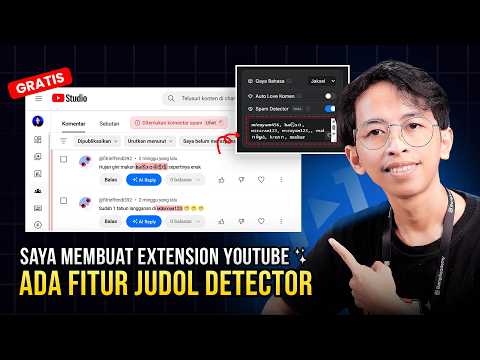
YouTube101 - Assistant Asisten AI yang akan bantu kalian mengembangkan channel YouTube dengan lebih gampang. [INDONESIA] YouTube101 Assistant adalah ekstensi Chrome buat content creator YouTube. Tombol AI-nya muncul langsung di dalam YouTube Studio — jadi nggak perlu pindah-pindah tab atau copy-paste ke aplikasi lain. Kamu pakai API key sendiri (BYOK) dari penyedia AI pilihan kamu. Beberapa penyedia populer sudah didukung langsung, dan kamu juga bisa pakai endpoint kustom sendiri. Nggak ada biaya langganan dari kami — kamu cuma bayar ke penyedia AI yang kamu pilih, dan ada kok penyedia yang paket gratisnya cukup buat pemakaian harian. Fitur Utama: • AI Title Generator - 5 judul dengan 5 formula berbeda (Clickbait, Benefit, Listicle, Direct, Mistake) • AI Description Generator - Deskripsi berstruktur lengkap dengan hashtag • AI Tags Generator - 30 tag SEO, otomatis menjaga batas 500 karakter YouTube • Smart Comment Reply - Balas komentar dengan 6 pilihan gaya, ngikutin bahasa komentarnya • Custom Prompt Template - Tulis prompt kamu sendiri buat judul, deskripsi, dan tag, simpan jadi beberapa template, dan ganti-ganti sesuai channel atau niche kamu • AI Translate - Terjemahkan judul & deskripsi video ke bahasa lain • Auto Translate - Terjemahkan ke banyak bahasa sekaligus dalam sekali klik (238 bahasa), dan simpan pilihan bahasamu buat video berikutnya • Generate Titles untuk Pengujian A/B - Isi ketiga kolom judul dengan formula berbeda • Playlist Description Generator - Deskripsi playlist yang optimal • Spam Detector - Deteksi komentar spam yang pakai karakter unicode menyamar • Auto Heart - Kasih ❤️ otomatis pas kamu balas komentar • Badge Monetisasi - Indikasi status monetisasi di halaman watch, channel, dan beranda • Tips Monetisasi - Panduan mengoptimalkan monetisasi channel Semua hasil AI cuma ngisi kolom sebagai draft — yang menekan Simpan atau Kirim tetap kamu. Satu-satunya pengecualian adalah Auto Translate, yang memang menyimpan terjemahan tiap bahasa — dan itu pun cuma jalan setelah kamu sendiri yang milih bahasanya lalu menekan tombolnya. [ENGLISH] YouTube101 Assistant is a Chrome extension for YouTube content creators. AI buttons appear right inside YouTube Studio — no tab switching, no copy-pasting into other apps. You bring your own API key (BYOK) from the AI provider of your choice. Several popular providers are supported out of the box, and you can also use your own custom endpoint. No subscription fee from us — you only pay your chosen AI provider, and some providers offer a free tier that covers everyday use. Key Features: • AI Title Generator - 5 titles using 5 different formulas (Clickbait, Benefit, Listicle, Direct, Mistake) • AI Description Generator - Structured descriptions with hashtags • AI Tags Generator - 30 SEO tags that automatically respect YouTube's 500-character limit • Smart Comment Reply - Reply with 6 style options, matching the commenter's language • Custom Prompt Template - Write your own prompts for titles, descriptions, and tags, save them as multiple templates, and switch between them per channel or niche • AI Translate - Translate video title & description into another language • Auto Translate - Translate into many languages in one click (238 languages), and save your language selection for the next video • Generate Titles for A/B Testing - Fill all three title slots with different formulas • Playlist Description Generator - Optimal playlist descriptions • Spam Detector - Catch spam comments using disguised unicode characters • Auto Heart - Automatically heart a comment when you reply • Monetization Badge - Monetization indicator on watch, channel, and home pages • Monetization Tips - Guidance for optimizing channel monetization Every AI result is filled in as a draft. You press Save or Send yourself. The one exception is Auto Translate, which does save each language's translation — and only runs after you pick the languages and press the button. Privacy & Security: • No data collection, no analytics, no telemetry • No account, no login • Your API key is stored in Chrome's local storage and never sent anywhere except to the AI provider you chose • Prompts go straight from your browser to your AI provider — we run no server in between • Works directly in YouTube Studio Requirements: • Google Chrome browser • An API key from a supported AI provider • YouTube Studio access • Internet connection Support: For support or feedback, visit: https://youtube101.id
4.6 out of 534 ratings
Details
- Version1.6.0
- UpdatedAugust 14, 2026
- Size170KiB
- LanguagesIndonesia
- DeveloperBang TutorialWebsite
Jimamun Kec. Lampihong Balangan, Kalimantan Selatan 71661 IDEmail
info.bangtutorial@gmail.com - Non-traderThis developer has not identified itself as a trader. For consumers in the European Union, please note that consumer rights do not apply to contracts between you and this developer.
Privacy

YouTube101 - Assistant has disclosed the following information regarding the collection and usage of your data. More detailed information can be found in the developer's privacy policy.
YouTube101 - Assistant handles the following:
This developer declares that your data is
- Not being sold to third parties, outside of the approved use cases
- Not being used or transferred for purposes that are unrelated to the item's core functionality
- Not being used or transferred to determine creditworthiness or for lending purposes