

YouTube windowed fullscreen
1 rating
)
Overview
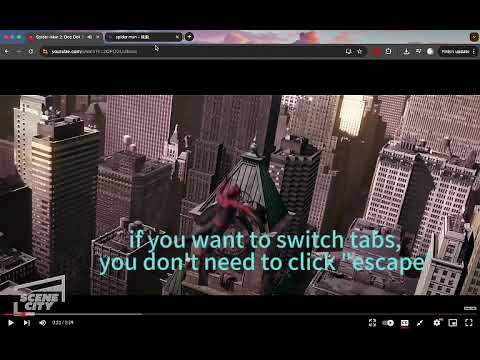
Enjoy the full-screen immersion of YouTube while conveniently viewing your browser tabs and system tray
Zoom in on YouTube videos in your browser window while keeping tabs and the address bar open, making it easier to watch and switch pages. YouTube's windowed fullscreen mode expands the player into the current browser's content area, hiding surrounding titles, comments, and recommendations. You get a more focused viewing space and can continue using your browser's tab bar without having to switch to system fullscreen. The video maintains its original aspect ratio and is displayed fully centered. The image is not stretched, nor are edges cropped to fill the window; necessary black borders are retained when the window and video are in different aspect ratios. Playback progress, volume, subtitles, and quality settings still use YouTube's built-in player controls. Open a YouTube video page, click the extension icon in your browser's toolbar, and then click "Enable Windowed Fullscreen." Press Esc, or reopen the extension and click Exit to return to the normal page. The extension will not change your original theater mode settings, and the page layout will automatically restore when you navigate within the site. The interface supports 55 languages, including Simplified Chinese, Traditional Chinese, English, Japanese, German, and Arabic. An example video of "Tom and Jerry" is provided within the extension for easy viewing. This extension is for the desktop version of YouTube's standard video viewing page. It does not offer video downloads, is not compatible with Shorts, mobile apps, or other video websites, and will not forcibly remove black bars from videos. YouTube page updates may affect compatibility. This is an independently developed extension, open source on GitHub, and has no affiliation or endorsement with Google or YouTube.
5 out of 51 rating
Details
- Version5.6
- UpdatedNovember 14, 2026
- Offered byran198
- Size80.68KiB
- Languages55 languages
- Developer
Email
xiran198@gmail.com - Non-traderThis developer has not identified itself as a trader. For consumers in the European Union, please note that consumer rights do not apply to contracts between you and this developer.
Privacy

This developer declares that your data is
- Not being sold to third parties, outside of the approved use cases
- Not being used or transferred for purposes that are unrelated to the item's core functionality
- Not being used or transferred to determine creditworthiness or for lending purposes