


概要
Use your mouse scroll to adjust the volume on YouTube and other HTML5 video players.
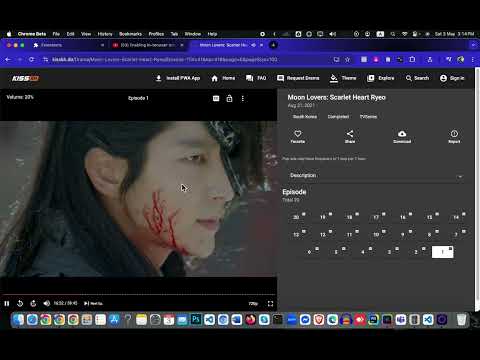
YouTube Volume Control by Mouse Scrolling By Masum Ahmed (https://facebook.com/withmasum) Easily control the volume of YouTube videos and any HTML5 video player on websites with a simple, intuitive feature — mouse scrolling. With the YouTube Volume Control by Mouse Scrolling extension, you no longer need to click on tiny volume sliders or use cumbersome controls. This lightweight and efficient extension gives you a seamless volume adjustment experience using just the scroll wheel on your mouse. How It Works: Once you install this extension, you can effortlessly adjust the volume of any video player that uses HTML5. Here's how: For YouTube and Other Websites: When you visit YouTube or any other website with HTML5 video players (such as Vimeo, Facebook videos, and more), the extension enables the use of the mouse scroll wheel to control the volume. Scroll to Adjust Volume: Simply hover your mouse pointer over the video player and scroll up to increase the volume or scroll down to decrease it. It's that simple — no more having to click on tiny volume icons or manually adjusting the volume with the slider. Instant Feedback: As you adjust the volume with your mouse scroll, a volume overlay will appear near the video player, showing you the exact percentage of the current volume in real time. This ensures that you know exactly where the volume is set, without disrupting your viewing experience. Works Across All Video Players: This extension works with any website that features an HTML5 video player. Whether you're watching a video on YouTube, a social media site, or any other streaming platform, the extension ensures you have control over the sound at all times. Key Features: Universal Compatibility: Works seamlessly with YouTube and any HTML5 video player across all websites. Effortless Volume Control: Adjust volume by simply scrolling your mouse over the video. It’s quick, easy, and natural. Instant Volume Feedback: Real-time display of the current volume percentage overlayed on the screen. No Permissions Needed: The extension requires no special permissions. Once installed, you can start using it right away without any setup. Lightweight & Fast: The extension doesn’t slow down your browsing experience or interfere with other tasks. Smooth User Experience: The design is minimal and unobtrusive, making it a perfect companion for your everyday video watching. Perfect For: YouTube and other video streaming sites — Stream videos without the need to click volume sliders. Multiple devices and platforms — No more fiddling with the interface; the scroll-to-adjust feature works across different websites and devices with HTML5 video support. Convenience and accessibility — Whether you're in the middle of a movie or listening to a podcast, adjusting the volume has never been easier.
5 点満点で 51 件の評価
詳細
プライバシー

このデベロッパーは、お客様のデータについて以下を宣言しています
- 承認されている以外の用途で第三者に販売しないこと
- アイテムの中心機能と関係のない目的で使用または転送しないこと
- 信用力を判断する目的または融資目的で使用または転送しないこと
サポート
質問や提案、問題がある場合は、パソコンのブラウザでこのページを開いてください