

YouTube Video Summarizer & Transcript | AI Chat

Overview
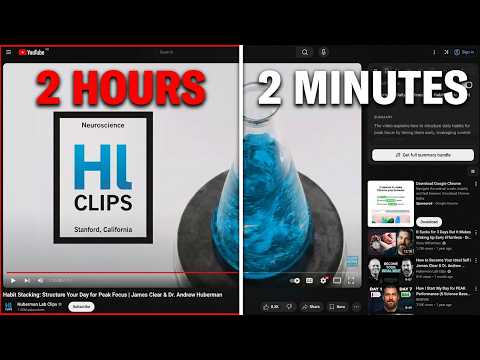
Summarize YouTube videos with AI. Get transcripts, timestamped outlines, actionable to-dos and AI chat, all without leaving YouTube.
YouTube summariser with AI summaries, timestamped outline, transcript, & chat. YouTube Summarizer AI helps you to save hours on long videos by extracting important key points accurately with clickable timestamps in seconds. Open any YouTube video, click Summarise, and get an honest title, TLDR, timestamped outline, actionable insights and chat that can search the web to find answers to your questions, all whiile you stay on YouTube 🚀 🌐 What makes SkipBait different 🌐 The YouTube summarizer with the AI Chat that is equipped to search the web in real-time to answer your questions while most of the other YouTube summariser stops only at searching transcript for the answer. This means when a video mentions a claim or a person you want to explore more, simply ask the chat without switching tabs. For videos filled with actionable insights like health related podcasts, SkipBait pulls all the actionable recommendations into easily scannable list with grounded timestamps so you never have to forget what to apply in real life. ⚡ Everything in the Free plan ✓ Unlimited transcript, forever ✓ 2 full summaries bundles per day ✓ Honest title, TLDR, timestamped outline with key takeaways ✓ Scannable actionable insights backed with timestamps ✓ Clickable timestamp to jump to that exact moment in the video ✓ Copy, export or share transcript and full summary bundle instantly ✓ AI chat that get web-search grounded answers beyond the transcript ✓ 15 chat messages, reset monthly ✓ Searchable transcript with auto-scroll feature ✓ Clean UI with compact and expanded view mode ✓ Recent summary history ✓ 7 days of unlimited access, free 🔓 What you unlock with Starter & Pro ✨ No confusing credit counting ✨ Unlimited summaries ✨ Unlimited transcripts ✨ Unlimited translations 🔥 x20 and x40 chat quota depending on the tier that suits your usage ✨ Works on videos beyond 8+ hours (long podcasts, lectures, interviews etc) ✨ See exact searches AI chat is querying to answer your question ✨ Chat in 50+ languages ✨ Translate transcripts to 20+ languages ✨ Translate summaries to 20+ languages (English, Español, Português, Français, Deutsch, Italiano, Nederlands, Polski, Русский, Українська, Türkçe, العربية, فارسی, हिन्दी, Bahasa Indonesia, Tiếng Việt, ภาษาไทย, 日本語, 한국어, 中文 简/繁) ✨ Optional focus mode — hide shorts and inline ads for intentional navigation. ✨ Clickable timestamps in outline and actionable insights, each point extracted is grounded with sources 📍 Perfect for: ➞ Students who need to summarize YouTube videos for lectures of turn YouTube videos into pdf exports ➞ Researchers screening 10 documentaries, and research videos — get and search through the transcript and summary without watching all 10 ➞ Professionals keeping up with industry podcasts — timestamped to-dos and AI chat for follow-up questions ➞ Lifelong learners who want answers beyond what the video covers — chat with YouTube videos and search the web without switching tabs 💡 How to use: 1️⃣ Open any YouTube video 2️⃣ Click "Get Summary Bundle" to get summary 3️⃣ Ask follow-up questions in the chat tab ❓FAQ: Is SkipBait free? Yes! You can summarize 2 YouTube videos per day, get 15 AI chat messages per month and unlimited transcript generation for free, forever. What videos can I summarize? SkipBait works as a YouTube video summarizer for tutorials, podcasts, lectures, documentaries, interviews, and more (any video with an available transcript). How do I get YouTube transcripts? Open any YouTube video, click "Generate Transcript" to get YouTube transcript instantly. You can also translate it in 20+ languages. What languages do summaries and chat support? SkipBait's YouTube AI chat supports 50+ languages while summaries and transcript can be translated to 20+ languages. 🚀 Get started Install YouTube Summarizer AI, visit a video, and click Summarise. Start saving hours on long videos and turn them into pdf notes in seconds.
5 out of 54 ratings
Details
- Version0.1.0
- UpdatedJune 28, 2026
- FeaturesOffers in-app purchases
- Size2.05MiB
- LanguagesEnglish
- DeveloperWebsite
Email
hello@skipbait.app - Non-traderThis developer has not identified itself as a trader. For consumers in the European Union, please note that consumer rights do not apply to contracts between you and this developer.
Privacy

YouTube Video Summarizer & Transcript | AI Chat has disclosed the following information regarding the collection and usage of your data. More detailed information can be found in the developer's privacy policy.
YouTube Video Summarizer & Transcript | AI Chat handles the following:
This developer declares that your data is
- Not being sold to third parties, outside of the approved use cases
- Not being used or transferred for purposes that are unrelated to the item's core functionality
- Not being used or transferred to determine creditworthiness or for lending purposes
Support
For help with questions, suggestions, or problems, visit the developer's support site