


Overview
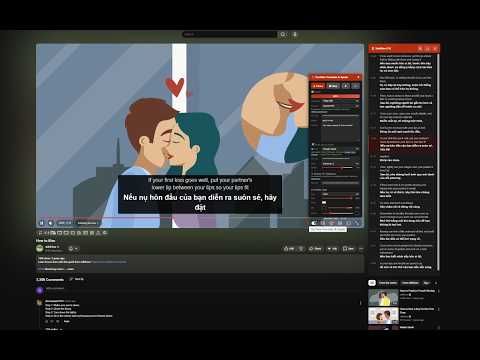
Translate subtitles into 100+ languages with bilingual display and text-to-speech. Works on YouTube, Udemy, TED, Coursera and more.
Video Translate & Speak — Watch Any Video in Your Language Translate subtitles into 90+ languages — right on the video player. No copy-pasting, no switching tabs, no interruptions. ━━━━━━━━━━━━━━━━━━━━━━━━━━━━━━ ✦ SUPPORTED PLATFORMS ━━━━━━━━━━━━━━━━━━━━━━━━━━━━━━ 🎬 YouTube 🎤 TED 📚 Udemy 🎓 Coursera More platforms coming soon... ━━━━━━━━━━━━━━━━━━━━━━━━━━━━━━ ✦ WHAT IT DOES ━━━━━━━━━━━━━━━━━━━━━━━━━━━━━━ 🌍 Instant Caption Translation Pick your language, hit translate, and watch subtitles appear in real time as the video plays. Supports 90+ languages out of the box. 🔤 Side-by-Side Bilingual View See both the original and translated text at the same time — ideal for picking up new vocabulary or following along in two languages. 🔊 Read Aloud Have the translated text spoken to you using your browser's built-in voices, Google Cloud TTS (Chirp3-HD) for natural speech, or your own local TTS server via WebSocket. 🎙️ No Captions? No Problem. Some videos simply don't have subtitles. With Soniox speech recognition, the extension listens to the tab audio and generates captions from scratch — in real time. 🤖 Multiple AI Translation Providers Choose the engine that fits your needs: • Google Free — instant, no key needed • Google Cloud API — higher quality and limits and many more... ✨ AI Video Summary (YouTube) Hit the Summarize button and get a structured summary of the entire video — overview, key points, takeaways, and details. Works with all AI providers (OpenAI, Gemini...). Pick your language and the summary is written in it. Summaries are cached locally — come back anytime without re-generating. Copy as Markdown or download as a .md file. 🎨 Make It Yours Customize everything: font, text size, colors, background opacity, and text stroke. Your subtitles, your style. 📥 Download as SRT Export both original and translated captions as SRT files (zipped together). Great for video editing, studying, or offline use. ⚡ Set It and Forget It Translations and summaries are cached locally per video. Come back anytime — no need to re-translate or re-summarize. Cache loads automatically when you revisit a video. 🖱️ Draggable Panels Move the control panel and subtitle list anywhere on screen. Works perfectly across all supported sites. 🔄 Smooth Navigation Built to handle single-page app behavior. Switch between videos on YouTube, TED, Udemy playlists — everything keeps working. 📜 Toggleable Side Panel Close the subtitle list anytime without losing it — hit the 📜 button to bring it back. ━━━━━━━━━━━━━━━━━━━━━━━━━━━━━━ ✦ GETTING STARTED ━━━━━━━━━━━━━━━━━━━━━━━━━━━━━━ 1. Go to any video on a supported platform 2. The control panel appears automatically on the player 3. Choose your language and provider → press ▶ Translate 4. That's it — bilingual subtitles appear instantly ━━━━━━━━━━━━━━━━━━━━━━━━━━━━━━ ✦ FREE vs. PREMIUM FEATURES ━━━━━━━━━━━━━━━━━━━━━━━━━━━━━━ Everything below works right after installation — zero setup: ✅ Caption translation (Google Translate, free) ✅ Bilingual overlay on the player ✅ YouTube, TED, Udemy, Coursera supported ✅ Voice readout via browser TTS ✅ Style customization ✅ SRT export ✅ Local caching (subtitles + summaries) ✅ Quick action buttons (Translate & Summarize) on YouTube ✅ OpenRouter with free models (e.g. openai/gpt-oss-120b:free) ━━━━━━━━━━━━━━━━━━━━━━━━━━━━━━ ✦ FAQ ━━━━━━━━━━━━━━━━━━━━━━━━━━━━━━ ❓ Do I need an API key? Nope. Install it and go. The free Google Translate engine handles translation, and your browser's voices handle speech. You can also use OpenRouter with free models — just grab a free key from openrouter.ai/keys. ❓ Then what are API keys for? They're optional upgrades: • Google Cloud Translation → better accuracy, especially for nuanced or technical language • OpenAI / Gemini / OpenRouter → AI-powered context-aware translation + video summarization • Soniox → generates live captions from audio when a video has no existing subtitles ❓ What is Ollama and how do I use it? Ollama lets you run AI models locally on your computer — completely free and private. Install from ollama.com, pull a model (e.g. `ollama pull llama3.2`), set environment variable `OLLAMA_ORIGINS=*`, restart Ollama, and select "Ollama (Local/Cloud)" in the extension. You can also use Ollama Cloud with a Pro subscription for faster inference. ❓ What is OpenRouter? OpenRouter gives you access to 200+ AI models through a single API key. Many models are free (look for `:free` tag). Get your key at openrouter.ai/keys and browse models at openrouter.ai/models. ❓ Will API keys cost me money? Each service offers a generous free tier. Google Cloud gives you 500,000 translated characters per month at no charge. OpenRouter has many free models. Ollama local is completely free. You'd only pay if you go beyond those limits or use paid models. ❓ Is my API key secure? Absolutely. Keys stay in your browser's local storage and are sent only to the official service endpoints (Google Cloud, OpenAI...). They never pass through any third-party server. ❓ What if a video has no subtitles at all? You'll need a Soniox API key for that. The extension captures the tab's audio stream and converts speech to text on the fly. ❓ Is this useful for language learning? Very much so. The bilingual display lets you compare original and translated text line by line. Pair that with voice readout for pronunciation, and you've got a solid immersion tool using real-world content. ❓ How does the AI Summary work? On YouTube, click the ✨ Summarize button on the right side. The extension grabs the video transcript and sends it to your chosen AI provider (OpenAI, Gemini, Ollama, or OpenRouter), which returns a structured summary with overview, key points, takeaways, and details — written in your chosen language. Summaries are cached so you don't need to regenerate them. ❓ How does Local WebSocket TTS work? Select "Local WebSocket" in TTS settings and run the supertonic-tool server (github.com/thanhng8/supertonic-tool). The extension connects to your local TTS server for speech output with adjustable playback speed. ━━━━━━━━━━━━━━━━━━━━━━━━━━━━━━ ✦ WHY THESE PERMISSIONS? ━━━━━━━━━━━━━━━━━━━━━━━━━━━━━━ • Site access (YouTube, TED, Udemy, Coursera) — to read captions and render the overlay on the player • API access (Google, OpenAI...) — to send translation/summarization requests to your chosen provider • Tab audio capture — only used when Soniox STT is active, to generate captions from audio • Storage — to keep your preferences, cached translations, summaries, and API keys locally ━━━━━━━━━━━━━━━━━━━━━━━━━━━━━━ 💬 Questions, bugs, or ideas? Drop a review or reach out via the support page — every bit of feedback helps shape future updates.
4.5 out of 524 ratings
Details
- Version1.6.2
- UpdatedOctober 11, 2026
- Size154KiB
- LanguagesEnglish
- DeveloperNGUYỄN DUY THANHWebsite
21 Minh Khai, Minh Khai, Hai Ba Trung Ha Noi, Hà Nội 11700 VNEmail
xem.home@gmail.comPhone
+84 917 507 361 - TraderThis developer has identified itself as a trader per the definition from the European Union and committed to only offer products or services that comply with EU laws.
Privacy

YouTube Translate & Speak has disclosed the following information regarding the collection and usage of your data. More detailed information can be found in the developer's privacy policy.
YouTube Translate & Speak handles the following:
This developer declares that your data is
- Not being sold to third parties, outside of the approved use cases
- Not being used or transferred for purposes that are unrelated to the item's core functionality
- Not being used or transferred to determine creditworthiness or for lending purposes
Support
For help with questions, suggestions, or problems, visit the developer's support site