


概述
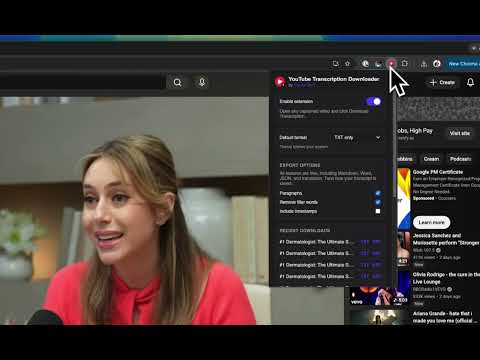
Download YouTube transcripts as TXT, SRT, Markdown, Word, or JSON, and translate them to any language on-device.
📝 YouTube Transcription Downloader, the simple way to get and translate video transcripts Download the transcript of any captioned YouTube video in one click, right from the watch page. Pick your format, optionally translate it into another language, and save. Everything runs in your browser. Nothing is uploaded. ✨ KEY FEATURES - One-click download: a Download Transcription button appears under the video - Multiple formats: TXT, SRT (subtitles), Markdown, Word, and JSON - Translate to any language, powered by Chrome's built-in on-device translation, free and private - Clean formatting: reflow into paragraphs, remove filler words, turn timestamps on or off - Works on both manual and auto-generated captions - Private by design: transcripts and translations never leave your device - No account, no sign-up, no credits, completely free 🎯 PERFECT FOR - Students taking notes from lectures and educational videos - Researchers collecting and searching video content - Content creators repurposing videos into articles or posts - Journalists transcribing interviews - Anyone who wants a clean, readable transcript fast 💡 HOW TO USE 1. Install the extension 2. Open any captioned YouTube video 3. Click Download Transcription (or pick a format from the dropdown) 4. Optionally choose a language to translate into, then save 🔒 PRIVACY - No personal data collection - No sign-up required - No remote servers: extraction and translation happen in your browser - No analytics or tracking Not affiliated with or endorsed by YouTube or Google.
4.5 星(5 星制)8 个评分
详情
隐私权

该开发者已声明,您的数据:
- 不会因未获批准的用途出售给第三方
- 不会为实现与产品核心功能无关的目的而使用或转移
- 不会为确定信用度或放贷目的而使用或转移