

YouTube Timestamp Dive Flow - Live & Comments
1 rating
)
Overview
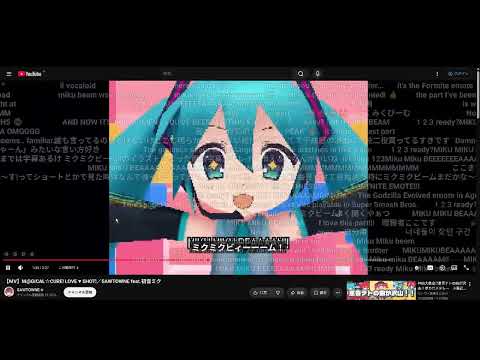
Flows YouTube timestamp comments & live chats (with replays) as danmaku on video! Includes a comment density heatmap on seek bar.
An extension that brings Nico Nico Douga and Bilibili style danmaku (barrage) comments to YouTube! Simply install it to enjoy the following viewing experiences: ✨ Danmaku Comments: Comments flow smoothly across the video (Full-screen supported). 🔥 Heatmap: Instantly find the "best moments" and highlights on the seek bar! 🙌 Ultimate Live Feeling: Experience the unity of watching in real-time, even on archived videos! 🎤 Perfect for Fans: Enjoy VTuber streams and Idol MVs along with everyone's reactions. [Supported Video & Comment Types] ✅ Live Streams (Real-time chat flows across the screen!) ✅ Premieres (Real-time chat flows across the screen!) ✅ Archived Streams / VODs (Chat replays flow exactly as they did live!) ✅ Regular Videos (Timestamped comments appear at their specified times!) 💎 Pro Version ($3 One-time payment, Lifetime unlock) A single payment unlocks the following features to make your viewing more comfortable: Opacity Adjustment: Adjust the transparency level of the text so it does not interfere with the video. Speed Adjustment: Change the speed of flowing comments to your preferred tempo. Amount Adjustment: Adjust font size and other settings to increase the amount of comments displayed on the screen at once. Line Spacing Adjustment: Adjust the vertical spacing between flowing comments. 🔒 Safety & Privacy We do not collect or store any personal information, browsing history, cookies, or other data.
5 out of 51 rating
Details
- Version2.9
- UpdatedAugust 10, 2026
- FeaturesOffers in-app purchases
- Offered byKisaragi
- Size133KiB
- Languages12 languages
- Developer
Email
dev.disinfect579@passinbox.com - Non-traderThis developer has not identified itself as a trader. For consumers in the European Union, please note that consumer rights do not apply to contracts between you and this developer.
Privacy

This developer declares that your data is
- Not being sold to third parties, outside of the approved use cases
- Not being used or transferred for purposes that are unrelated to the item's core functionality
- Not being used or transferred to determine creditworthiness or for lending purposes