

YouTube Text Tools - Video Transcript and Summary

Overview
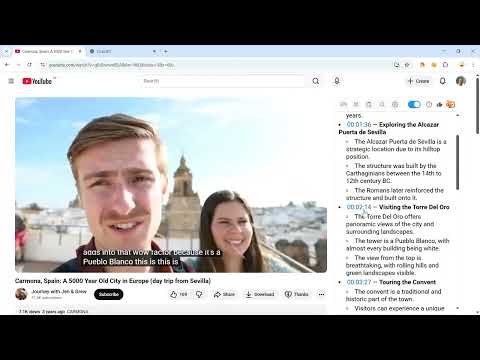
Get the transcript of any YouTube video next to the player. Search it, copy it, translate it or summarize it with AI.
Read any YouTube video as text. The extension opens the full YouTube transcript next to the player, with a timestamp on every line. When you don't have time to watch, it makes a short AI summary. How to start 1. Click "Add to Chrome". 2. Open a video on YouTube. 3. The transcript panel appears on the right side of the player. That's it. What data the extension sends To work, the extension sends some data to our server: - usage data: which features you use, errors, browser and extension version, and the YouTube video you used it on; - a device identifier and your IP address, for free limits and abuse protection; - your email, if you sign in with Google; - the video's captions, when you ask for a translation or an AI summary (deleted within 24 hours). We never sell your data or use it for advertising. Privacy policy: youtubetexttools.com/privacy.html What it does ▸ YouTube transcript with timestamps The extension turns the video's captions into a clean transcript. Click any line and the video jumps to that moment. Manual and auto-generated captions both work, in any language. ▸ Search inside the video Looking for one quote in a two-hour lecture? Type a word and you see every place it's said. Each match links to its timestamp. ▸ Auto-scroll As the video plays, the transcript scrolls with it and highlights the current line. You can read along without pausing. ▸ Copy the text Copy the whole transcript or only the part you need. Paste it into your notes, a document or an AI chat. ▸ AI summary Get a summary of a YouTube video in seconds, with clickable timestamps for the key moments. It's a YouTube video summarizer for lectures, podcasts, interviews and long tutorials. ▸ Translation Translate the transcript into 100+ languages, even when the video has no subtitles in yours. Language learners can listen in one language and read in another. ▸ Font size Make the text bigger or smaller for comfortable reading. Who uses it Students study from lecture transcripts instead of rewatching. Researchers and journalists find exact quotes with timestamps. Creators convert their YouTube video to text and reuse it in blog posts and newsletters. Language learners read along with native speakers. Free and Pro Transcripts are free, with no sign-up and no ads. AI summaries and server translations have a free monthly allowance. Pro removes the limits. Questions ❓ How do I get the transcript of a YouTube video? Install the extension and open the video. The full transcript appears next to the player on its own. ❓ Can it transcribe any YouTube video to text? Any video with captions, manual or auto-generated. Most videos have them. Videos without captions aren't supported yet. ❓ Is this YouTube transcript generator free? Yes, transcripts are free. AI summaries and server translations have a free allowance; Pro gives unlimited use. ❓ Can I save the transcript? Yes. Copy it with one click and paste it into any document or note app. ❓ Does this YouTube video transcriber keep my data private? Yes. We send only the data listed in "What data the extension sends" above, and we never sell it or use it for advertising. Details: youtubetexttools.com/privacy.html Release notes: https://youtubetexttools.com/releases.html
4.5 out of 591 ratings
Details
- Version1.5.19
- UpdatedNovember 22, 2026
- Size223KiB
- Languages55 languages
- DeveloperWebsite
Email
m4d.smith@gmail.com - Non-traderThis developer has not identified itself as a trader. For consumers in the European Union, please note that consumer rights do not apply to contracts between you and this developer.
Privacy

YouTube Text Tools - Video Transcript and Summary has disclosed the following information regarding the collection and usage of your data. More detailed information can be found in the developer's privacy policy.
YouTube Text Tools - Video Transcript and Summary handles the following:
This developer declares that your data is
- Not being sold to third parties, outside of the approved use cases
- Not being used or transferred for purposes that are unrelated to the item's core functionality
- Not being used or transferred to determine creditworthiness or for lending purposes
Support
For help with questions, suggestions, or problems, please open this page on your desktop browser