


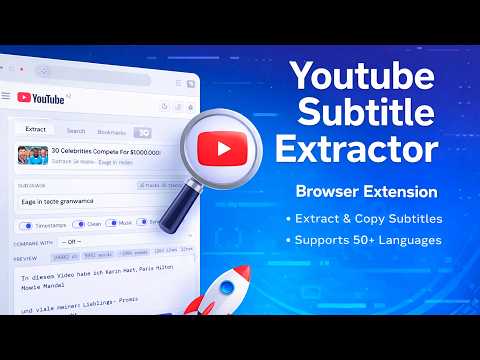
Overview
Extract, search, bookmark and export YouTube subtitles. v1.0 by Viktor Vilud.
ENGLISH Short description: Extract, search and export YouTube subtitles in one click. Dual-language view, real-time sync, bookmarks, .srt export. Full description: Youtube Subtitle Extractor lets you grab the full transcript of any YouTube video instantly — no copying line by line and no need to open the transcript panel manually. Core features: One-click extraction — open any YouTube video, click the extension icon and get the full subtitle text immediately. Works with regular videos, Shorts and auto-generated captions. Smart language detection — the extension automatically selects the subtitle track that matches the video's audio language. You can switch between all available tracks with one click. Real-time sync — enable Sync mode and the current subtitle line highlights as the video plays. Click any timestamp to jump directly to that moment. Dual-language comparison — display two subtitle tracks side by side (for example English + Russian) with time-aligned rows. Perfect for language learning and translation. Export options — copy to clipboard with Ctrl+Shift+C, download as .txt, or download as .srt (standard subtitle file compatible with VLC, Premiere and other video editors). Search — search across the full transcript and instantly jump to any matching moment in the video. Bookmarks — save specific moments together with subtitle text. Bookmarks persist across sessions. History — your last extractions are saved so you can copy them again without reopening the video. Display options include toggling timestamps, cleaning filler noise from auto-generated captions, keeping or removing music tags like [Music] or [Applause], and switching between Dark, Light and OLED themes. The interface is available in English, Russian, German and Spanish and is automatically detected based on your browser language. No account required. No data collection. No tracking. Works entirely in your browser. ------------------------------------------------------------------------------- РУССКИЙ Краткое описание: Извлекайте, ищите и экспортируйте субтитры YouTube в один клик. Двойной язык, синхронизация, закладки, экспорт .srt. Полное описание: Youtube Subtitle Extractor — это расширение для мгновенного получения полного транскрипта любого видео на YouTube. Не нужно копировать строки вручную и открывать панель транскрипта. Основные возможности: Извлечение в один клик — откройте любое видео, нажмите на иконку расширения и получите полный текст. Работает с обычными видео, Shorts и автоматически созданными субтитрами. Умное определение языка — расширение автоматически выбирает дорожку субтитров, соответствующую языку аудио видео. Между всеми доступными языками можно переключаться в один клик. Синхронизация в реальном времени — включите режим Sync, и текущая строка субтитров будет подсвечиваться во время воспроизведения. Нажмите на таймкод, чтобы перейти к нужному моменту. Сравнение двух языков — отображение двух дорожек рядом (например русский + английский) с выравниванием по времени. Удобно для изучения языков и перевода. Экспорт — копирование текста через Ctrl+Shift+C, скачивание в формате .txt или .srt (стандартный формат субтитров, поддерживаемый VLC, Premiere и другими видеоредакторами). Поиск — быстрый поиск по всему транскрипту с переходом к найденному моменту. Закладки — сохранение конкретных моментов вместе с текстом субтитров. Закладки сохраняются между сессиями. История — последние извлечения сохраняются, чтобы можно было снова скопировать текст без повторного открытия видео. Параметры отображения включают включение и скрытие таймкодов, очистку автоматических субтитров от шумовых слов, сохранение или удаление тегов [Music] и [Applause], а также выбор темы оформления: тёмная, светлая или OLED. Интерфейс доступен на английском, русском, немецком и испанском языках и определяется автоматически. Не требует регистрации. Не собирает данные. Работает полностью в браузере. ------------------------------------------------------------------------------- DEUTSCH Kurzbeschreibung: YouTube-Untertitel mit einem Klick extrahieren, durchsuchen und exportieren. Zwei-Sprachen-Ansicht, Sync, Lesezeichen, .srt Export. Vollständige Beschreibung: Youtube Subtitle Extractor ermöglicht es dir, das vollständige Transkript jedes YouTube-Videos sofort zu extrahieren — ohne Zeile für Zeile zu kopieren und ohne das Transkript-Panel manuell zu öffnen. Hauptfunktionen: Ein-Klick-Extraktion — Öffne ein YouTube-Video, klicke auf das Erweiterungssymbol und erhalte sofort den kompletten Untertiteltext. Funktioniert mit normalen Videos, Shorts und automatisch generierten Untertiteln. Intelligente Spracherkennung — Die Erweiterung wählt automatisch die Untertitelspur aus, die zur Audiosprache des Videos passt. Zwischen allen verfügbaren Spuren kann mit einem Klick gewechselt werden. Echtzeit-Synchronisierung — Aktiviere den Sync-Modus und die aktuelle Untertitelzeile wird während der Wiedergabe hervorgehoben. Klicke auf einen Zeitstempel, um direkt zu diesem Moment zu springen. Zwei-Sprachen-Vergleich — Zeige zwei Untertitelspuren nebeneinander an (z. B. Deutsch + Englisch) mit zeitlicher Ausrichtung. Ideal zum Sprachenlernen und Übersetzen. Exportoptionen — Kopieren in die Zwischenablage mit Strg+Shift+C, Download als .txt oder als .srt (Standard-Untertiteldatei, kompatibel mit VLC, Premiere und anderen Videobearbeitungsprogrammen). Suche — Durchsuche das gesamte Transkript und springe direkt zu passenden Stellen im Video. Lesezeichen — Speichere bestimmte Momente zusammen mit dem Untertiteltext. Lesezeichen bleiben zwischen Sitzungen erhalten. Verlauf — Deine letzten Extraktionen werden gespeichert, sodass du sie erneut kopieren kannst, ohne das Video wieder zu öffnen. Anzeigeoptionen umfassen das Ein- oder Ausblenden von Zeitstempeln, das Entfernen von Füllwörtern aus automatisch generierten Untertiteln, das Behalten oder Entfernen von Tags wie [Music] oder [Applause] sowie die Auswahl zwischen Dark-, Light- und OLED-Design. Keine Registrierung erforderlich. Keine Datenerfassung. Funktioniert vollständig im Browser. ------------------------------------------------------------------------------- ESPAÑOL Descripción corta: Extrae, busca y exporta subtítulos de YouTube en un clic. Vista en dos idiomas, sincronización, marcadores, exportación .srt. Descripción completa: Youtube Subtitle Extractor te permite obtener instantáneamente la transcripción completa de cualquier video de YouTube, sin copiar línea por línea ni abrir manualmente el panel de transcripción. Funciones principales: Extracción con un clic — Abre un video de YouTube, haz clic en el icono de la extensión y obtén inmediatamente todo el texto de los subtítulos. Funciona con videos normales, Shorts y subtítulos generados automáticamente. Detección inteligente de idioma — La extensión selecciona automáticamente la pista de subtítulos que coincide con el idioma del audio del video. Puedes cambiar entre todas las pistas disponibles con un solo clic. Sincronización en tiempo real — Activa el modo Sync y la línea actual de subtítulos se resaltará mientras el video se reproduce. Haz clic en cualquier marca de tiempo para ir directamente a ese momento. Comparación de dos idiomas — Muestra dos pistas de subtítulos lado a lado (por ejemplo, español + inglés) con alineación por tiempo. Perfecto para aprender idiomas y traducir. Opciones de exportación — Copia al portapapeles con Ctrl+Shift+C, descarga como .txt o como .srt (archivo estándar de subtítulos compatible con VLC, Premiere y otros editores de video). Búsqueda — Busca en toda la transcripción y salta directamente a cualquier coincidencia en el video. Marcadores — Guarda momentos específicos junto con el texto de los subtítulos. Los marcadores se mantienen entre sesiones. Historial — Tus últimas extracciones se guardan para que puedas copiarlas nuevamente sin volver a abrir el video. Opciones de visualización incluyen activar o desactivar marcas de tiempo, limpiar el ruido de subtítulos automáticos, mantener o eliminar etiquetas como [Music] o [Applause], y elegir entre los temas Dark, Light y OLED. No requiere registro. No recopila datos. Funciona completamente dentro de tu navegador.
0 out of 5No ratings
Details
- Version1.0
- UpdatedFebruary 24, 2026
- Size39.44KiB
- LanguagesEnglish
- Developer
- Non-traderThis developer has not identified itself as a trader. For consumers in the European Union, please note that consumer rights do not apply to contracts between you and this developer.
Privacy

This developer declares that your data is
- Not being sold to third parties, outside of the approved use cases
- Not being used or transferred for purposes that are unrelated to the item's core functionality
- Not being used or transferred to determine creditworthiness or for lending purposes
Support
For help with questions, suggestions, or problems, please open this page on your desktop browser