

YouTube Subscription Organizer

Descripción general
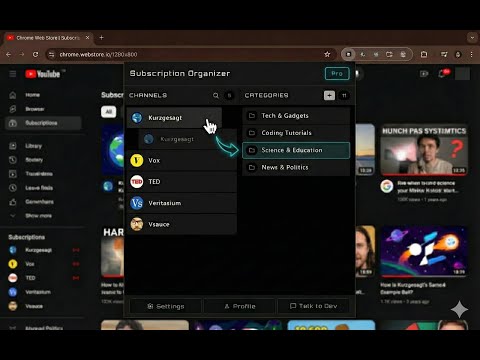
Organize your YouTube subscriptions by content niche with drag-and-drop categorization
Tired of scrolling through a messy YouTube Subscriptions feed? This extension lets you organize your YouTube channels into categories and filter your Subscriptions page with one click — so you only see the videos you’re in the mood for. If you’re subscribed to dozens or hundreds of channels, your feed becomes a mix of gaming, tech, music, vlogs, tutorials, news, and entertainment — all jumbled together. YouTube gives you no way to sort or filter subscriptions… so you end up endlessly scrolling. This extension fixes that. It lets you create custom categories (like Gaming, Tech Reviews, Music, Education, Podcasts, Fitness, Cooking, Finance — anything you want), assign your channels to them, and filter your Subscriptions feed by category. Instead of chaos — you get a clean, focused feed. ⭐ What This Extension Does ✔ Organize YouTube subscriptions into categories ✔ Create folders / groups for channels ✔ Filter your Subscriptions feed by topic ✔ Switch between content moods with one click ✔ Drag-and-drop channel organization ✔ Automatically detects new subscriptions ✔ Works with large channel lists (100–500+ subs) It’s like turning your Subscriptions page into a personalized content dashboard. 🎯 Who This Is Perfect For This extension is great for: users subscribed to many different types of channels students who switch between study & entertainment tech & gaming fans with huge subscription lists productivity-focused viewers people who binge-watch less when the feed is organized anyone who wants a calmer YouTube experience Whether you watch to learn, relax, study, or unwind — you can instantly switch content modes. 🧩 How It Works 1️⃣ Load your YouTube channels 2️⃣ Create categories that match your interests 3️⃣ Drag channels into categories 4️⃣ Go to your Subscriptions page 5️⃣ Click a category → see only those videos Click again to turn the filter off. No complicated setup. No scripts. No performance impact. 🔧 Key Features Popup Channel Manager drag & drop channels into categories search channels by name reorder categories optional multi-category support badge alert when new uncategorized channels are found Subscriptions Page Category Bar filter feed by category one-click content switching matches YouTube dark / light theme automatically Auto-Sync new subscriptions appear automatically removed channels disappear from lists 🔐 Privacy & Data No tracking No analytics No external servers All data stays on your computer. Optional cloud sync is available for users who want to use the same setup across devices. 💰 Free vs Pro Free plan includes: up to 3 categories all essential features Pro unlocks: unlimited categories Flexible pricing options available. ❓ FAQ Does it work on the YouTube homepage? No — it’s designed specifically for the Subscriptions page (/feed/subscriptions). Does it slow down YouTube? No — filtering is done with lightweight CSS hide/show. Does it work with large subscription lists? Yes — supports 500+ channels. Is login required? No — except if you choose optional sync. 🟢 Stop scrolling through chaos — organize once, filter forever Structure your feed. Watch what you want. Save time, reduce noise, and stay focused.
4 de 53 valoraciones
Detalles
- Versión1.2.2
- Actualizado16 de enero de 2026
- Tamaño96.71KiB
- IdiomasEnglish
- DesarrolladorANSHUMAN MANDALSitio web
BANIPUR MIYAPUR RAGHUNATHGANJ, West Bengal 742235 INCorreo electrónico
superextensions25000@gmail.comTeléfono
+91 97335 26888 - OperadorEste desarrollador se ha identificado como operador según la definición de la Unión Europea y se ha comprometido a ofrecer solo productos o servicios que cumplan las leyes de la UE.
Privacidad

YouTube Subscription Organizer ha revelado la siguiente información sobre la recogida y el uso de tus datos. Puedes consultar información más detallada en la privacy policy del desarrollador.
YouTube Subscription Organizer gestiona lo siguiente:
Este desarrollador declara que tus datos:
- No se venden a terceros, excepto en los casos de uso aprobados
- No se usan ni se transfieren para fines no relacionados con la función principal del elemento.
- No se usan ni se transfieren para determinar la situación crediticia ni para ofrecer préstamos.