


Overview
AI YouTube comment management — triage your inbox, draft replies in your voice, and engage your community faster.
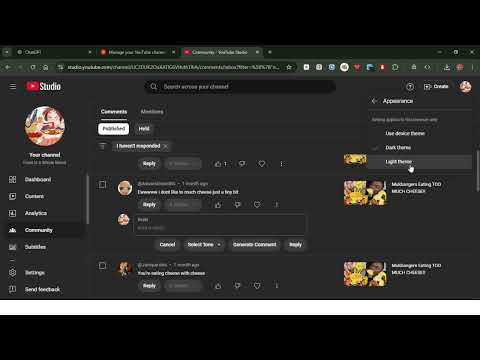
YouTube Studio GPT – AI comment management for creators Your YouTube comment inbox, handled. AI drafts replies in your voice — you review, edit, and send. Built for creator engagement on both YouTube.com and YouTube Studio. Managing comments shouldn’t take hours. YouTube Studio GPT helps you reply faster without sounding like a bot: draft replies that match your channel tone, then approve, tweak, or dismiss before anything goes out. Works everywhere you reply • YouTube.com — generate replies on any video’s comment section • YouTube Studio — same tools inside Studio when you manage comments • Open Reply on any comment to pick a tone and Generate on the spot What you get • AI-powered drafts — intelligent replies based on the comment, your tone, and channel context • Customizable tones — Friendly, Professional, Casual, and your own custom tones • Default tone & append messages — set a default voice and optional fixed (or random) footers for links and CTAs • Channel connection — connect your YouTube channel for dashboard analytics, comment monitoring, and drafts from real comments • Review queue — approve, edit, or dismiss drafts so you stay in control • Comment agent (optional) — auto-draft replies as comments come in; learn from your approvals over time • Dashboard — channel stats, pending drafts, and quick access to your workflow • Rewards & daily streak — earn bonus credits with games and streak rewards • Credits system — free monthly credits to start; upgrade for more capacity Why creators use it • Reply to more comments without living in the inbox • Keep conversations authentic — drafts match your voice, not a generic bot • Stay productive on youtube.com and Studio with the same workflow Getting started 1. Install and pin the extension 2. Sign in with Google and connect your YouTube channel 3. Open Reply on any comment (YouTube or Studio), choose a tone, and Generate 4. Review the draft, edit if needed, then post Privacy & control You choose what gets posted. Drafts are for review — nothing sends without you unless you explicitly enable agent auto-post after building trust from your approvals. Perfect for creators who want faster engagement without losing the human touch. --- Updates v0.13.12 (9 June 2026) • Popup activity & stats snapshot • Broadcasts with media attachments (images, GIFs, video) • Announcement banner rotation & analytics • OrchOS design updates across key pages • PartnerFlow UTM tracking for extension links v0.13.11 (14 May 2026) • Product updates and fixes (see in-extension changelog) v0.13.10 (6 April 2026) • Product updates and fixes v0.13.8–9 (18 March 2026) • Product updates and fixes v0.13.7 (11 March 2026) • Product updates and fixes v0.13.4 (2 March 2026) • Connect your YouTube channel directly • Major upgrade — full changelog in the extension v0.12 (29 Nov 2025) • Polished UI • Gamified daily reward system v0.11 (15 Nov 2025) • 3rd-person reply perspective • Comment Settings tab • Up to 5 append messages + random append • Data & Privacy tab • View stored data / clear reply history / reset settings • Tone picker styling fixes for YouTube Studio v0.10 (06 Nov 2025) • Append Message — fixed text appended to each reply (affiliates, CTAs, etc.) v0.9 (29 Oct 2025) • Fixed auto login session • Custom tone creation v0.8 (23 Oct 2025) • Extension pages • Comment language detection • Default commenting tone • Channel context • Latest AI models & prompting v0.7 • Google Auth
3 out of 53 ratings
Details
- Version1.18.0
- UpdatedSeptember 24, 2026
- FeaturesOffers in-app purchases
- Size4.21MiB
- LanguagesEnglish
- DeveloperWebsite
Email
beukzgroup@outlook.com - Non-traderThis developer has not identified itself as a trader. For consumers in the European Union, please note that consumer rights do not apply to contracts between you and this developer.
Privacy

YouTube Studio GPT has disclosed the following information regarding the collection and usage of your data. More detailed information can be found in the developer's privacy policy.
YouTube Studio GPT handles the following:
This developer declares that your data is
- Not being sold to third parties, outside of the approved use cases
- Not being used or transferred for purposes that are unrelated to the item's core functionality
- Not being used or transferred to determine creditworthiness or for lending purposes
Support
For help with questions, suggestions, or problems, please open this page on your desktop browser