

YouTube Spoiler Blocker
1 rating
)
Overview
Hide YouTube videos and Shorts by keyword. Avoid spoilers for shows, movies and games.
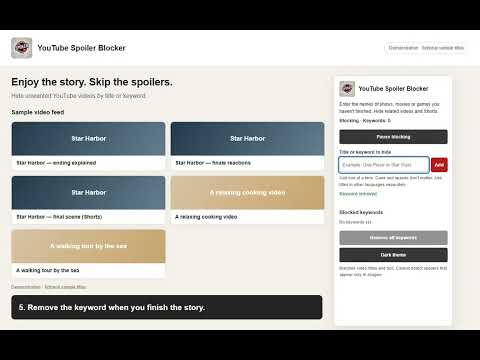
Enjoy YouTube without stumbling across videos about a story you haven't finished. YouTube Spoiler Blocker hides video cards that contain the titles or keywords you choose. Add a show, film, game or other topic to reduce unwanted videos in your home feed, searches, subscriptions and recommendations. Matching Shorts and mix cards are supported too. HOW TO USE 1. Install the extension and refresh any YouTube tabs that were already open. 2. Click the extension icon. Enter one title or keyword and select Add. 3. Matching video cards disappear. Add other titles one at a time. 4. Use Pause blocking to show hidden videos again. Select Resume blocking to turn it back on; pausing does not expire automatically. 5. Remove an individual keyword or clear the list when you no longer need it. Open tabs update immediately. FEATURES • Immediate updates when adding, removing or pausing keywords. • Case, spaces and compatible Unicode forms are normalized. • Light and dark themes. • English, Korean, Japanese, Spanish and Brazilian Portuguese interfaces, selected by your Chrome language. • Existing keywords and theme preferences are preserved when updating. IMPORTANT Filtering uses titles and card text, not image recognition. Spoilers that appear only in thumbnails cannot be detected. Names in different languages must be added separately. This extension helps reduce spoilers; it cannot guarantee that every spoiler will be hidden. Settings are stored using Chrome's sync storage. No extension account or external filtering service is required. The tutorial uses fictional sample titles.
5 out of 51 rating
Details
- Version1.2.0
- UpdatedOctober 12, 2026
- Offered by개발개발
- Size46.04KiB
- Languages5 languages
- Developer
Email
devholden9@gmail.com - Non-traderThis developer has not identified itself as a trader. For consumers in the European Union, please note that consumer rights do not apply to contracts between you and this developer.
Privacy

YouTube Spoiler Blocker has disclosed the following information regarding the collection and usage of your data. More detailed information can be found in the developer's privacy policy.
YouTube Spoiler Blocker handles the following:
This developer declares that your data is
- Not being sold to third parties, outside of the approved use cases
- Not being used or transferred for purposes that are unrelated to the item's core functionality
- Not being used or transferred to determine creditworthiness or for lending purposes