

YouTube Screenshot with Subtitles — Frame & Caption Capture

Overview
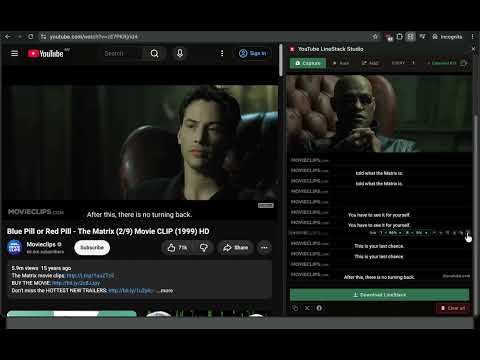
Capture YouTube screenshots with subtitles baked in. Grab video frames with captions/lyrics, export stacked collages. 100% local.
Turn any YouTube moment into a shareable image. YouTube Screenshot with Subtitles captures still frames from YouTube videos with the subtitles, captions, or lyrics on screen, then stacks them into one vertical collage worth keeping. Use it to save movie quotes, song lyrics from music videos, recipe and tutorial steps, or grab a clean video thumbnail / still image. Features: - Capture the current YouTube frame with subtitle and caption text, straight from the side panel - Stack multiple screenshots into a subtitle-preserving vertical collage — export as PNG or JPEG - Keyboard shortcut (Ctrl+Shift+G / Cmd+Shift+G) to grab a video frame without leaving the player - Frames survive closing and reopening the side panel; delete, drag, and reorder freely - 100% local: images stay on your device, nothing is uploaded Works on youtube.com video pages.
0 out of 5No ratings
Details
- Version0.7.3
- UpdatedSeptember 20, 2026
- Offered byleovoon
- Size35.47KiB
- LanguagesEnglish
- Developer
Email
voonlihhaur@gmail.com - Non-traderThis developer has not identified itself as a trader. For consumers in the European Union, please note that consumer rights do not apply to contracts between you and this developer.
Privacy

This developer declares that your data is
- Not being sold to third parties, outside of the approved use cases
- Not being used or transferred for purposes that are unrelated to the item's core functionality
- Not being used or transferred to determine creditworthiness or for lending purposes
Support
For help with questions, suggestions, or problems, visit the developer's support site