

YouTube Screenshot Pro
3 个评分
)
概述
Capture YouTube screenshots with color filters, subtitles, and your own branding logo.
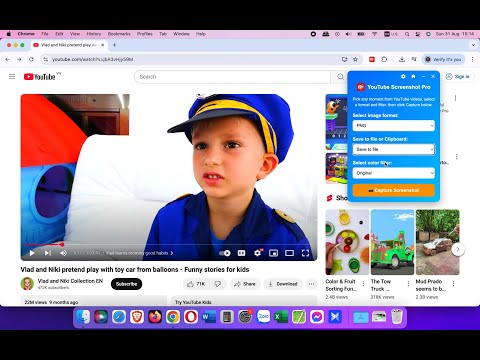
YouTube Screenshot Pro - Capture Perfect Frames with Filters & Subtitles Take high-quality screenshots of YouTube videos in just one click - with color filters, subtitles, and your own branding logo. YouTube Screenshot Pro helps you capture the exact frame you want from any YouTube video (regular videos, Shorts, Livestream and even Ads), with the option to apply creative color filters, include video subtitles, and even add your own logo watermark. Whether you’re creating thumbnails, saving learning material, or sharing content on social media, this extension gives you full control over how your screenshots look. KEY FEATURES: • One-click screenshots directly from YouTube videos. • Color Filters - Apply unique visual styles (Mono B&W, Sepia, Vintage Film, Teal & Orange, Red, and more) before capturing. • Subtitles on Screenshots - Keep the original YouTube captions in your image for tutorials, study notes, or quotes. • Custom Watermark - Upload your branding logo, adjust position, size, padding, and opacity to brand your screenshots. • Flexible Output - Save screenshots as PNG, JPEG, or WEBP. Choose to download, copy to clipboard, or both. • Quick Capture Mode - Instantly grab frames without opening the UI. • Options Page - Choose whether to always ask where to save, include subtitles by default, or manage your watermark logo. • Works Everywhere - Capture not just regular YouTube videos, but also Shorts, Livestreams, and even YouTube Ads - something most other screenshot extensions cannot do. • Movie Mode: Use the Minimize button together with a color filter to watch YouTube videos with special effects (without needing to re-apply filters). • Keyboard Shortcuts (Window/Mac): o Alt+S (⌥+S): Quick capture o Alt+X (⌥+X): Open/close UI (keep filters & settings) o Alt+Z (⌥+Z): Minimize/restore UI (clear filters & settings) WHO IS THIS FOR? This extension is perfect for: • Content Creators & YouTubers - Create thumbnails and visuals with subtitles or unique filters. • Web Designers & Graphic Designers - Capture styled frames for inspiration and design assets. • Students & Educators - Save key frames with subtitles for study, tutorials, or presentations. • Social Media Managers - Share polished, branded screenshots quickly. Unlike other YouTube screenshot extensions, YouTube Screenshot Pro is the only tool that supports both color filters and subtitles in screenshots - making it a must-have for professionals who care about design and storytelling. HOW TO USE IT? 1. Open any YouTube video. 2. Press Alt+X (⌥+X on Mac) or click the extension icon to open the screenshot UI. 3. Select your format, output type, and filter style. 4. (Optional) Enable subtitles and watermark in the Options page. 5. Click “Capture Screenshot” - your frame will be saved instantly! 6. For fast action: just press Alt+S (or ⌥+ S on Mac OS) to take a quick capture without opening the UI. Highlight your ideas, capture learning moments, and create professional visuals from YouTube - all with a single click. Install YouTube Screenshot Pro today and take your YouTube screenshots to the next level.
3.7 星(5 星制)3 个评分
详情
- 版本2.3.4
- 上次更新日期2025年9月1日
- 提供方Nguyen Ba Vinh
- 大小53.22KiB
- 语言English
- 开发者VietSEO.vn
Ngoc Quan Village, Lam Thao Commune Bắc Ninh, Bac Ninh Province 223740 VN邮箱
nguyenbavinh89@gmail.com - 非交易者该开发者尚未将自己标识为交易者。欧盟地区消费者须知:消费者权利可能不适用于您与该开发者达成的合约。
隐私权

该开发者已声明,您的数据:
- 不会因未获批准的用途出售给第三方
- 不会为实现与产品核心功能无关的目的而使用或转移
- 不会为确定信用度或放贷目的而使用或转移
支持
若有任何疑问、建议或问题,请在桌面浏览器中打开此页面