

YouTube Screenshot Pro
평점 3개
)
개요
Capture YouTube screenshots with color filters, subtitles, and your own branding logo.
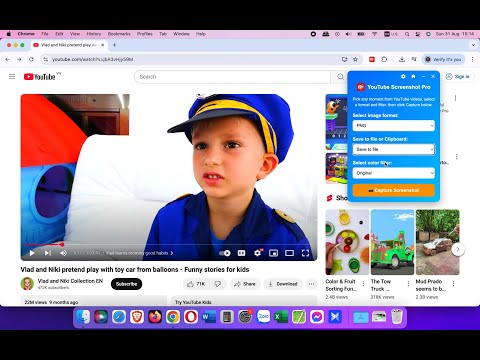
YouTube Screenshot Pro - Capture Perfect Frames with Filters & Subtitles Take high-quality screenshots of YouTube videos in just one click - with color filters, subtitles, and your own branding logo. YouTube Screenshot Pro helps you capture the exact frame you want from any YouTube video (regular videos, Shorts, Livestream and even Ads), with the option to apply creative color filters, include video subtitles, and even add your own logo watermark. Whether you’re creating thumbnails, saving learning material, or sharing content on social media, this extension gives you full control over how your screenshots look. KEY FEATURES: • One-click screenshots directly from YouTube videos. • Color Filters - Apply unique visual styles (Mono B&W, Sepia, Vintage Film, Teal & Orange, Red, and more) before capturing. • Subtitles on Screenshots - Keep the original YouTube captions in your image for tutorials, study notes, or quotes. • Custom Watermark - Upload your branding logo, adjust position, size, padding, and opacity to brand your screenshots. • Flexible Output - Save screenshots as PNG, JPEG, or WEBP. Choose to download, copy to clipboard, or both. • Quick Capture Mode - Instantly grab frames without opening the UI. • Options Page - Choose whether to always ask where to save, include subtitles by default, or manage your watermark logo. • Works Everywhere - Capture not just regular YouTube videos, but also Shorts, Livestreams, and even YouTube Ads - something most other screenshot extensions cannot do. • Movie Mode: Use the Minimize button together with a color filter to watch YouTube videos with special effects (without needing to re-apply filters). • Keyboard Shortcuts (Window/Mac): o Alt+S (⌥+S): Quick capture o Alt+X (⌥+X): Open/close UI (keep filters & settings) o Alt+Z (⌥+Z): Minimize/restore UI (clear filters & settings) WHO IS THIS FOR? This extension is perfect for: • Content Creators & YouTubers - Create thumbnails and visuals with subtitles or unique filters. • Web Designers & Graphic Designers - Capture styled frames for inspiration and design assets. • Students & Educators - Save key frames with subtitles for study, tutorials, or presentations. • Social Media Managers - Share polished, branded screenshots quickly. Unlike other YouTube screenshot extensions, YouTube Screenshot Pro is the only tool that supports both color filters and subtitles in screenshots - making it a must-have for professionals who care about design and storytelling. HOW TO USE IT? 1. Open any YouTube video. 2. Press Alt+X (⌥+X on Mac) or click the extension icon to open the screenshot UI. 3. Select your format, output type, and filter style. 4. (Optional) Enable subtitles and watermark in the Options page. 5. Click “Capture Screenshot” - your frame will be saved instantly! 6. For fast action: just press Alt+S (or ⌥+ S on Mac OS) to take a quick capture without opening the UI. Highlight your ideas, capture learning moments, and create professional visuals from YouTube - all with a single click. Install YouTube Screenshot Pro today and take your YouTube screenshots to the next level.
5점 만점에 3.7점평점 3개
세부정보
- 버전2.3.4
- 업데이트됨2025년 9월 1일
- 제공Nguyen Ba Vinh
- 크기53.22KiB
- 언어English
- 개발자VietSEO.vn
Ngoc Quan Village, Lam Thao Commune Bắc Ninh, Bac Ninh Province 223740 VN이메일
nguyenbavinh89@gmail.com - 비판매자판매자로 식별되지 않은 개발자입니다. 유럽 연합에 거주하는 소비자의 경우, 이 개발자와 체결한 계약에 대해서는 소비자 권리가 적용되지 않을 수 있음을 유의해야 합니다.
개인정보 보호

개발자가 사용자 데이터에 관해 다음과 같이 선언했습니다
- 승인된 사용 사례를 제외하고 서드 파티에 판매하지 않음
- 항목의 핵심 기능과 관련 없는 목적으로 사용하거나 전송하지 않음
- 신용도 판단 또는 대출 목적으로 사용하거나 전송하지 않음
지원
질문, 제안 또는 문제와 관련하여 도움이 필요하면 데스크톱 브라우저에서 이 페이지를 여세요.