


總覽
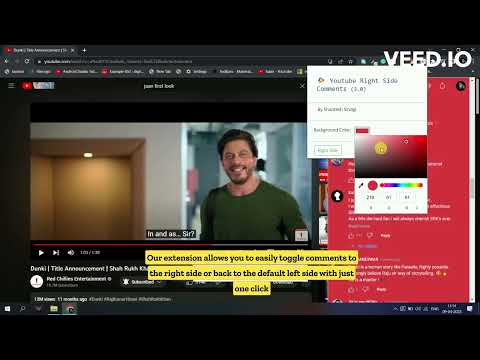
Easily toggle YouTube comments to the right or default left side with our Chrome extension for a more organized viewing experience.
Simplify your YouTube viewing experience with our Chrome extension! Tired of constantly scrolling through comments on the left side of your screen? Our extension allows you to easily toggle comments to the right side or back to the default left side with just one click. Enjoy a clean and organized video viewing experience, while still keeping up with the conversation. Get it now and make your YouTube experience more convenient. Feature Alert : - Now you can use hot key Ctrl + Shift + Y to toggle. The new feature of this Chrome extension allows you to customize the background color of the comments box according to your preference, making it easier to read and interact with. You can choose from a variety of colors to find the one that suits you best. With this added feature, you can now personalize your commenting experience and make it more comfortable for you.
4.3 分 (滿分 5 分)25 個評分
詳細資料
- 版本5.0
- 已更新2026年1月6日
- 提供者Shantesh Sindgi
- 大小287KiB
- 語言English
- 開發人員
電子郵件
sindgishantesh@gmail.com - 非交易商這位開發人員並未表明自己是交易商。歐盟地區的消費者請注意,消費者權利不適用於你和這位開發人員之間簽訂的合約。
隱私權

這位開發者就你的資料做出下列聲明:
- 除經核准的用途外,不會將你的資料販售給第三方
- 不會基於與商品核心功能無關的目的,使用或轉移資料
- 不會為了確認信用度或基於貸款目的,使用或轉移資料
支援
如有疑問或建議,請使用電腦版瀏覽器開啟這個頁面